EasyManua.ls Logo

Sony FH-C33X - Adjusting the Volume; Selecting the Audio; Chapter 5: Sound Adjustment

Sony FH-C33X
26 pages
Print Icon
To Next Page IconTo Next Page
To Previous Page IconTo Previous Page
Loading...
a
ee
a
ee
eee
Chapter
>
Adjusting
the
Sound
EQ
PRESET
oa
oct:
ert
late.
:
‘|
To
fully
enjoy
the
sound
coming
from
your
|
YY
O
stereo
system,
make
the
following
audio
.
PANeUCy
agatsayt
adjustments.
See
the
following
sections
for
additional
sound
adjustments.
Adjusting
the
Volume
POWER—>ON
VOLUME
Adjusting
the
Sound
Selecting
the
Audio
Emphasis
=H
00
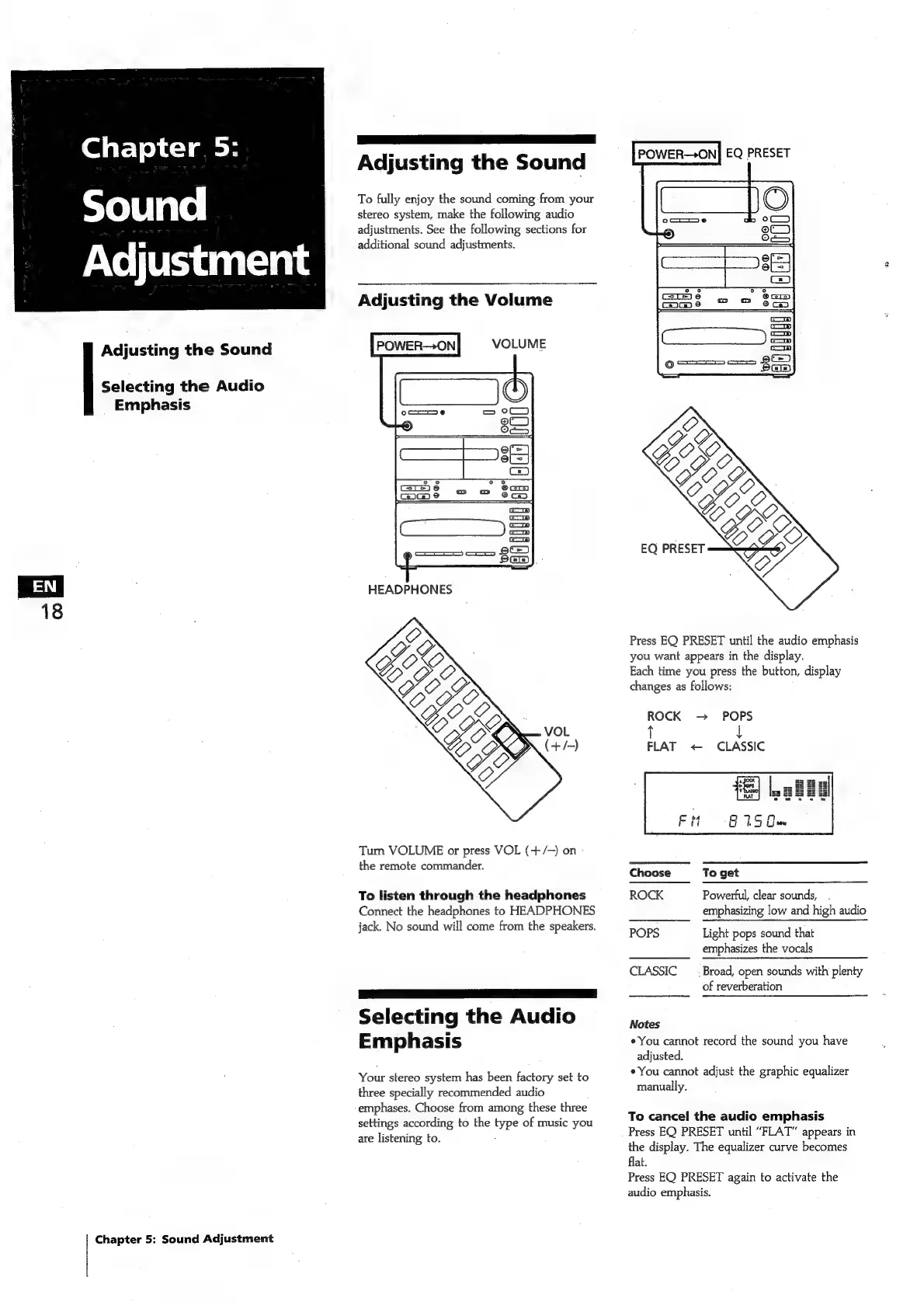
Press
EQ
PRESET
until
the
audio
emphasis
you
want
appears
in
the
display.
Each
time
you
press
the
button,
display
changes
as
follows:
ROCK
POPS
t
FLAT
<
CLASSIC
Turn
VOLUME
or
press
VOL
(+/-)
on
the
remote
commander.
Ghose
Fe
gat
To
listen
through
the
headphones
ROCK
Powerful,
clear
sounds,
Connect
the
headphones
to
HEADPHONES
emphasizing
low
and
high
audio
jack.
No
sound
will
come
from
the
speakers.
POPS
Light
popa
sdund
that
emphasizes
the
vocals
CLASSIC
_
Broad,
open
sounds
with
plenty
of
reverberation
SS
ae
Selecting
the
Audio
Nase
Emphasis
¢
You
cannot
record
the
sound
you
have
adjusted.
*You
cannot
adjust
the
graphic
equalizer
Your
stereo
system
has
been
factory
set
to
manually.
three
specially
recommended
audio
emphases.
Choose
from
among
these
three
settings
according
to
the
type
of
music
you
are
listening
to.
;
To
cancel
the
audio
emphasis
Press
EQ
PRESET
until
“FLAT”
appears
in
the
display.
The
equalizer
curve
becomes
flat.
Press
EQ
PRESET
again
to
activate
the
audio
emphasis.
Chapter
5:
Sound
Adjustment

Related product manuals