EasyManua.ls Logo

Sony FH-C33X - Playing Tracks in Random Order (Shuffle Play)

Sony FH-C33X
26 pages
Print Icon
To Next Page IconTo Next Page
To Previous Page IconTo Previous Page
Loading...
Checking
the
tracks
on
the
CDs
(Music
Scan)
You
can
check
the
tracks
by
scanning
the
beginning
of
each
track
on
the
CD.
_
Three
scanning
times
can
be
selected:
10,
20
and
30
seconds,
after
which
the
track
is
faded
out
in
two
seconds.
POWER-—-ON
MUSIC
SCAN
11
Press
MUSIC
SCAN
so
that
p>
flashes
|
in
the
display.
2
while
“M
SCAN
10”
is
lit,
press
MUSIC
SCAN
to
select
the
scanning
time.
Each
time
you
press
this
button,
the
display
changes
as
follows:
M
SCAN
10
=>
M
SCAN
20
tM
SCAN
30
—+—1
Playing
mode
_—_
Tracks
played
Normal
play
(ALL
DISCS)
CDs.
:
Normal
play
(1
DISC)
CD
in
order.
Shuffle
play
You
cannot
use
Music
Scan
(ALL
DISCS)
in
this
mode.
Shuffle
play
Plays
all
the
tracks
on
the
(1
DISC)
CD
at
random.
Programme
play
programmed
order.
Notes
on
handling
discs
*To
keep
the
disc
clean,
handle
the
disc
by
its
edge.
Do
not
touch
the
surface.
Do
not
stick
paper
or
tape
onto
the
disc.
Plays
the
first
track
on
all
Plays
all
the
tracks
on
the
Plays:
all
the
tracks
in
their
Do
not
expose
the
CD
to
direct
sunlight
or
heat
sources
such
as
hot
air
ducts,
nor
leave
it
in
a
car
parked
in
direct
sunlight
__as
there
can
be
a
considerable
rise
in
temperature
inside
the
car.
Sea
ee
el
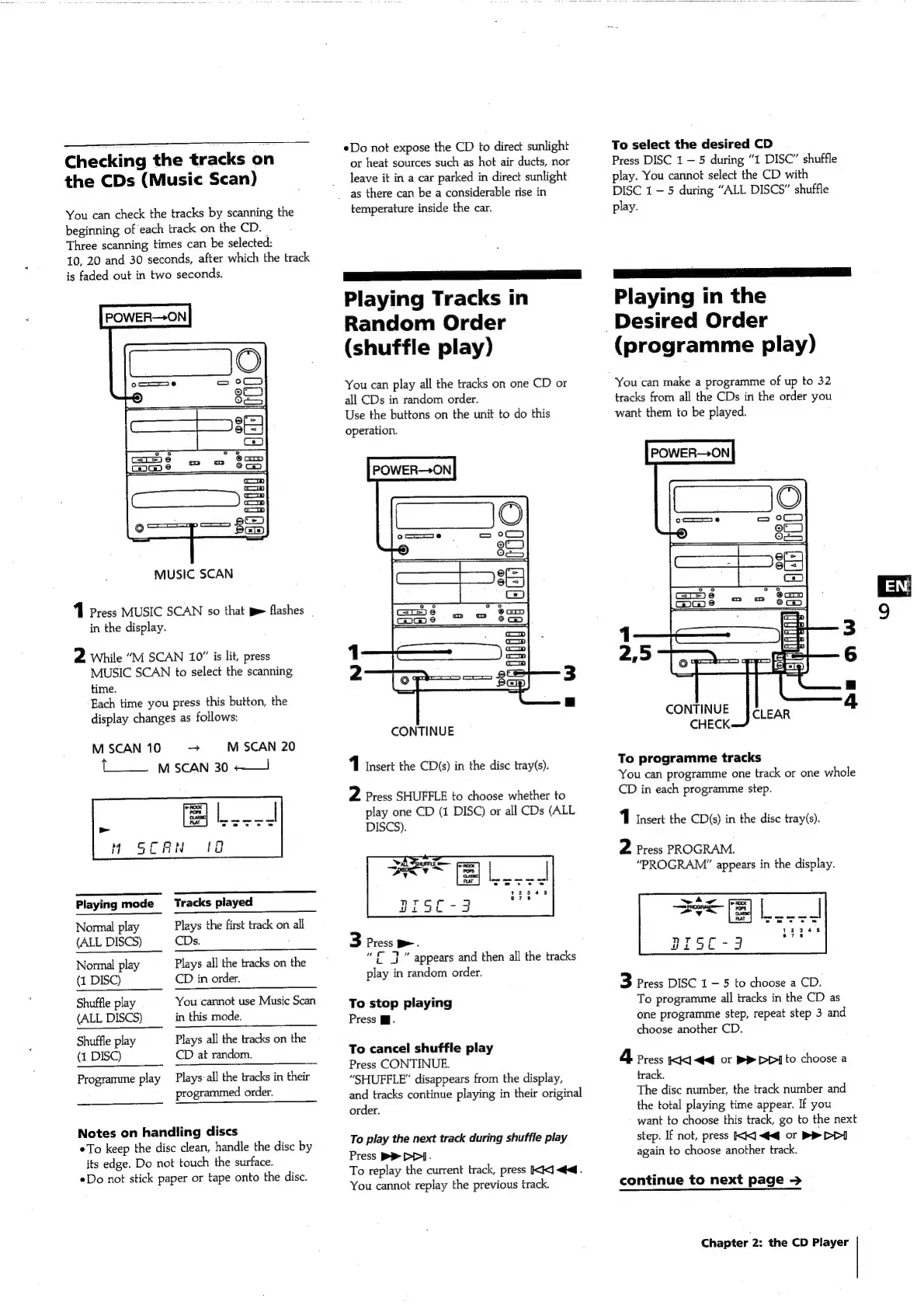
Playing
Tracks
in
Random
Order
(shuffle
play)
You
can
play
all
the
tracks
on
one
CD
or
all
CDs
in
random
order.
Use
the
buttons
on
the
unit
to
do
this
operation.
POWER-—+ON
CONTINUE
1
Insert
the
CD(s)
in
the
disc
tray(s).
2
Press
SHUFFLE
to
choose
whether
to
play
one
CD
(1
DISC)
or
all
CDs
(ALL
DISCS).
3
Press
D>.
£
7)”
appears
and
then
all
the
tracks
play
in
random
order.
To
stop
playing
Press
Mi.
To
cancel
shuffle
play
Press
CONTINUE.
“SHUFFLE”
disappears
from
the
display,
and
tracks
continue
playing
in
their
original
order.
To
play
the
next
track
during
shuffle
play
Press
PD}
DD].
To
replay
the
current
track,
press
Ki
<4.
You
cannot
replay
the
previous
track.
To
select
the
desired
CD
Press
DISC
1
5
during
“1
DISC”
shuffle
play.
You
cannot
select
the
CD
with
DISC
1
—5
during
“ALL
DISCS”
shuffle
play.
Playing
in
the
Desired
Order
(programme
play)
You
can
make
a
programme
of
up
to
32
tracks
from
all
the
CDs
in
the
order
you
want
them
to
be
played.
POWER—ON
1
3
2,5
6
a
CONTINUE
4
CHECK
To
programme
tracks
You
can
programme
one
track
or
one
whole
CD
in
each
programme
step.
1
Insert
the
CD(s)
in
the
disc
tray(s).
2
Press
PROGRAM.
“PROGRAM”
appears
in
the
display.
3
Press
DISC
1
5
to
choose
a
CD.
To
programme
all
tracks
in
the
CD
as
one
programme
step,
repeat
step
3
and
choose
another
CD.
4
Press
kKK1
<<q
or
BR
DPI]
to
choose
a
track.
The
disc
number,
the
track
number
and
the
total
playing
time
appear.
If
you
want
to
choose
this
track,
go
to
the
next
step.
If
not,
press
KK]
<<
or
|
again
to
choose
another
track.
continue
to
next
page
>
Chapter
2:
the
CD
Player
of

Related product manuals