EasyManua.ls Logo

Sony FH-C33X - Timer-Recording Radio Programmes

Sony FH-C33X
26 pages
Print Icon
To Next Page IconTo Next Page
To Previous Page IconTo Previous Page
Loading...
20
=
continued
3
set
the
hour
you
want
the
music
to
go
on
by
pressing
TUNER/TIMER
(+-/-),
then
press
MEMORY/NEXT.
Set the
minutes
in
the
same
way.
“OFF”
appears
and
the
hour
digits
flash
in
the
display.
4
Set the
hour
you
want
the
music
to
go
off
by
pressing
TUNER/TIMER
(+/-),
then
press
MEMORY/NEXT.
Set
the
minutes
in
the
same
way.
The
sound
source
setting
screen
appears.
5
choose
a
sound
source
by
pressing
TUNER/TIMER
(+-/-).
Each
time
you
press
the
button,
the
display
changes
as
follows:
TUNER
«+»
CD
PLAY
<>
TAPE
PLAY
©
Press
MEMORY/NEXT.
The
preset
items
appear
in
the
display
sequentially.
To
play
Do
this
a
CD
Insert
a
CD.
a
Tape
Insert
a
tape
in
deck
A
or
B
with
the
side
you
want
to
play
facing
towards
you.
7
Press
SYSTEM
POWER
to
turn
off
the
system.
.
About
10
seconds
before
the
preset
time,
the
power
will
go
on
and
the
music
will
play.
At
the
turn-off
time,
the
power
will
go
off
again.
if
you
made
a
mistake
during
setting
procedure
Repeat
steps
1
through
7.
To
check
the
preset
items
To
change
the
timer
settings
To
cancel
the
timer
To
activate
the
timer
again
See
“Timer-Recording
Radio
Programmes”.
Chapter
6:
Additional
Features
eas
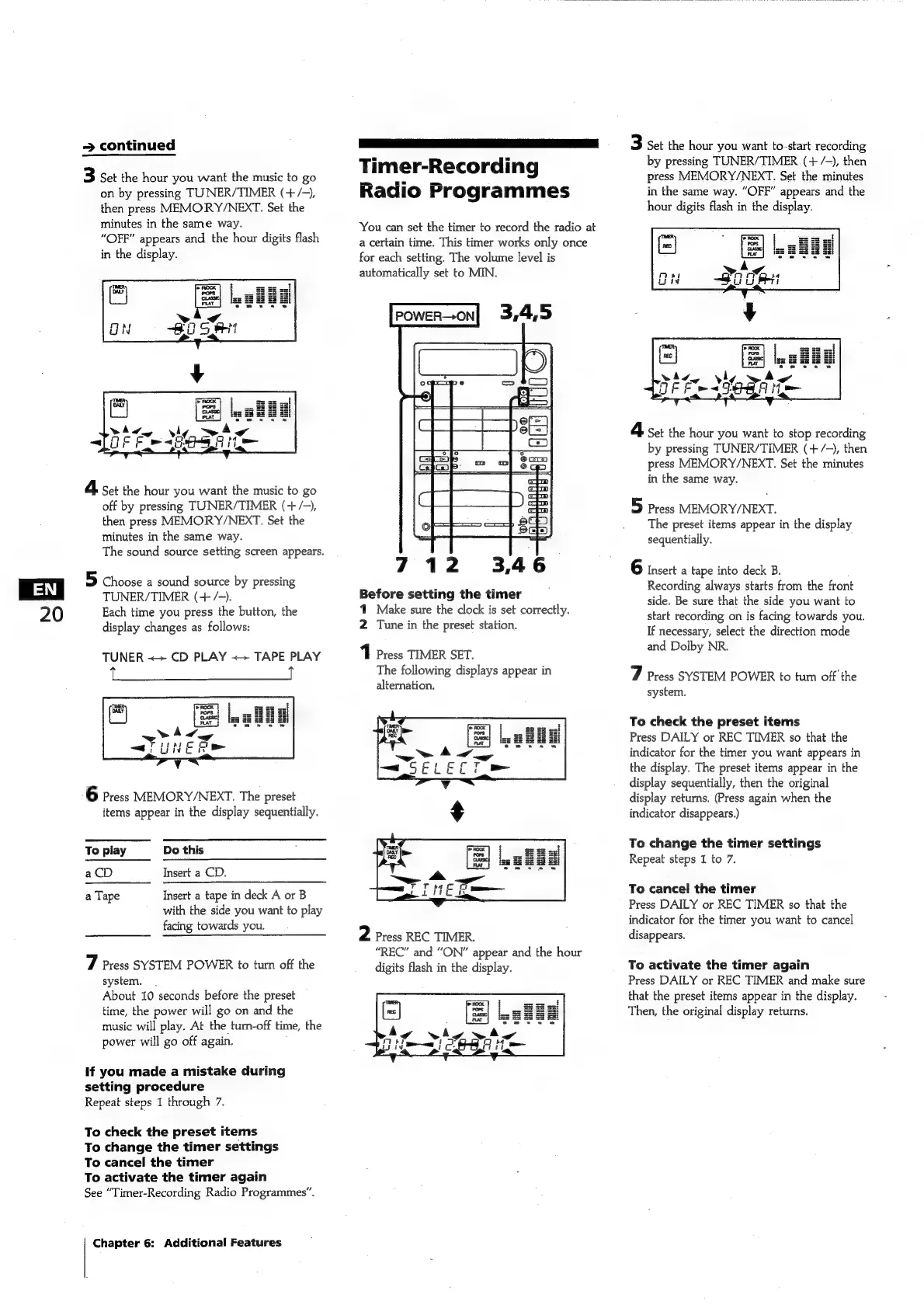
Timer-Recording
Radio
Programmes
You
can
set
the
timer
to
record
the
radio
at
a
certain
time.
This
timer
works
only
once
for
each
setting.
The
volume
level
is
automatically
set
to
MIN.
fo
7
|
712
3,46
Before
setting
the
timer
1
Make
sure
the
clock
is
set
correctly.
2
Tune
in
the
preset
station.
1
Press
TIMER
SET.
The
following
displays
appear
in
alternation.
2
Press
REC
TIMER.
“REC”
and
“ON”
appear
and
the
hour
digits
flash
in
the
display.
3
set
the
hour
you
want
to-start
recording
by
pressing
TUNER/TIMER
(+
/-),
then
press
MEMORY/NEXT.
Set
the
minutes
in
the
same
way.
“OFF”
appears
and
the
hour
digits
flash
in
the
display.
4
set
the
hour
you
want
to
stop
recording
by
pressing
TUNER/TIMER
(+
/-),
then
press
MEMORY/NEXT.
Set
the
minutes
in
the
same
way.
5
Press
MEMORY/NEXT.
The
preset
items
appear
in
the
display
sequentially.
6
insert
a
tape
into
deck
B.
Recording
always
starts
from
the
front
side.
Be
sure
that
the
side
you
want
to
start
recording
on
is
facing
towards
you.
If
necessary,
select
the
direction
mode
and
Dolby
NR.
7
Press
SYSTEM
POWER
to
tum
off’
the
system.
To
check
the
preset
items
Press
DAILY
or
REC
TIMER
so
that
the
indicator
for
the
timer
you
want
appears
in
the
display.
The
preset
items
appear
in
the
display
sequentially,
then
the
original
display
returns.
(Press
again
when
the
indicator
disappears.)
To
change
the
timer
settings
Repeat
steps
1
to
7.
To
cancel
the
timer
Press
DAILY
or
REC
TIMER
so
that
the
indicator
for
the
timer
you
want
to
cancel
disappears.
To
activate
the
timer
again
Press
DAILY
or
REC
TIMER
and
make
sure
that
the
preset
items
appear
in
the
display.
Then,
the
original
display
returns.

Related product manuals