EasyManua.ls Logo

Sony FH-C33X - Inserting the Batteries; Setting the Clock

Sony FH-C33X
26 pages
Print Icon
To Next Page IconTo Next Page
To Previous Page IconTo Previous Page
Loading...
=
er
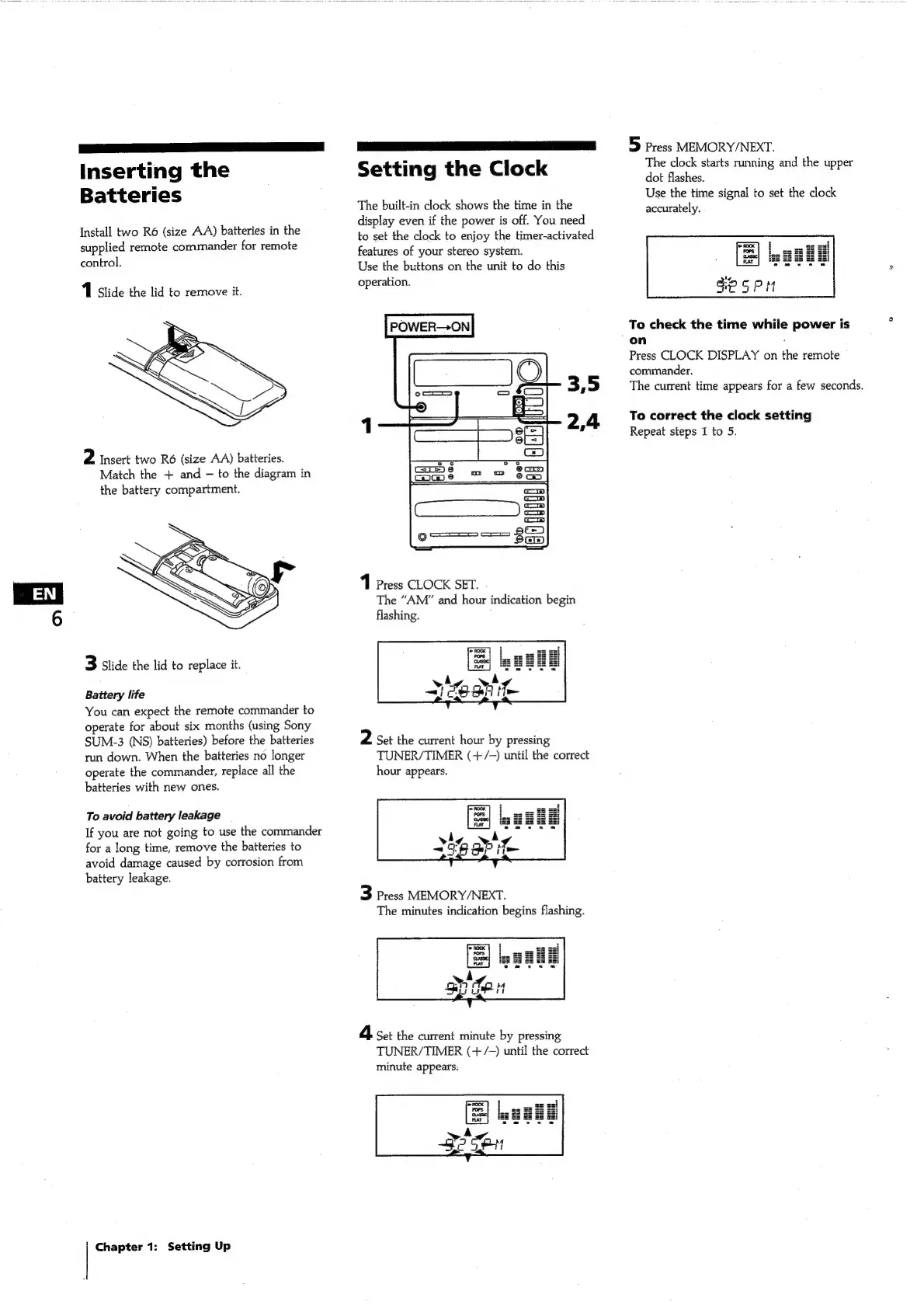
Inserting
the
Batteries
Install
two
R6
(size
AA)
batteries
in
the
supplied
remote
commander
for
remote
control.
1
Slide
the
lid
to
remove
it.
2
Insert
two
R6
(size
AA)
batteries.
Match
the
+
and
to
the
diagram
in
the
battery
compartment.
3
Slide
the
lid
to
replace
it.
Battery
life
You
can
expect
the
remote
commander
to
operate
for
about
six
months
(using
Sony
SUM-3
(NS)
batteries)
before
the
batteries
run
down.
When
the
batteries
no
longer
operate
the
commander,
replace
all
the
batteries
with
new
ones.
To
avoid
battery
leakage
If
you
are
not
going
to
use
the
commander
for
a
long
time,
remove
the
batteries
to
avoid
damage
caused
by
corrosion
from
battery
leakage.
Chapter
1:
Setting
Up
Setting
the
Clock
The
built-in
clock
shows
the
time
in
the
display
even
if
the
power
is
off.
You
need
to
set
the
clock
to
enjoy
the
timer-activated
features
of
your
stereo
system.
Use
the
buttons
on
the
unit
to
do
this
operation.
POWER-—>ON
3,5
2,4
1
Press
CLOCK
SET.
The
“AM”
and
hour
indication
begin
flashing.
2
Set
the
current
hour
by
pressing
TUNER/TIMER
(+/-—)
until
the
correct
hour
appears.
3
Press
MEMORY/NEXT.
The
minutes
indication
begins
flashing.
4
Set
the
current
minute
by
pressing
TUNER/TIMER
(+/-—)
until
the
correct
minute
appears:
5
Press
MEMORY/NEXT.
The
clock
starts
running
and
the
upper
dot
flashes.
Use
the
time
signal
to
set
the
clock
accurately.
To
check
the
time
while
power
is
on
z
Press
CLOCK
DISPLAY
on
the
remote
commander.
The
current
time
appears
for
a
few
seconds.
To
correct
the
clock
setting
Repeat
steps
1
to
5.

Related product manuals