EasyManua.ls Logo

Sony FH-C33X - Playing a Tape

Sony FH-C33X
26 pages
Print Icon
To Next Page IconTo Next Page
To Previous Page IconTo Previous Page
Loading...
Chapter
4:
the
Tape
>
Player
Playing
a
Tape
Recording
a
CD
Recording
a
CD:
Selecting
Tape
Length
Automatically
(tape
select
edit)
Recording
a
CD:
Specifying
Track
Order
(programme
edit)
Recording
From
the
Radio
Recording
From
Another
Tape
(dubbing)
[Re
Se
EE
Playing
a
Tape
You
can
use
TYPE
I
(normal)
and
TYPE
II
(CrO,)
tapes.
When
you
insert
the
tape,
the
deck
detects
the
tape
type
automatically.
POWER—ON
=
WN
DOLBY
NR
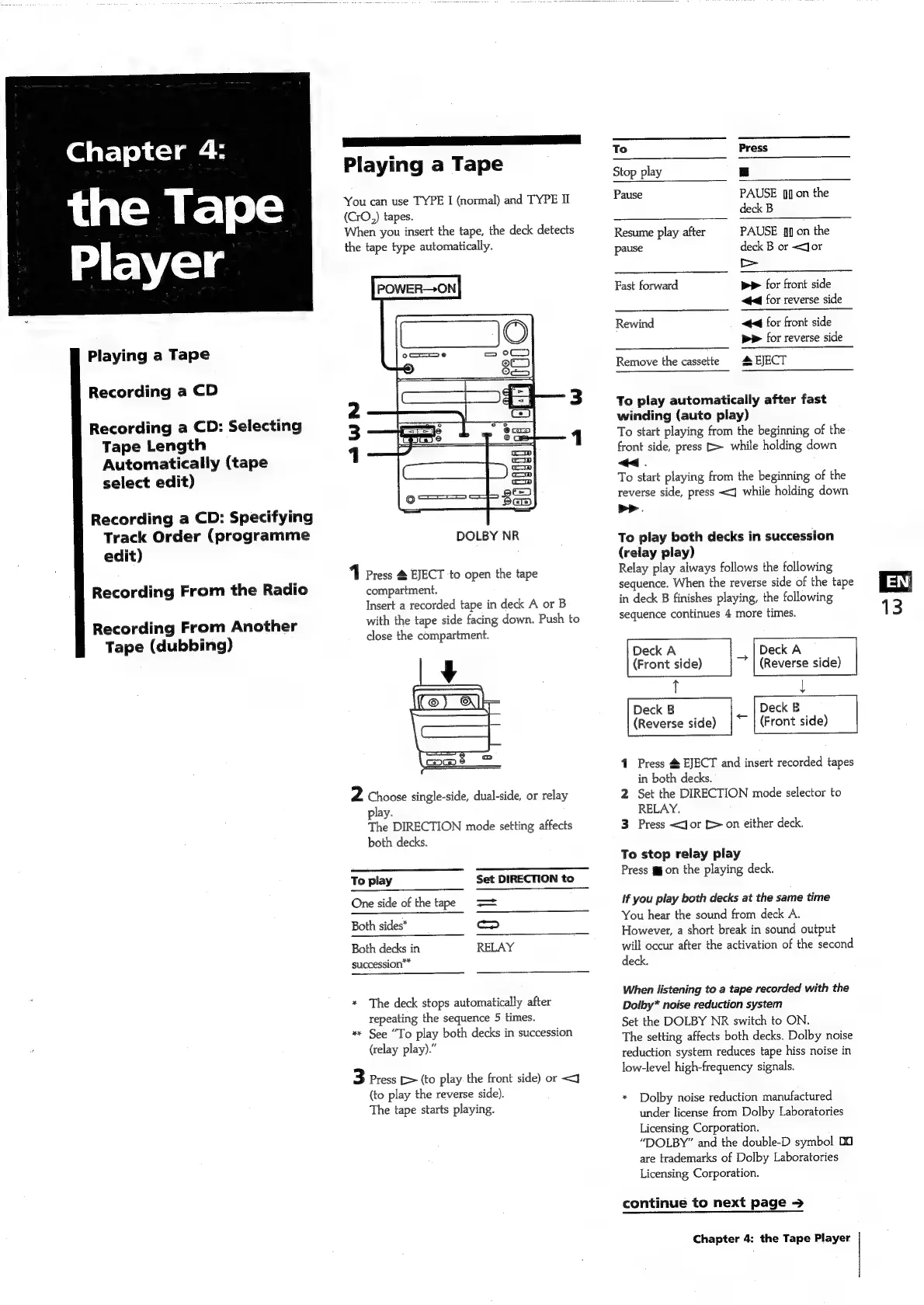
1
Press
4
EJECT
to
open
the
tape
compartment.
Insert
a
recorded
tape
in
deck
A
or
B
with
the
tape
side
facing
down.
Push
to
close
the
compartment.
2
Choose
single-side,
dual-side,
or
relay
play.
The
DIRECTION
mode
setting
affects
both
decks.
To
play
Set
DIRECTION
to
_
One
side
of
the
tape
>=
Both
sides*
fase)
Both
decks
in
RELAY
succession**
*
The
deck
stops
automatically
after
repeating
the
sequence
5
times.
**
See
“To
play
both
decks
in
succession
(relay
play).”
3
Press
[>
(to
play
the
front
side)
or
<j
(to
play
the
reverse
side).
The
tape
starts
playing.
To
Press
Stop
play
|
Pause
PAUSE
[i
on
the
deck
B
Resume
play
after
PAUSE
fl]
on
the
pause
deck
B
or
<Jor
a
es
Fast
forward
pp
for
front
side
44
for
reverse
side
Rewind
44
for
front
side
pp
for
reverse
side
Remove
the
cassette
EJECT
To
play
automatically
after
fast
winding
(auto
play)
To
start
playing
from
the
beginning
of
the
front
side,
press
[>
while
holding
down
<<.
To
start
playing
from
the
beginning
of
the
reverse
side,
press
<q]
while
holding
down
>>.
To
play
both
decks
in
succession
(relay
play)
Relay
play
always
follows
the
following
sequence.
When
the
reverse
side
of
the
tape
in
deck
B
finishes
playing,
the
following
sequence
continues
4
more
times.
Deck
A
(Front
side)
Deck
B
Deck
A
(Reverse
side)
Deck
B
<_
(Reverse
side)
(Front
side)
4
1
Press
4
EJECT
and
insert
recorded
tapes
in
both
decks.
2
Set
the
DIRECTION
mode
selector
to
RELAY.
3
Press
<Jor
[>
on
either
deck.
To
stop
relay
play
Press
gon
the
playing
deck.
if
you
play
both
decks
at
the
same
time
You
hear
the
sound
from
deck
A.
However,
a
short
break
in
sound
output
will
occur
after
the
activation
of
the
second
deck.
When
listening
to
a
tape
recorded
with
the
Dolby*
noise
reduction
system
Set
the
DOLBY
NR
switch
to
ON.
The
setting
affects
both
decks.
Dolby
noise
reduction
system
reduces
tape
hiss
noise
in
low-level
high-frequency
signals.
*
Dolby
noise
reduction
manufactured
under
license
from
Dolby
Laboratories
Licensing
Corporation.
“DOLBY”
and
the
double-D
symbol
00
are
trademarks
of
Dolby
Laboratories
Licensing
Corporation.
continue
to
next
page
>
Chapter
4:
the
Tape
Player
EN

Related product manuals