EasyManua.ls Logo

Sony FH-C33X - Page 7

Sony FH-C33X
26 pages
Print Icon
To Next Page IconTo Next Page
To Previous Page IconTo Previous Page
Loading...
Inserting
the
CDs
Playing
the
Entire
CD
(normal
play)
Playing
Tracks
in
Random
Order
(shuffle
play)
Playing
in
the
Desired
Order
(programme
play)
Playing
Repeatedly
(repeat
play)
Inserting
the
CDs
You
can
insert
five
CDs
at
one
time.
In
addition
to
playing
these
five
CDs
in
succession,
you
can
also
play
them
back
in
a
wide
variety
of
other
modes,
such
as
repeat,
shuffle,
and
programme.
You
can
also
play
back
only
certain
selected
CDs
and
tracks
that
you
want
to
hear.
You
can
operate
the
stereo
system
on
the
unit
or
from
the
supplied
remote
commander.
Also,
you
can
play
12
cm
(5-inch)
and
8
cm
(3-inch)
CDs.
If
the
CD
is
supplied
with
an
adaptor,
remove
it
before
playing
the
CD.
Before
you
play
the
CD,
decrease
the
sound
level
by
turing
the
VOLUME
control
~
counterclockwise,
to
avoid
damaging
the
speakers.
Note
When
the
system
is
first
plugged
in,
even
if
the
power
is
not
on,
the
CD
player
will
make
mechanical
sounds
internally,
and
the
message
“Initializing”
will
scroll
across
the
display
window.
While
this
display
is
in
progress,
nothing
will
happen
even
if
the
power
is
turned
on
and
the
CD
player
buttons
are
pressed.
If
any
other
function
(TUNER,
TAPE)
is
selected,
sound
will
be
produced
from
the
speakers
but
the
“Initializing”
message
will
still
scroll
across
the
display.
POWER—+ON
1b
Sol
bs
We
Bg
|
1
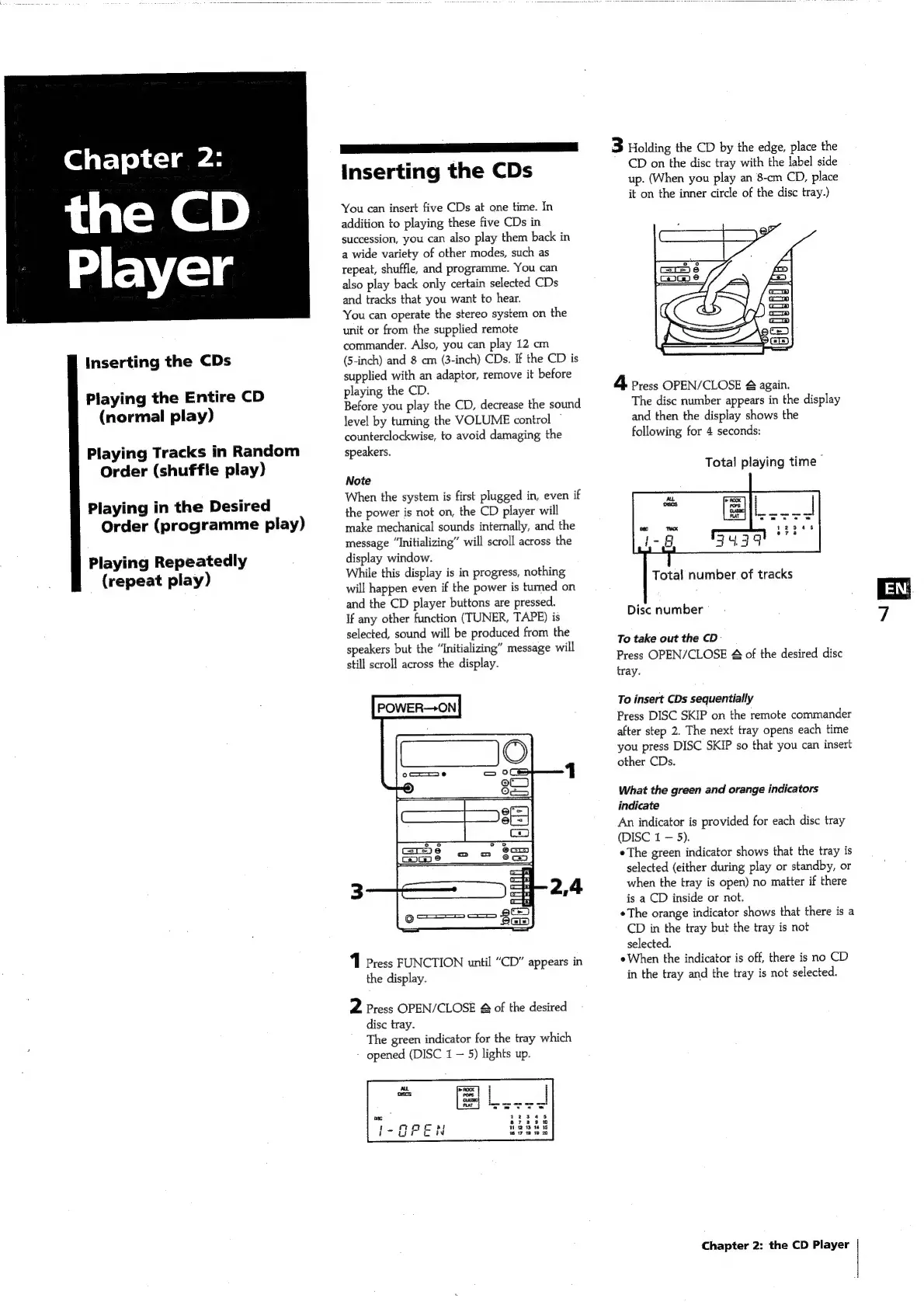
Press
FUNCTION
until
“CD”
appears
in
the
display.
2
Press
OPEN/CLOSE
&
of
the
desired
disc
tray.
The
green
indicator
for
the
tray
which
-
opened
(DISC
1
5)
lights
up.
3
Holding
the
CD
by
the
edge,
place
the
CD
on
the
disc
tray
with
the
label
side
up.
(When
you
play
an
8-cm
CD,
place
it
on
the
inner
circle
of
the
disc
tray.)
4
Press
OPEN/CLOSE
&
again.
The
disc
number
appears
in
the
display
and
then
the
display
shows
the
following
for
4
seconds:
Total
playing
time
Total
number
of
tracks
Disc
number
To
take
out
the
CD
Press
OPEN/CLOSE
&
of
the
desired
disc
tray.
To
insert
CDs
sequentially
Press
DISC
SKIP
on
the
remote
commander
after
step
2.
The
next
tray
opens
each
time
you
press
DISC
SKIP
so
that
you
can
insert
other
CDs.
What
the
green
and
orange
indicators
indicate
An
indicator
is
provided
for
each
disc
tray
(DISC
1
5).
The
green
indicator
shows
that
the
tray
is
selected
(either
during
play
or
standby,
or
when
the
tray
is
open)
no
matter
if
there
is
a
CD
inside
or
not.
The
orange
indicator
shows
that
there
is
a
CD
in
the
tray
but
the
tray
is
not
selected.
e
When
the
indicator
is
off,
there
is
no
CD
in
the
tray
and
the
tray
is
not
selected.
Chapter
2:
the
CD
Player
~o

Related product manuals