EasyManua.ls Logo

Sony FH-C33X - Page 8

Sony FH-C33X
26 pages
Print Icon
To Next Page IconTo Next Page
To Previous Page IconTo Previous Page
Loading...
fi
ee
Le
||
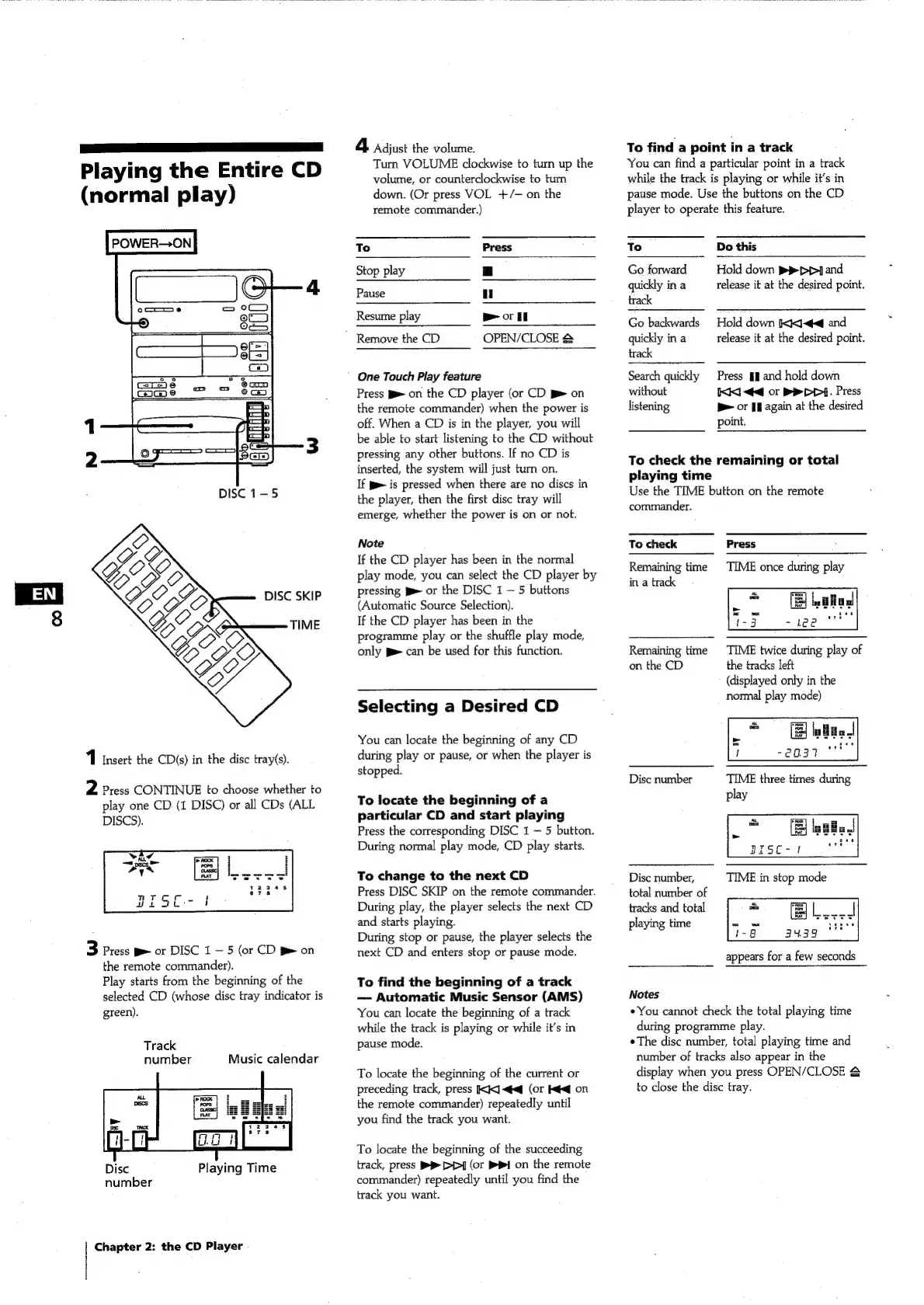
Playing
the
Entire
CD
(normal
play)
POWER—ON
DISC
1-5
DISC
SKIP
TIME
1
Insert
the
CD(s)
in
the
disc
tray(s).
2
Press
CONTINUE
to
choose
whether
to
play
one
CD
(1
DISC)
or
all
CDs
(ALL
DISCS).
3
Press
p>
or
DISC
1
5
(or
CD
J
on
the
remote
commander).
Play
starts
from
the
beginning
of
the
selected
CD
(whose
disc
tray
indicator
is
green).
Track
number
Music
calendar
Disc
Playing
Time
number
Chapter
2:
the
CD
Player
4
Adjust
the
volume.
Turn
VOLUME
clockwise
to
turn
up
the
volume,
or
counterclockwise
to
tum
down.
(Or
press
VOL
+/-
on
the
remote
commander.)
to.
Press
Stop
play
|
Pause
ul
Resume
play
Bor
"
Remove
the
CD
OPEN/CLOSE
&
One
Touch
Play
feature
Press
pe
on
the
CD
player
(or
CD
on
the
remote
commander)
when
the
power
is
off.
When
a
CD
is
in
the
player,
you
will
be
able
to
start
listening
to
the
CD
without
pressing
any
other
buttons.
If
no
CD
is
inserted,
the
system
will
just
turn
on.
If
pe
is
pressed
when
there
are
no
discs
in
the
player,
then
the
first
disc
tray
will
emerge,
whether
the
power
is
on
or
not.
Note
If
the
CD
player
has
been
in
the
normal
play
mode,
you
can
select
the
CD
player
by
pressing
pe
or
the
DISC
1
5 buttons
(Automatic
Source
Selection).
If
the
CD
player
has
been
in
the
programme
play
or
the
shuffle
play
mode,
only
p>
can
be
used
for
this
function.
Selecting
a
Desired
CD
You
can
locate
the
beginning
of
any
CD
during
play
or
pause,
or
when
the
player
is
stopped.
To
locate
the
beginning
of
a
particular
CD
and
start
playing
Press
the
corresponding
DISC
1
5
button.
During
normal
play
mode,
CD
play
starts.
To
change
to
the
next
CD
Press
DISC
SKIP
on
the
remote
commander.
During
play,
the
player
selects
the
next
CD
and
starts
playing.
During
stop
or
pause,
the
player
selects
the
next
CD
and
enters
stop
or
pause
mode.
To
find
the
beginning
of
a
track
Automatic
Music
Sensor
(AMS)
You
can
locate
the
beginning
of
a
track
while
the
track
is
playing
or
while
it’s
in
pause
mode.
To
locate
the
beginning
of
the
current
or
preceding
track,
press
KK]
<q
(or
ké<q
on
the
remote
commander)
repeatedly
until
you
find
the
track
you
want.
To
locate
the
beginning
of
the
succeeding
track,
press
BR
D>]
(or
PPI
on
the
remote
commander)
repeatedly
until
you
find
the
track
you
want.
To
find
a
point
in
a
track
You
can
find
a
particular
point
in
a
track
while
the
track
is
playing
or
while
it’s
in
pause
mode.
Use
the
buttons
on
the
CD
player
to
operate
this
feature.
To
Do
this
Go
forward
Hold
down
ppp]
and
quickly
in
a
release
it
at
the
desired
point.
track
Go
backwards
Hold
down
(k<]<qaq
and
quickly
in
a
release
it
at
the
desired
point.
track
Search
quickly
Press
gg
and
hold
down
without
I<i<d
<q
or
BEY.
Press
listening
be
or
fl
again
at
the
desired
point.
To
check
the
remaining
or
total
playing
time
Use
the
TIME
button
on
the
remote
commander.
To check
Press
Remaining
time
TIME
once
during,
play
in
a
track
Remaining
time
TIME
twice
during
play
of
on
the
CD
the
tracks
left
(displayed
only
in
the
normal
play
mode)
Disc
number
play
Disc
number,
total
number
of
tracks
and
total
playing
time
appears
for
a
few
seconds
Notes
¢You
cannot
check
the
total
playing
time
during
programme
play.
The
disc
number,
total
playing
time
and
number
of
tracks
also
appear
in
the
display
when
you
press
OPEN/CLOSE
&
to
close
the
disc
tray.

Related product manuals