31
ADJUSTMENT
WB/MURA/CUC DATA TRANSFER VIA SERVICE MODE
Apply when B* board or Panel is replaced.
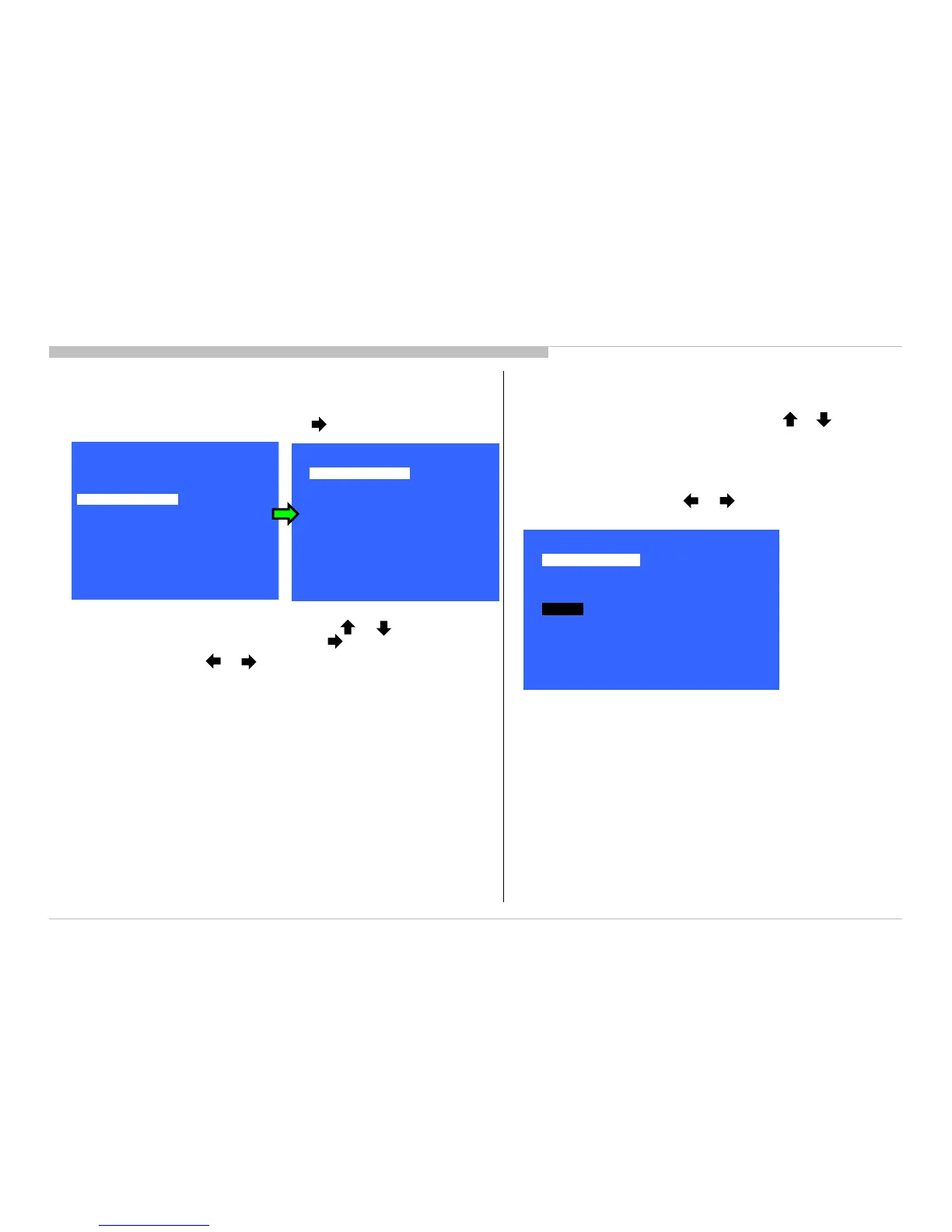
1) In Service Mode, select “Panel/PQ” pressing button.
2) Go to “WB/Mura/CUC data transfer”, category by or button.
To select “WB/Mura/CUC data transfer”, press button.
3) To change data, press or button.
4) In “WB/Mura/CUC data transfer:
a) Select “WB/Gamma data transfer” by pressing or on remote
commander until cursor is on “WB/Gamma data transfer”.
Selectable items are:
→ 0. SoC to T-con
→ T-con to SoC
→ Initialize data
b) To change the items, press or on remote commander.
c) Select “[Start]” and press “Enter” button to start transfer.
KDL-50W800C, 805C, 807C, 809C/KDL-55W800C, 805C








 To Next Page