EasyManua.ls Logo

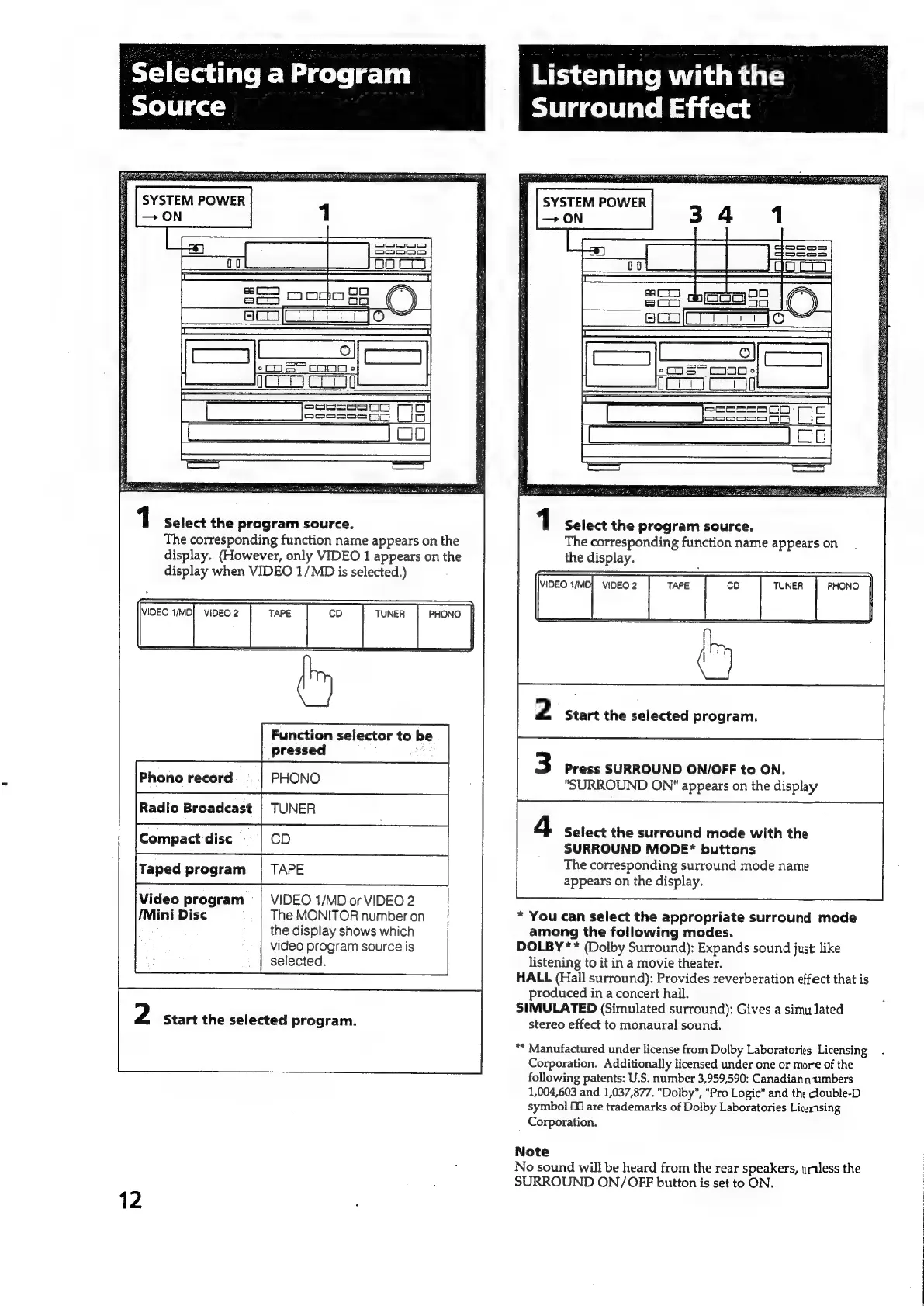
Sony HCD-551 - Selecting a Program Source; Choosing Input Sources; Listening with the Surround Effect; Enabling and Selecting Surround Modes

Sony HCD-551
32 pages
Print Icon
To Next Page IconTo Next Page
To Previous Page IconTo Previous Page
Loading...
Selecting
a
Program
Source
1
Select
the
program
source.
The
corresponding
function
name
appears
on
the
display.
(However,
only
VIDEO
1
appears
on
the
display
when
VIDEO
1/MD
is
selected.)
i
ilo
i“
ae
Video
program
=|
VIDEO
1/MD
or
VIDEO
2
/Mini
Disc
The
MONITOR
number
on
the
display
shows
which
video
program
source
is
selected.
2
Start
the
selected
program.
12
Listening
with
the
Surround
Effect
1
Select
the
program
source.
The
corresponding
function
name
appears
on
the
display.
VIDEO
1/MD]
VIDEO
2
TUNER
|
PHONO
|
2
Start
the
selected
program.
3
Press
SURROUND
ON/OFF
to
ON.
"SURROUND
ON"
appears
on
the
display
Select
the
surround
mode
with
the
SURROUND
MODE*
buttons
The
corresponding
surround
mode
name
appears
on
the
display.
*
You
can
select
the
appropriate
surround
mode
among
the
following
modes.
DOLBY
**
(Dolby
Surround):
Expands
sound
just
like
listening
to
it
in
a
movie
theater.
HALL
(Hail
surround):
Provides
reverberation
effect
that
is
produced
in
a
concert
hall.
SIMULATED
(Simulated
surround):
Gives
a
simu
lated
stereo
effect
to
monaural
sound.
“*
Manufactured
under
license
from
Dolby
Laboratories
Licensing
Corporation.
Additionally
licensed
under
one
or
more
of
the
following
patents:
U.S.
number
3,959,590:
Canadiann
umbers
1,004,603
and
1,037,877.
"Dolby",
"Pro
Logic"
and
the
dlouble-D
symbol
Dd
are
trademarks
of
Dolby
Laboratories
Licensing
Corporation.
Note
No
sound
will
be
heard
from
the
rear
speakers,
urtless
the
SURROUND
ON/OFF
button
is
set
to
ON.

Related product manuals