EasyManua.ls Logo

Sony HCD-551 - Playing Back Tapes; Basic Playback Operation; Playback Controls and Notes

Sony HCD-551
32 pages
Print Icon
To Next Page IconTo Next Page
To Previous Page IconTo Previous Page
Loading...
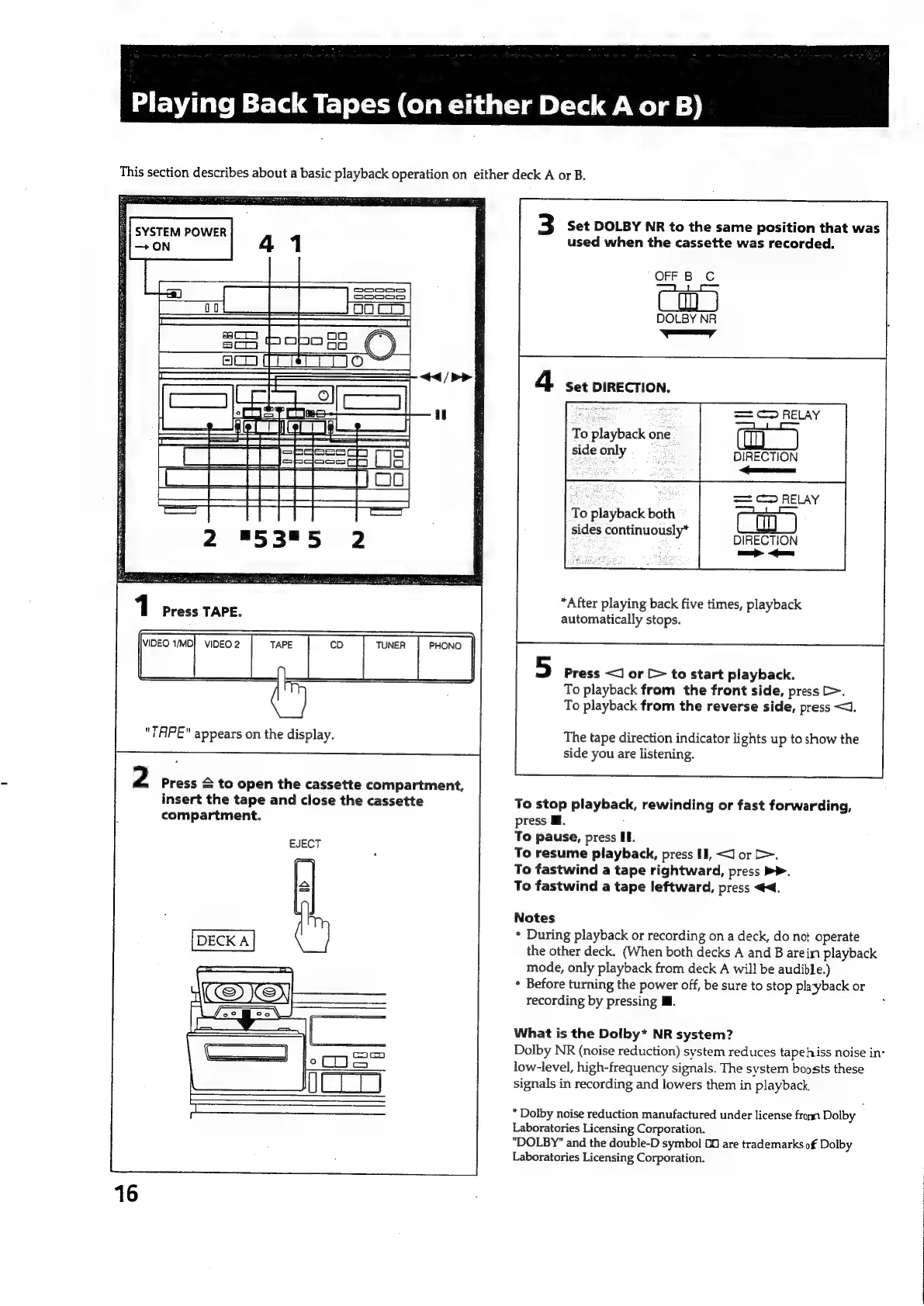
Playing
Back
Tapes
(on
either
Deck
A
or
B)
This
section
describes
about
a
basic
playback
operation
on
either
deck
A
or
B.
3
Set
DOLBY
NR
to
the
same
position
that
was
used
when
the
cassette
was
recorded.
OFF
B
C
DOLBY
NR
ay
i
|
4
Set
DIRECTION.
==
C2
RELAY
|
To
playback
one.
sideonly
DIRECTION
s—
C2
RELAY
Ih
To
playback
both
sides
continuously*
DIRECTION
we
<Gomes
*After
playing
back
five
times,
playback
automatically
stops.
Press
<J
or
[>
to
start
playback.
To
playback
from
the
front
side,
press
>.
To
playback
from
the
reverse
side,
press
<<.
"TAPE"
appears
on
the
display.
iy
tape
Sasa
indicator
lights
up
to
show
the
side
you
are
listening.
2
Press
&
to
open
the
cassette
compartment,
insert
the
tape
and
close
the
cassette
To
stop
playback,
rewinding
or
fast
forwarding,
compartment.
press
Ml.
To
pause,
press
IE.
To
resume
playback,
press
HI,
<I
or
>.
To
fastwind
a
tape
rightward,
press
>>.
To
fastwind
a
tape
leftward,
press
<4.
EJECT
Notes
*
During
playback
or
recording
on
a
deck,
do
not
operate
the
other
deck.
(When
both
decks
A
and
B
arein
playback
mode,
only
playback
from
deck
A
will
be
audible.)
*
Before
turning
the
power
off,
be
sure
to
stop
playback
or
recording
by
pressing
Ml.
What
is
the
Dolby*
NR
system?
low-level,
high-frequency
signals.
The
system
boosts
these
signals
in
recording
and
lowers
them
in
playback.
*
Dolby
noise
reduction
manufactured
under
license
from
Dolby
Laboratories
Licensing
Corporation.
"DOLBY"
and
the
double-D
symbol
OO
are
trademarks
of
Dolby
Laboratories
Licensing
Corporation.
Dolby
NR
(noise
reduction)
system
reduces
tape
hiss
noise
in:

Related product manuals