EasyManua.ls Logo

Sony HCD-551 - Hooking Up the System; System Connection Overview; Antenna and Speaker Connections

Sony HCD-551
32 pages
Print Icon
To Next Page IconTo Next Page
To Previous Page IconTo Previous Page
Loading...
Hooking
Up
the
System
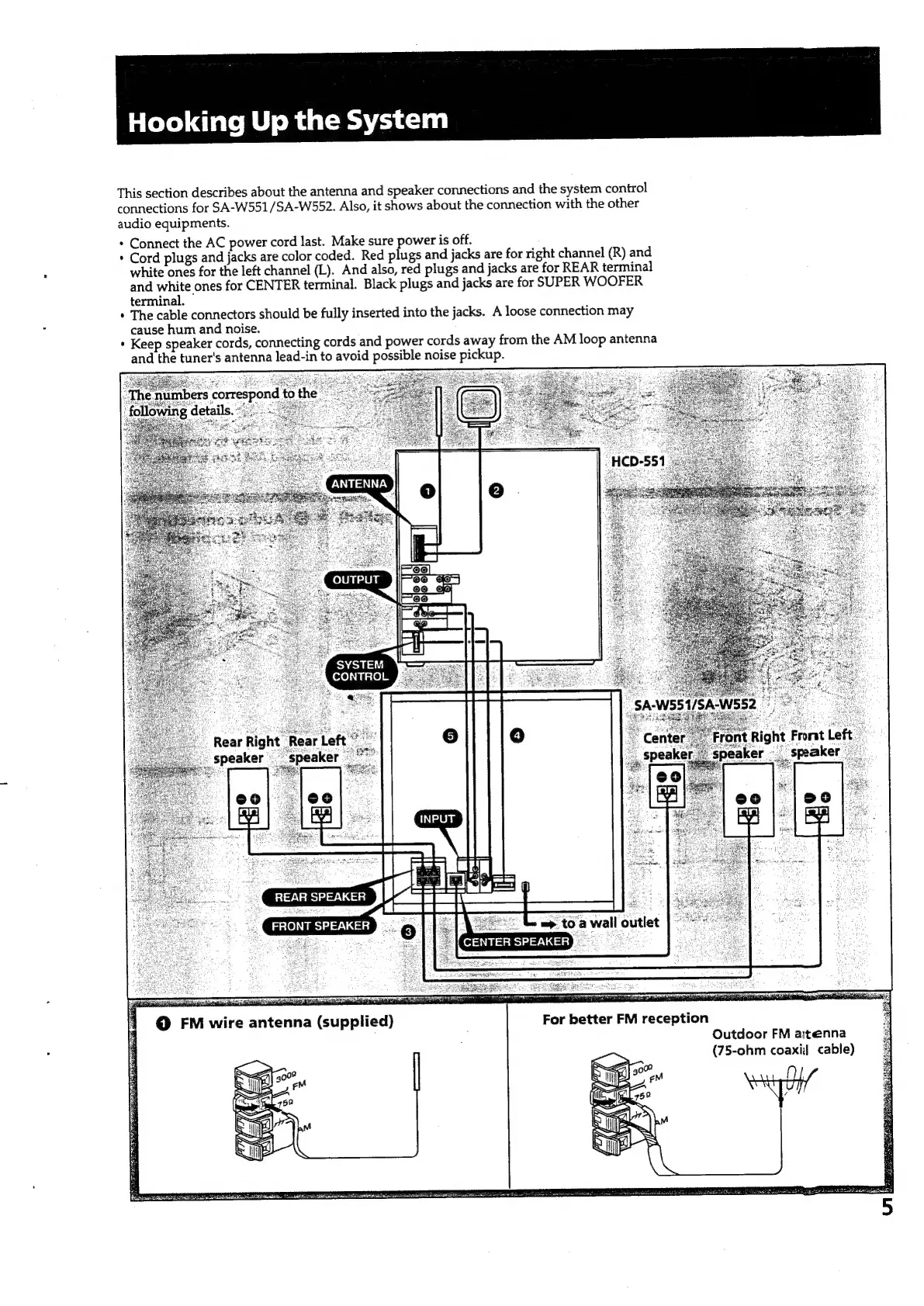
This
section
describes
about
the
antenna
and
speaker
connections
and
the
system
control
connections
for
SA-W551/SA-W552.
Also,
it
shows
about
the
connection
with
the
other
audio
equipments.
*
Connect
the
AC
power
cord
last.
Make
sure
power
is
off.
*
Cord
plugs
and
jacks
are
color
coded.
Red
plugs
and
jacks
are
for
right
channel
(R)
and
white
ones
for
the
left
channel
(L).
And
also,
red
plugs
and
jacks
are
for
REAR
terminal
and
white
ones
for
CENTER
terminal.
Black
plugs
and
jacks
are
for
SUPER
WOOFER
terminal.
*
The
cable
connectors
should
be
fully
inserted
into
the
jacks.
A
loose
connection
may
cause
hum
and
noise.
+
Keep
speaker
cords,
connecting
cords
and
power
cords
away
from
the
AM
loop
antenna
and
the
tuner's
antenna
lead-in
to
avoid
possible
noise
pickup.
“HCD-551
OUTPUT
SYSTEM
CONTROL.
REAR
SPEAKER
«Lp
toa
wall
outlet
CENTER
SPEAKER
gem
FRONT
SPEAKER
For
better
FM
reception
Outdoor
FM
aitenna
(75-ohm
coaxij
cable)

Related product manuals