19
HCD-BC150/BC250
SECTION 4
ELECTRICAL ADJSTMENT
DVD SECTION
AUTO SERVO ADJUSTMENT
After parts related to the servo circuit (RF amplifier (IC102), DSP
(IC201), motor driver (IC101), EEPROM (IC205) so on) are
replaced, re-adjusting the servo circuit is necessary.
[TEST DISC LIST]
Use the following test disc on test mode.
TDV-520CSO (DVD-SL): PART No. J-2501-236-A
LUV-P01 (CD): PART No. 4-999-032-01
TDV-540C (DVD-DL): PART No. J-2501-235-A
Note: Do not use exiting test disc for DVD.
[RFMON Level Check]
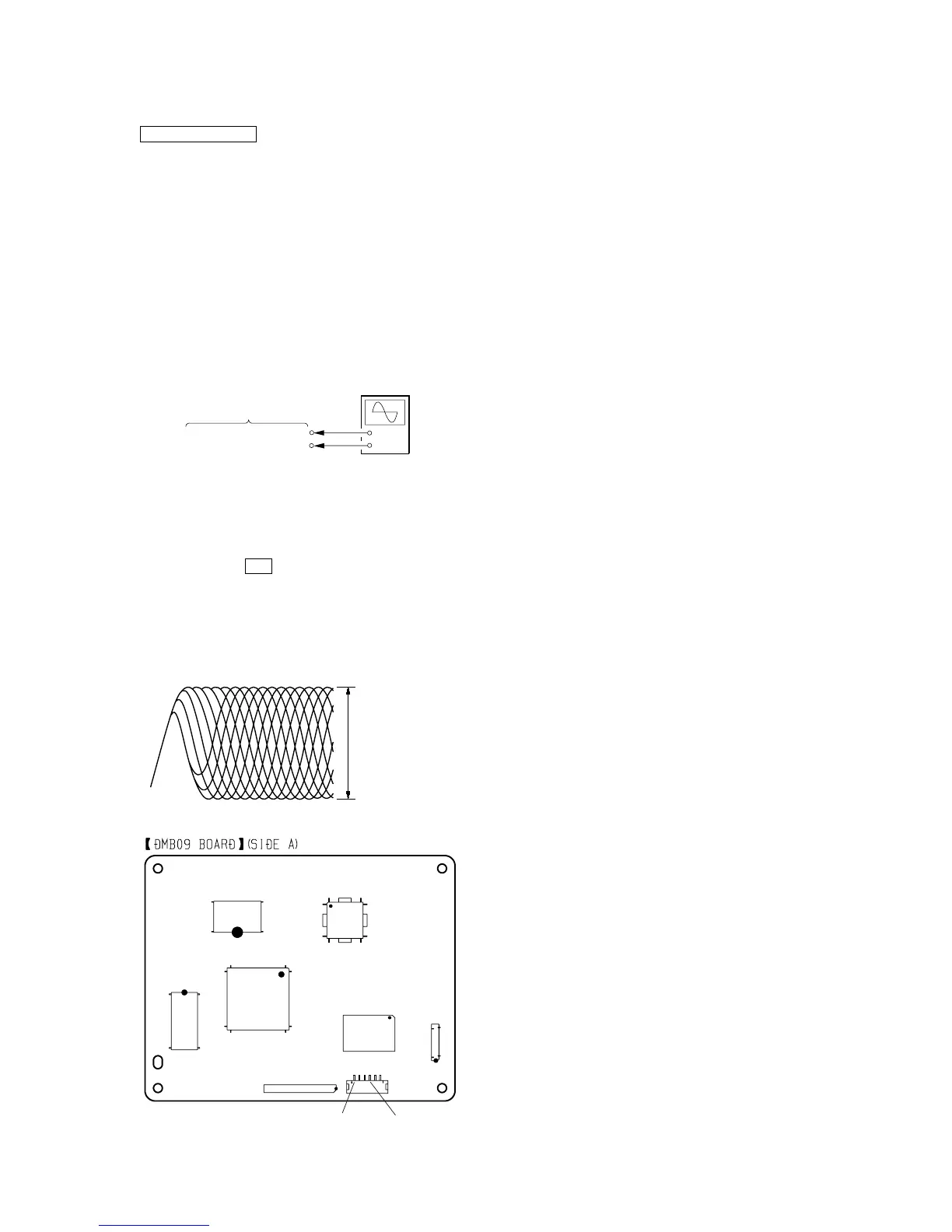
Connection:
+
–
DMB09 board
oscilloscope
CN204 pin
6
(RFMON)
CN204 pin
3
(GND)
Procedure:
1. Connect an oscilloscope to CN204 pin 6 (RFMON) and
CN204 pin 3 (GND) on the DMB09 board.
2. Turn the power on.
3. Set the test disc (DVD: TDV-520CSO, CD: LUV-P01) on the
tray and press H button to playback.
4. Confirm that oscilloscope waveform is clear and check
RFMON signal level is correct or not.
Note: A clear RFMON signal waveform means that the shape “◊” can be
clearly distinguished at the center of the waveform.
RFMON signal waveform
VOLT/DIV: 200 mV
TIME/DIV: 500 ns
level: 0.8
±
0.2 Vp-p (DVD)
0.8
±
0.2 Vp-p (CD)
Checking Location: DMB09 board (Side A)
IC101
IC102
CN204
CN103
IC204
IC201
CN202
IC206
CN204 pin
3
(GND



 To Next Page