12
HCD-DX375
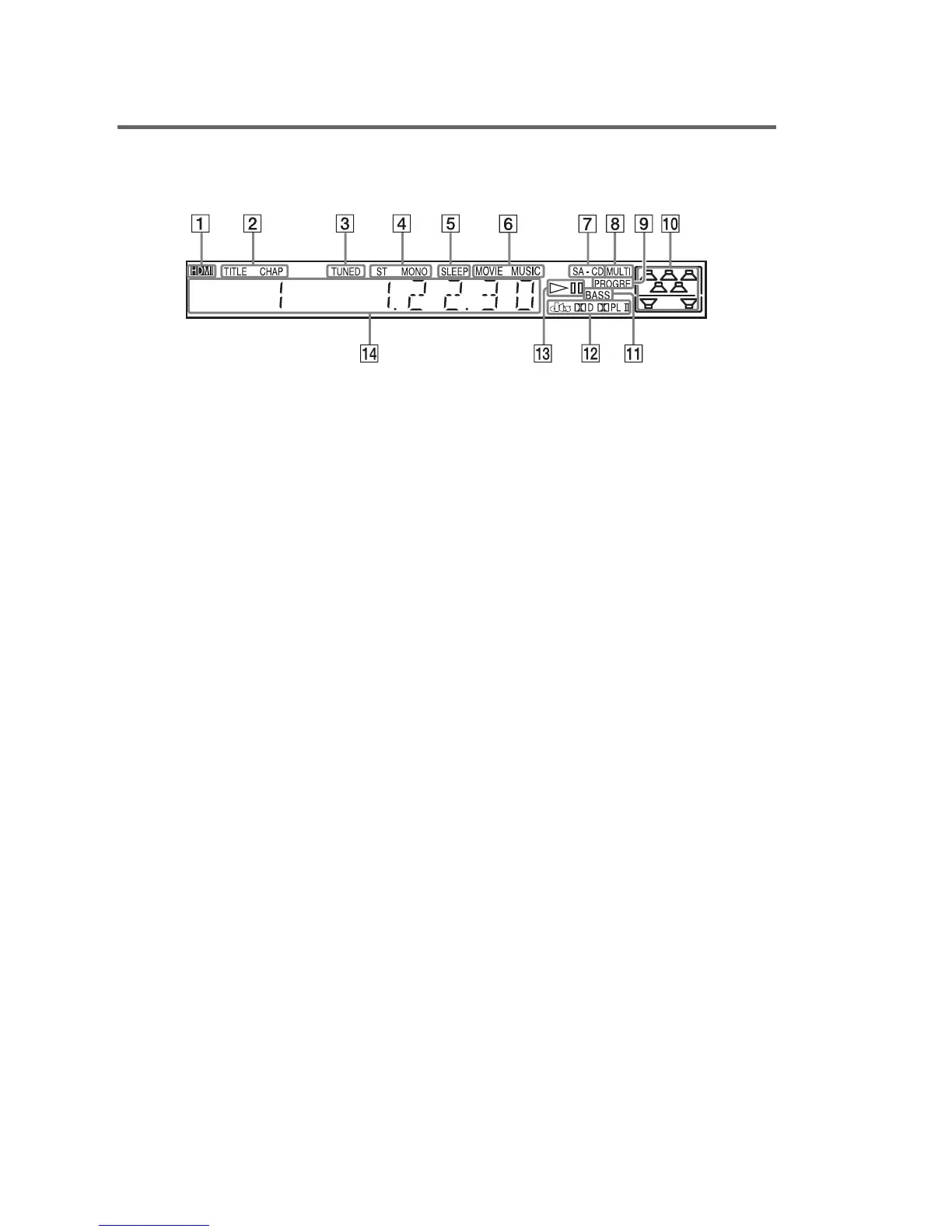
Front panel display
About the indications in the front panel display
A Lights up when the HDMI OUT jack is
correctly connected to HDCP (high-
bandwidth digital content protection)
compliant device with HDMI or DVI
(digital visual interface) input. (24)
B Lights up when the time information of
a title or chapter appears in the front
panel display. (DVD only) (46)
C Lights up when a station is received.
(Radio only) (58)
D Monaural/Stereo effect (Radio only)
(58)
E Lights up when the sleep timer is set.
(63)
F Lights up when the music or movie
mode is selected. (Except for JPEG)
(33)
G Lights up when Super Audio CD is
loaded.
H Lights up during MULTI channel
playback. (Super Audio CD only) (49)
I Lights up when the system outputs
progressive signals (DVD function
only). (26)
J Indicates the selected [SPEAKER
FORMATION]. (67)
K Lights up when the DYNAMIC BASS is
selected. (62)
L Current surround format (Except for
JPEG and Super Audio CD)
M Playing status (DVD function only)
N Displays system’s status such as
chapter, title, or track number, time
information, radio frequency, playing
status, sound field, etc.


 To Next Page