12
HCD-EP30/EP40
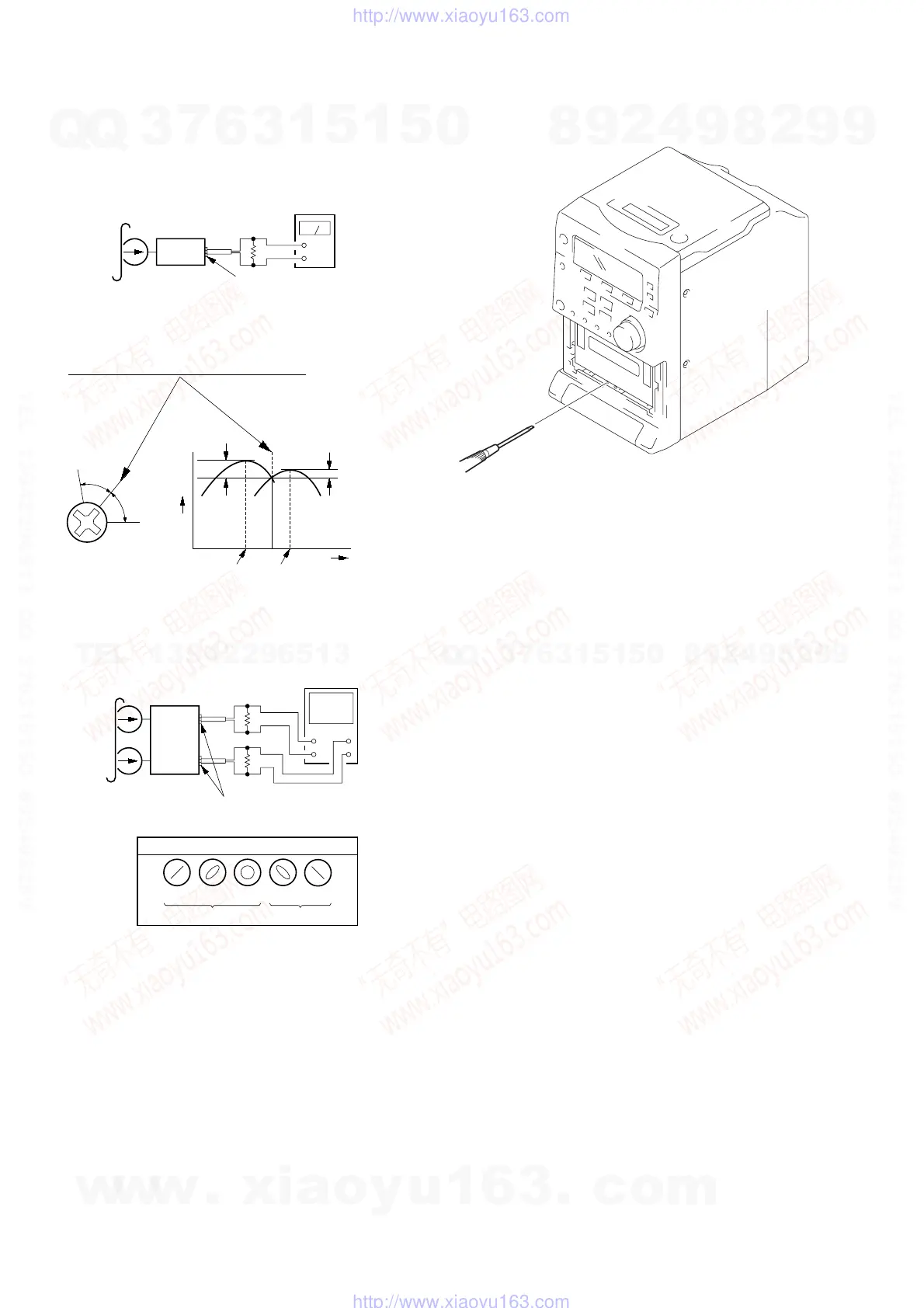
2. Turn the adjustment screw and check output peaks. If the peaks
do not match for L-CH and R-CH, turn the adjustment screw
so that outputs match within 1dB of peak.
3. Mode: Playback (FWD)
4. Repeat step 1 to 3 in playback (REV) mode.
5. After the adjustments, apply suitable locking compound to the
parts adjusted.
Screw
position
L-CH
peak
within
1dB
Output
level
L-CH
peak
R-CH
peak
within
1dB
Screw
position
R-CH
peak
test tape
P-4-A063
(6.3 kHz, –10 dB)
L-CH
R-CH
HEADPHONE board
PHONES jack (JK401)
oscilloscope
V
H
+
+
–
–
screen pattern
in phase
good wrong
45
°
90
°
135
°
180
°
32
Ω
32
Ω
set
Record/Playback Head Azimuth Adjustment
Procedure:
1. Mode: Playback (FWD)
level meter
test tape
P-4-A063
(6.3 kHz, –10 dB)
set
HEADPHONE board
PHONES jack (JK401)
32
Ω
+
–
Adjustment Location: Record/Playback/Erase Head.
Note: Refer to “3-7. CASSETTE LID” (see page 10)
w
w
w
.
x
i
a
o
y
u
1
6
3
.
c
o
m
Q
Q
3
7
6
3
1
5
1
5
0
9
9
2
8
9
4
2
9
8
T
E
L
1
3
9
4
2
2
9
6
5
1
3
9
9
2
8
9
4
2
9
8
0
5
1
5
1
3
6
7
3
Q
Q
TEL 13942296513 QQ 376315150 892498299
TEL 13942296513 QQ 376315150 892498299
http://www.xiaoyu163.com
http://www.xiaoyu163.com



 To Next Page