22
Menus
To output as VBS
Outputting a prompter signal (HSC300R)
There are two types of prompter signals (VBS and SDI) which
are selected using a menu of the connected CCU.
In the case of the VBS prompter
Two prompter lines can be used at the same time.
• A VBS signal input to the PROMPTER1 connector on a
CCU is output from the PROMPTER/GENLOCK/RET IN
connector of this unit.
• A VBS signal input to the PROMPTER2 connector on a
CCU is output from the TEST OUT connector of this unit.
To output the prompter 2 signal from the TEST OUT
connector
In the case of the SDI prompter
Either HD-SDI or SD-SDI can be input.
• The signal supplied to the SDI RET connector of the CCU is
output from the SDI connector of the camera.
• Menus of the CCU are used for switching between SDI
RET1 and SDI RET2 of the CCU input connectors, as well
as between HD-SDI and SD-SDI.
To output the SDI prompter signal from the SDI connector
Outputting a prompter signal (HSC300RF/
HSC100RF/HSC100R)
A VBS signal input to the PROMPTER connector on a CCU is
output from the PROMPTER/GENLOCK/RET IN connector of
this unit.
Outputting a Trunk Signal
Connects to an external device connected to the TRUNK
connector on the CCU to provide a communication path via
the CCU between that device and another external device
connected to the REMOTE connector on the camera.
To output the trunk signal from the REMOTE connector
Menus
The menus displayed on the viewfinder screen enable various
settings of the camera.
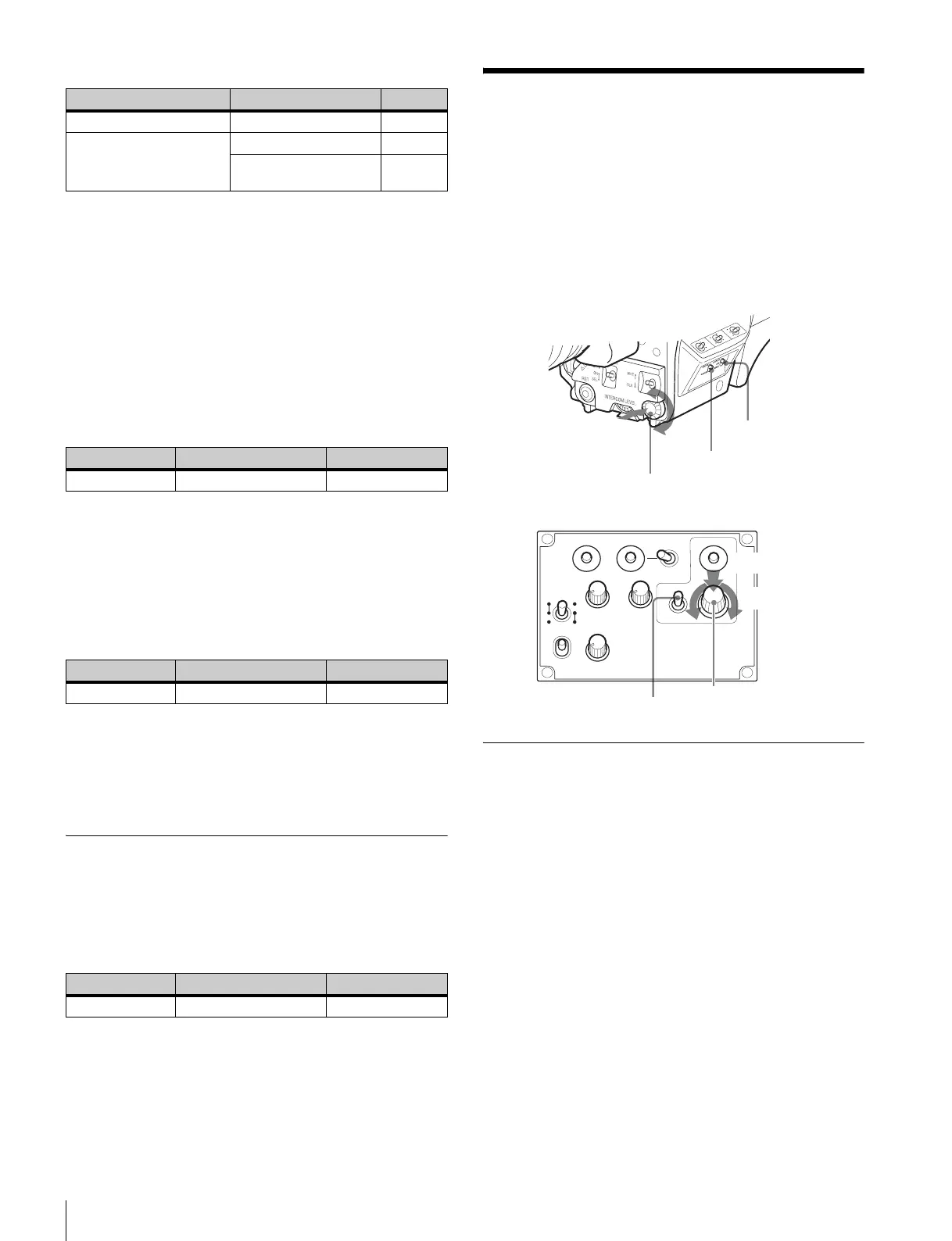
The following controls are used to operate the menus.
To enter menu mode, you can use the DISPLAY/MENU switch
either on the side or on the rear operation panel.
The menu control knob at the low on the front panel and that
on the rear operation panel function the same. Rotate the knob
to select menu items or values and push on it to register
(enter) the selection.
Displaying Menu Pages
To display a menu page
Set the DISPLAY/MENU switch to MENU.
The menu page last accessed will be displayed. If it is the first
time, the CONTENTS page of the USER menu will be
displayed.
To display the TOP MENU screen
If you set the DISPLAY/MENU switch to MENU while holding
the menu control knob pressed, “TOP” is displayed at the
upper right corner of the screen.
Turn the menu control knob to move the pointer (,) on the
display to “TOP” and push on the knob. The TOP MENU
screen is displayed, listing the available menus.
Menu page Item Setting
<POWER SAVE> DOWN CONVERTER ACTIVE
<TEST OUT> OUTPUT VBS
DOWN CONVERTER
SELECT
VF
Menu page Item Setting
<TEST OUT> OUTPUT PROMPTER2
Menu page Item Setting
<SDI OUT> SDI OUT SDI-PROMPTER
Menu page Item Setting
<TRUNK> TRUNK ON
PGM1
INCOM
PGM2
ASSIGNABLE
234
RET1 RET
PROD
ENG
REAR
ON
OFF
MICLEVEL
DISPLAY
MENU
OFF
FRONT
INTERCOM EARPHONE
STATUS/CANCEL switch
DISPLAY/MENU switch
Menu control knob
Push
Rotate
Menu control knob
DISPLAY/MENU switch
Rear operation panel
Push
Front right
Rotate


 To Next Page