11
GB
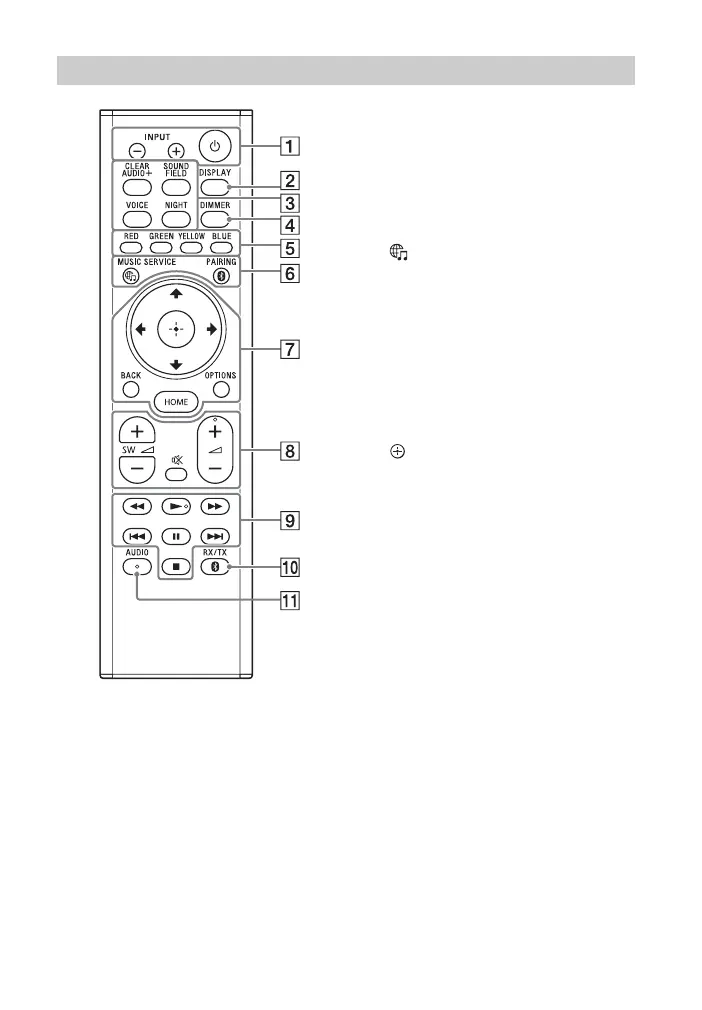
INPUT +/– (page 13, 25)
(power)
Turns on the system or sets it to
standby mode.
DISPLAY**
Displays playback information on
the TV screen.
Playback information is not
displayed for TV input.
CLEAR AUDIO+ (page 28)
SOUND FIELD (page 28)
VOICE (page 29)
NIGHT (page 29)
DIMMER (page 48)
Color buttons
Shortcut keys for selecting items
on some menus.
MUSIC SERVICE (page 41)
BLUETOOTH PAIRING (page 32)
OPTIONS** (page 30, 60)
Displays the options menu on the
TV screen.
The options menu is not
displayed for the TV input.
BACK (page 13)
/// (page 13)
(enter) (page 13)
HOME (page 13)
(muting)
Turns off the sound temporarily.
(volume) +*/–
Adjusts the volume.
SW (subwoofer volume) +/–
Adjusts the volume of the
subwoofer.
Playback operation buttons
/ (rewind/fast forward)
Searches backward or forward.
/ (previous/next)
Selects the previous/next
chapter, track, or file.
(play)*
Starts or re-starts playback
(resume play).
(pause)
Pauses or re-starts playback.
(stop)
Stops playback.
Remote Control



 To Next Page