22
GB
Mounting the Main Unit
on a Wall
You can mount the main unit on a wall.
• Prepare screws (not supplied) that are
suitable for the wall material and
strength. As a plasterboard wall is
especially fragile, attach the screws
securely in the wall beam. Install the
speakers horizontally, hung by screws in
studs in a continuous flat section of the
wall.
• Have the installation done by a Sony
dealer or licensed contractor and pay
special attention to safety during the
installation.
• Sony shall not be held responsible for
accidents or damage caused by improper
installation, insufficient wall strength,
improper screw installation or natural
disaster, etc.
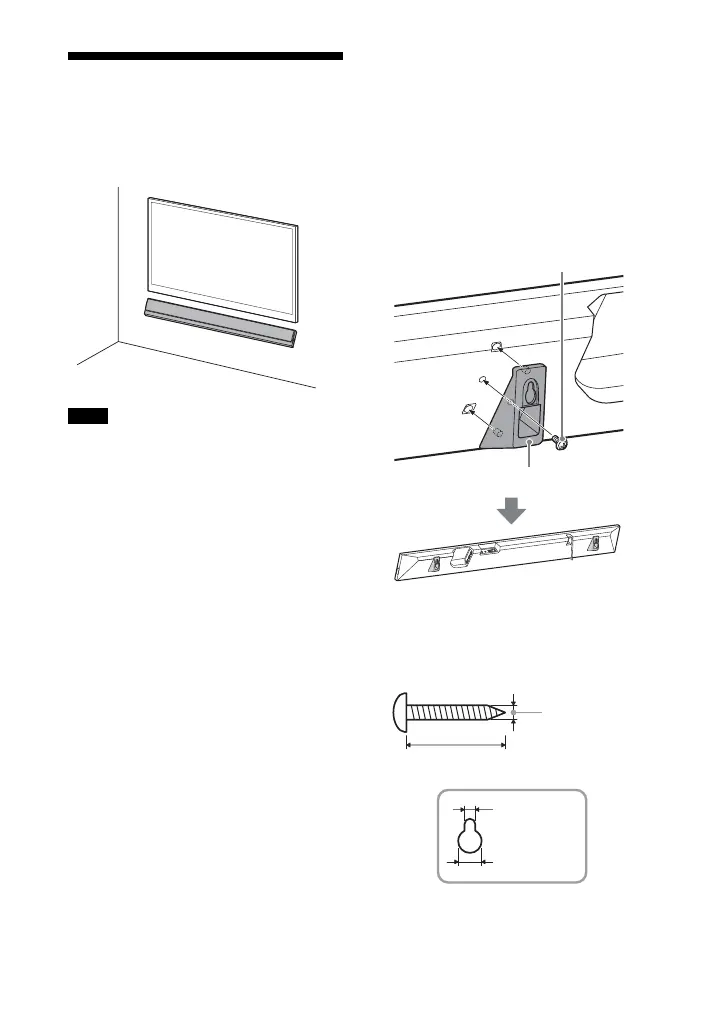
1 Fix the wall mounting brackets
(supplied) to the bracket fixing
holes on the bottom of the main
unit with the screws (supplied) so
that the surface of each wall
mounting bracket is as shown in
the illustration.
Fix the two wall mounting brackets
to the left and right fixing holes on
the bottom of the main unit.
2 Prepare screws (not supplied) that
are suitable for the holes on the
wall mounting bracket.
Notes
Screw (supplied)
Wall mounting brackets (supplied)
Hole on the wall mounting bracket
4mm
More than 30 mm
4.6 mm
10 mm



 To Next Page