23
GB
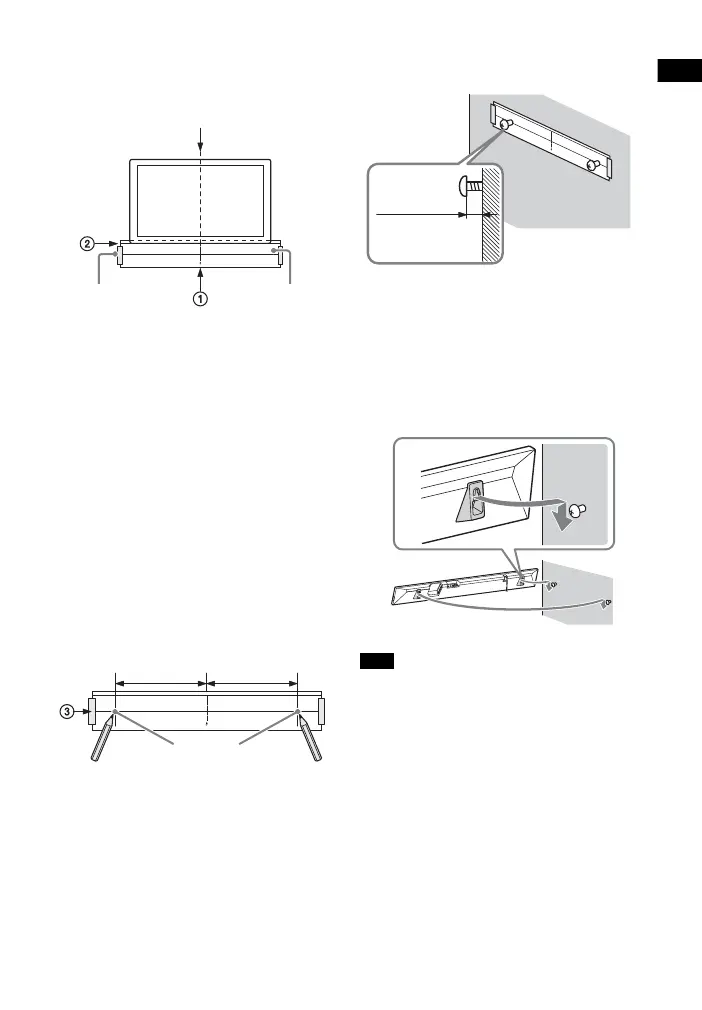
3 Stick WALL MOUNT TEMPLATE
(supplied) on a wall.
1 Align TV CENTER LINE () of
WALL MOUNT TEMPLATE with the
center line of your TV.
2 Align TV BOTTOM LINE () of
WALL MOUNT TEMPLATE with the
bottom of your TV, then stick
WALL MOUNT TEMPLATE on a
wall by using a commercially
available adhesive tape, etc.
4 Mark the screw positions
described as bellow on SCREW
LINE () of WALL MOUNT
TEMPLATE.
Measure the distance described
below with a scale, then mark using
a pencil, etc.
5 Fasten the screws into the mark.
6 Remove WALL MOUNT TEMPLATE.
7 Hang the wall mounting bracket
on the screws.
Align the holes of the wall mounting
bracket with the screws, then hang
the main unit on the two screws.
When sticking WALL MOUNT TEMPLATE,
smooths it out fully.
Center of the TV
WALL MOUNT
TEMPLATE
Adhesive tape,
etc.
Screw position
365 mm
365 mm
Note



 To Next Page