17
GB
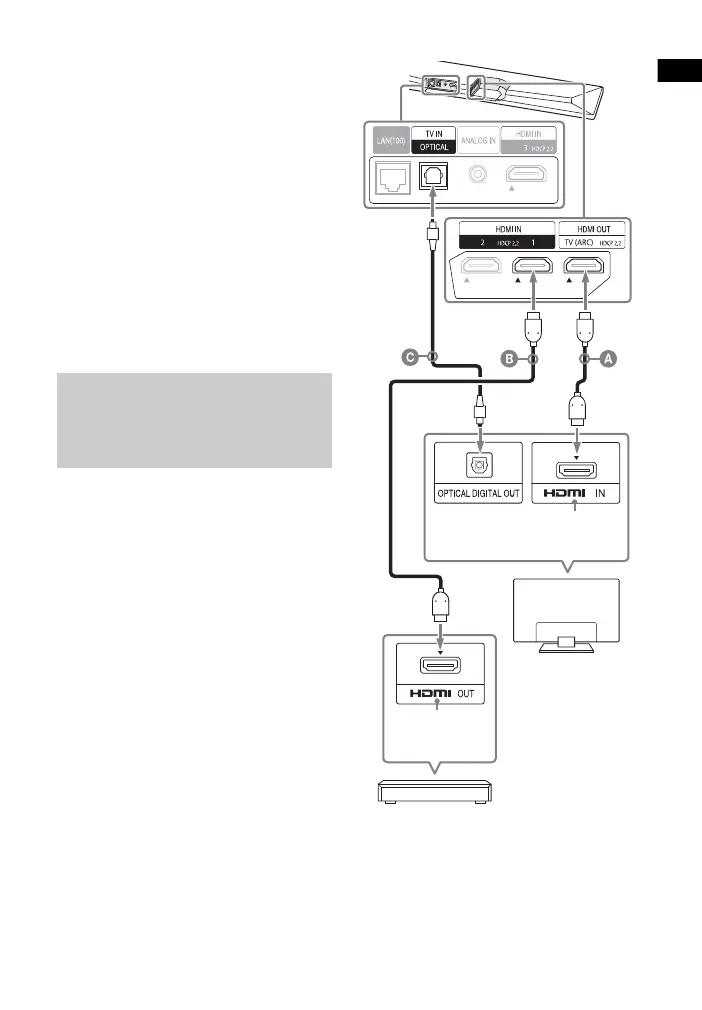
2 Connect the HDCP2.2-compatible
HDMI IN jack on the TV and HDMI
OUT jack on the main unit with the
HDMI cable (supplied).
TV connection is completed.
3 Connect the HDCP2.2-compatible
HDMI OUT jack of the 4K device
and HDMI IN jack of the main unit
with the HDMI cable (not
supplied).
Refer to the operating instructions
of the 4K device to check that the
HDMI OUT jack of the 4K device is
compatible with HDCP2.2.
4K device connection is completed.
If your TV’s HDCP2.2-compatible HDMI
IN jack is not compatible with ARC
(Audio Return Channel), the TV sound is
not output from the system.
In this case, connect the optical output
jack of the TV and the TV IN (OPTICAL)
jack on the main unit with the optical
digital cable (not supplied).
HDMI cable (supplied)
HDMI cable (not supplied)
Use an HDMI cable which supports the 4K
video format that you want to watch. For
details, see “Supported HDMI Video
Formats” (page 75).
Optical digital cable (not supplied)
When an HDCP2.2-
Compatible HDMI Jack on
the TV is not Labeled with
“ARC”
HDCP2.2-
compatible
HDMI jack
Blu-ray Disc player,
cable box, or satellite
box, etc.
HDCP2.2-
compatible
HDMI jack
TV



 To Next Page