Getting Started
15
GB
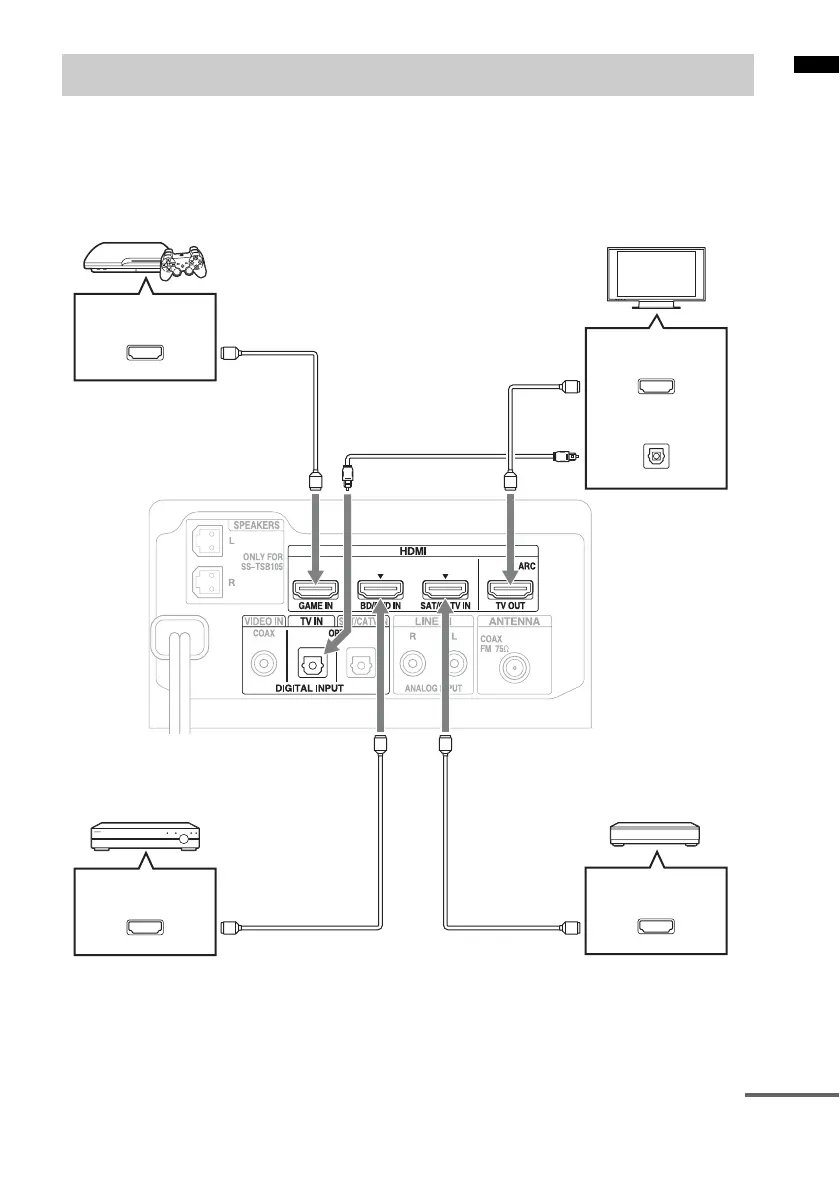
Connect the TV and/or player, etc., with HDMI jacks to the system using an HDMI cable.
By connecting Sony “BRAVIA” Sync-compatible equipment using HDMI cables and by setting the
Control for HDMI function via the TV for each connected equipment, operation can be simplified. See
“What is “BRAVIA” Sync?” (page 21).
We recommend that you connect products featuring “BRAVIA” Sync to the system.
Connecting the TV and player, etc.
TV
Digital Audio OUT
(optical)
HDMI cable
(not supplied)
Digital optical cord for a
TV (supplied)
Blu-ray Disc player, DVD
player, etc.
HDMI OUT
“PlayStation
®
3” etc.
HDMI cable
(not supplied)
Rear of the subwoofer
Satellite tuner or cable television
tuner, etc., with an HDMI jack
HDMI OUT HDMI OUT
HDMI IN (ARC)
HDMI cable
(not supplied)
HDMI cable
(not supplied)
continued



 To Next Page