27
GB
Tuner Functions
2 Press PRESET +/– repeatedly to select
the preset station.
Each time you press the button, the system
tunes in one preset station.
You can select the preset number directly by
pressing the number buttons while pressing
and holding SHIFT.
3 Adjust the volume by pressing 2 +/–.
To listen to non-preset radio
stations
Use manual or automatic tuning.
For manual tuning, see “Listening to the radio”
(page 25).
For automatic tuning, press and hold TUNING
+/– in step 2. The automatic tuning stops when
the system tunes in a station. To stop the
automatic tuning while automatic tuning is in
progress, press TUNING +/–.
If a FM program is noisy
If a FM program is noisy, you can select
monaural reception. There will be no stereo
effect, but reception will improve.
1 Press MENU.
2 Press X/x repeatedly until “FM MODE”
appears on the front panel display, then
press or c.
3 Press X/x to select “MONO.”
• STEREO: Stereo reception.
• MONO: Monaural reception.
4 Press .
The setting is made.
5 Press MENU.
• To improve reception, reorient the FM wire antenna
(aerial) (supplied).
You can enter a name for preset stations. These
names (for example, “XYZ”) appear on the front
panel display when a station is selected.
You can enter a name of up to 10 characters.
Note that no more than one name can be entered
for each preset station.
• You cannot enter a name for a preset station for which
a Radio Data System (RDS) broadcast is received
(page 29).
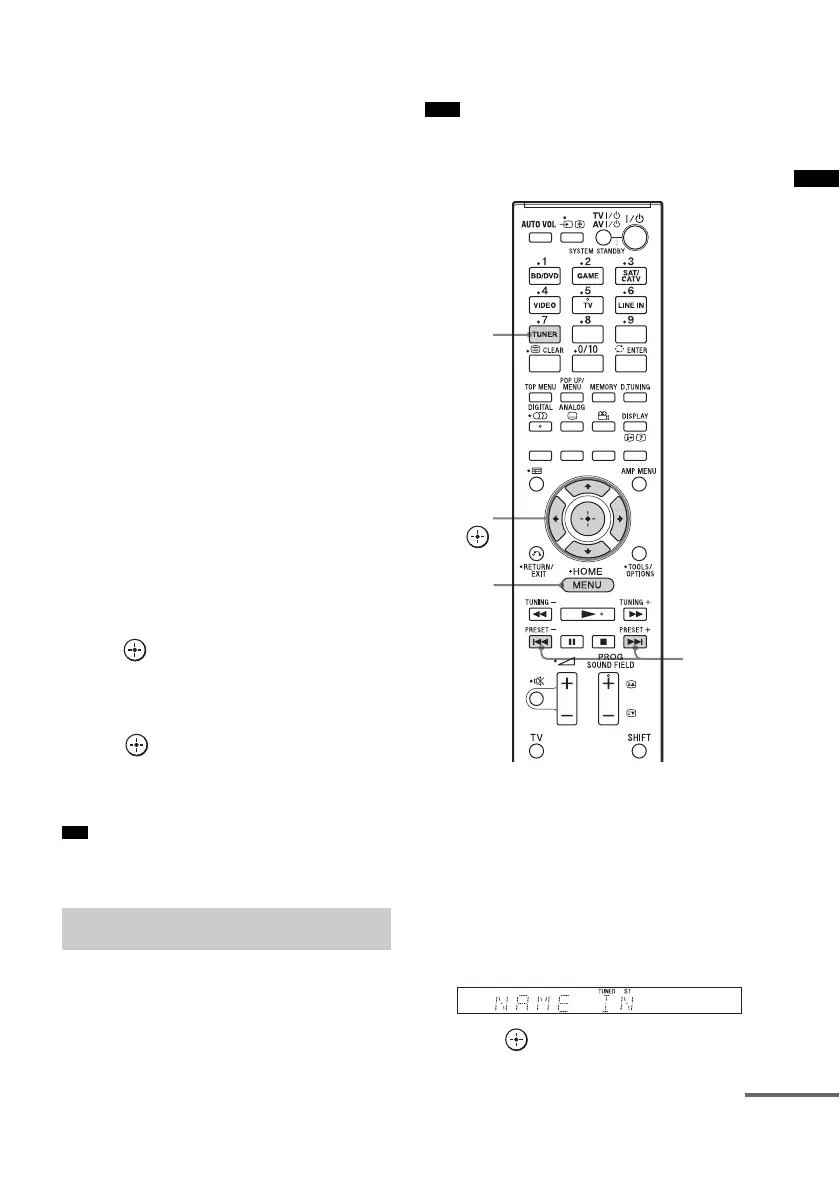
1 Press TUNER.
The last received station is tuned in.
2 Press PRESET +/– repeatedly to select
the preset station you want to create a
name for.
3 Press MENU.
4 Press X/x repeatedly until “NAME IN”
appears on the front panel display.
5 Press .
Tip
Naming preset stations
Note
MENU
PRESET
+/–
C, X, x, c,
TUNER
continued



 To Next Page