Getting Started
17
GB
When connecting equipment that do not have HDMI jacks, such as a “PlayStation
®
2,” a DVD player,
a satellite tuner, or a cable television tuner, etc., set “CTRL HDMI” to “OFF” in the AMP menu of the
system (page 20).
* When connecting equipment shown with an asterisk in the above illustration, set “CTRL HDMI” to “OFF.”
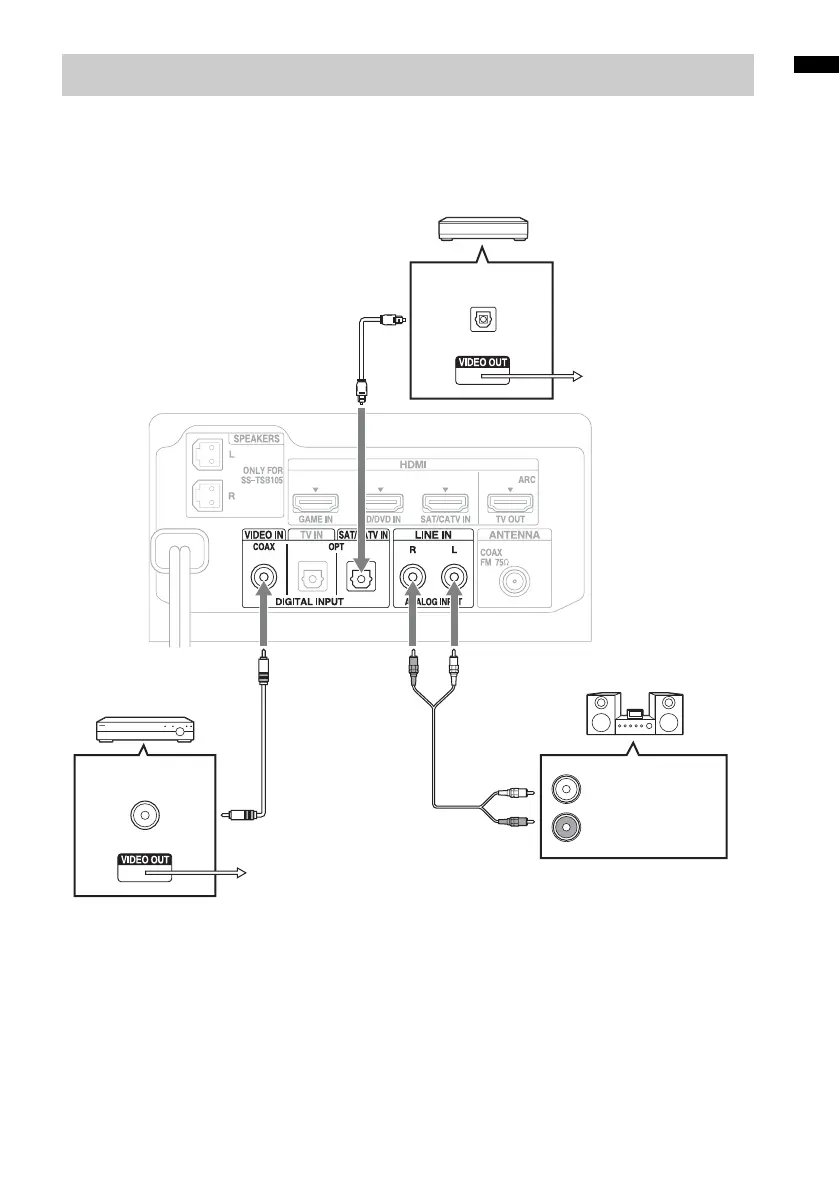
Connecting other equipment
DVD player, etc.*
Digital Audio OUT
(coaxial)
Digital coaxial cord
(not supplied)
Audio cord
(not supplied)
Other audio equipment, etc.
Audio signal OUT
To the VIDEO IN of
the TV.
Digital Audio OUT
(optical)
Digital optical cord
(not supplied)
Rear of the subwoofer
To the VIDEO IN of the TV.
Satellite tuner or cable television tuner, etc.,
without an HDMI jack*



 To Next Page