23
GB
Playback Options
• We recommend that you use an HDMI
authorized cable or a Sony HDMI cable.
• We do not recommend using an HDMI-DVI
conversion cable.
• Check the setup of the connected equipment if
an image is poor or the sound does not come
out of a equipment connected via the HDMI
cable.
• Audio signals (sampling frequency, bit length,
etc.) transmitted from an HDMI jack may be
suppressed by the connected equipment.
• Sound may be interrupted when the sampling
frequency or the number of channels of audio
output signals from the playback equipment is
switched.
• When the connected equipment is not
compatible with copyright protection
technology (HDCP), the image and/or the
sound from the HDMI TV OUT jack may be
distorted or may not be output.
In this case, check the specification of the
connected equipment.
• When “TV” is selected for the input source of
the system, video signals via the HDMI input
jack (BD/DVD, GAME, SAT/CATV) that was
selected last time are output from the HDMI
TV OUT jack.
• This system supports Deep Colour,
“x.v.Colour,” and 3D transmission.
• To enjoy 3D images, connect 3D-compatible
TV and video equipment (Blu-ray Disc player,
Blu-ray Disc recorder, “PlayStation
®
3,” etc.)
to the system using High Speed HDMI cables,
put on 3D glasses, and then play back 3D-
compatible content.
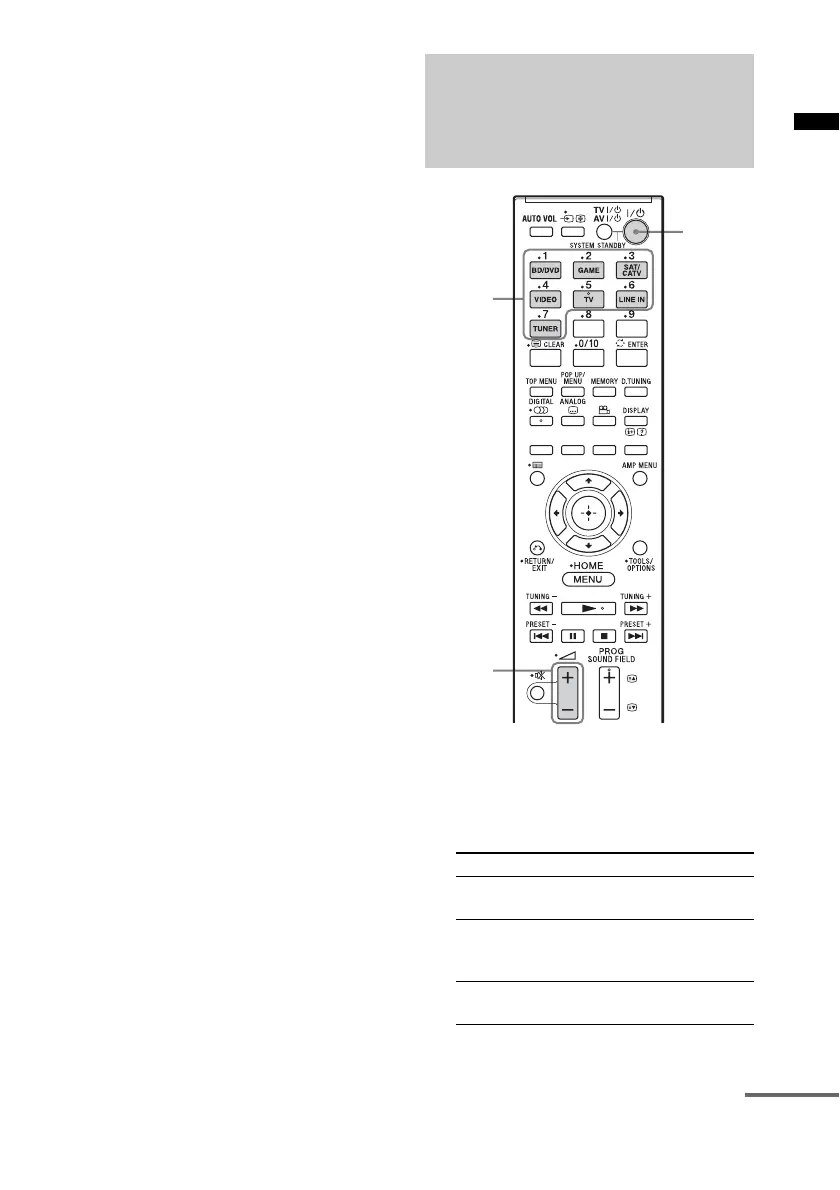
1 Play the connected equipment.
2
Turn on the system.
3 Press the input buttons to display the
input source on the front panel display.
Operating the system
using the supplied remote
control
Input source Playable equipment
TV TV, etc. connected to the TV IN
jack
BD/DVD Blu-ray Disc player, etc.
connected to the BD/DVD IN
jack
GAME Video game, etc. connected to
the GAME IN jack
?/1
2 +/–
Input
buttons
continued



 To Next Page