Getting Started
9
GB
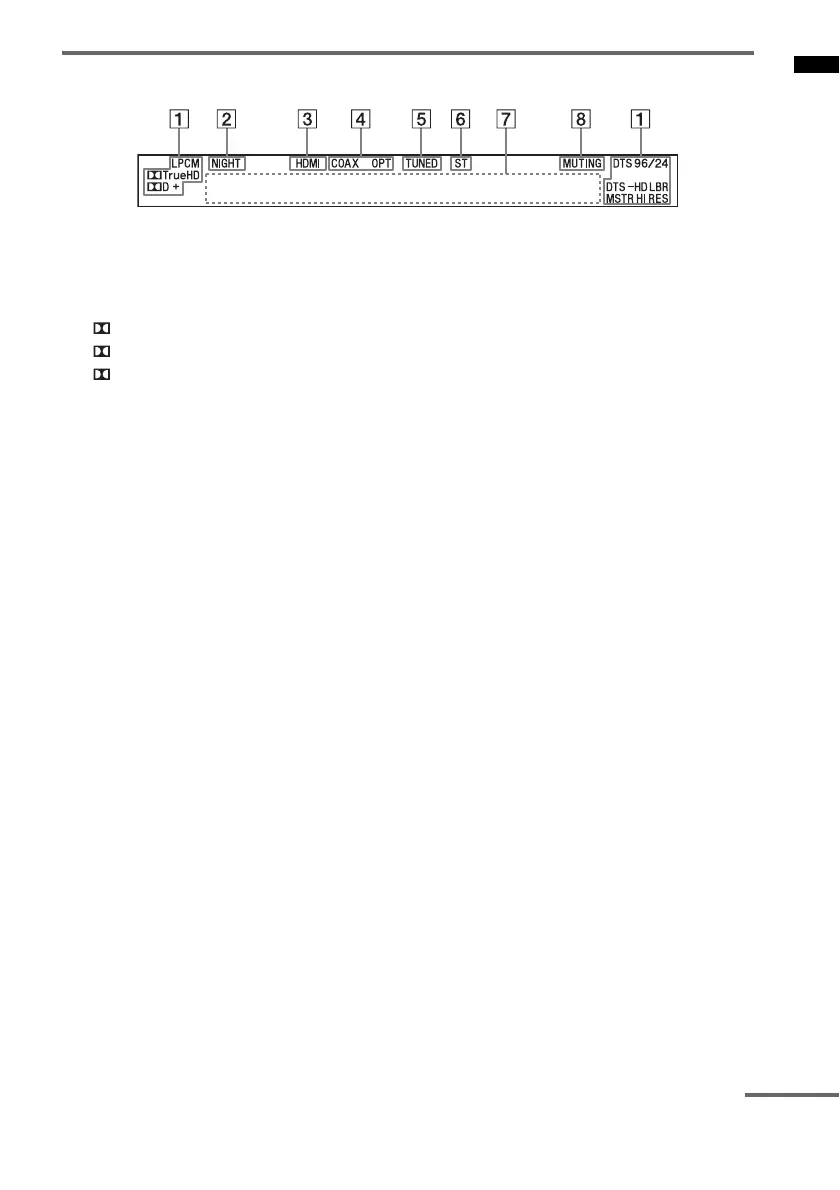
Front panel display (subwoofer)
A Audio format indicators
Light up according to the audio format that
is being input to the system.
LPCM: Linear PCM
TrueHD: Dolby TrueHD
D: Dolby Digital
D+: Dolby Digital Plus
DTS
DTS 96/24*
DTS-HD LBR: DTS-HD Low Bit Rate
DTS-HD MSTR: DTS-HD Master Audio
DTS-HD HI-RES: DTS-HD High
Resolution Audio
* Lights up only when a DTS 96/24 signal is
input while “2CH STEREO” is selected for the
sound field. If you select a sound field other
than “2CH STEREO,” it does not light up.
B NIGHT (page 37)
Lights up in NIGHT MODE.
C HDMI (page 15)
Lights up when an HDMI signal is input or
when an Audio Return Channel (ARC)
signal is being input to the system while
“TV” is selected as the input source.
D COAX/OPT
Lights up when a digital input jack (COAX
or OPT) is being used.
E TUNED (page 26)
Lights up when tuned in to an FM radio
station.
F ST (page 26)
Lights up when an FM stereo program is
received.
G Message display area
Displays volume, selected input source, etc.
H MUTING
Lights up when the sound is turned off.
continued



 To Next Page