17
GB
Connections
2: Connecting the speakers
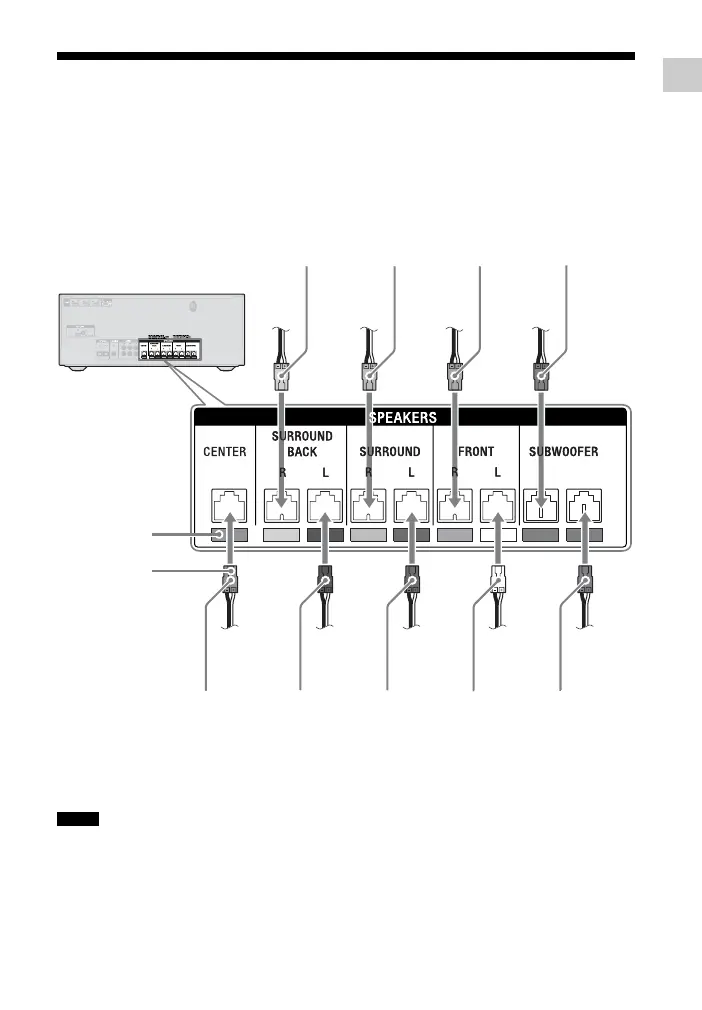
Before connecting cords, be sure to disconnect the AC power cord (mains lead).
When connecting the speaker cords, match the color of the connector to the color label
under the SPEAKERS jacks of the receiver. Be sure to insert the speaker connector until it
clicks.
* HT-M77 only.
** HT-M77 and HT-M55 only.
• Check the speaker type by referring to the
speaker label on the rear panel of the speakers.
• The center speaker and subwoofers do not have
any character on the speaker label. For details
on the speaker type, see page 62.
Green
(Center
speaker)
Tan*
(Surround back
right speaker
(SBR))
Brown*
(Surround back
left speaker
(SBL))
Gray
(Surround
right speaker
(SR))
Blue
(Surround
left speaker
(SL))
Red
(Front right
speaker (R))
White
(Front left
speaker (L))
Purple
(Subwoofer)
Purple**
(Subwoofer)
Color label
Connector
Notes



 To Next Page