43
GB
Adjusting settings
Using the settings menu
You can customize the receiver by making
various adjustments using the setting menu.
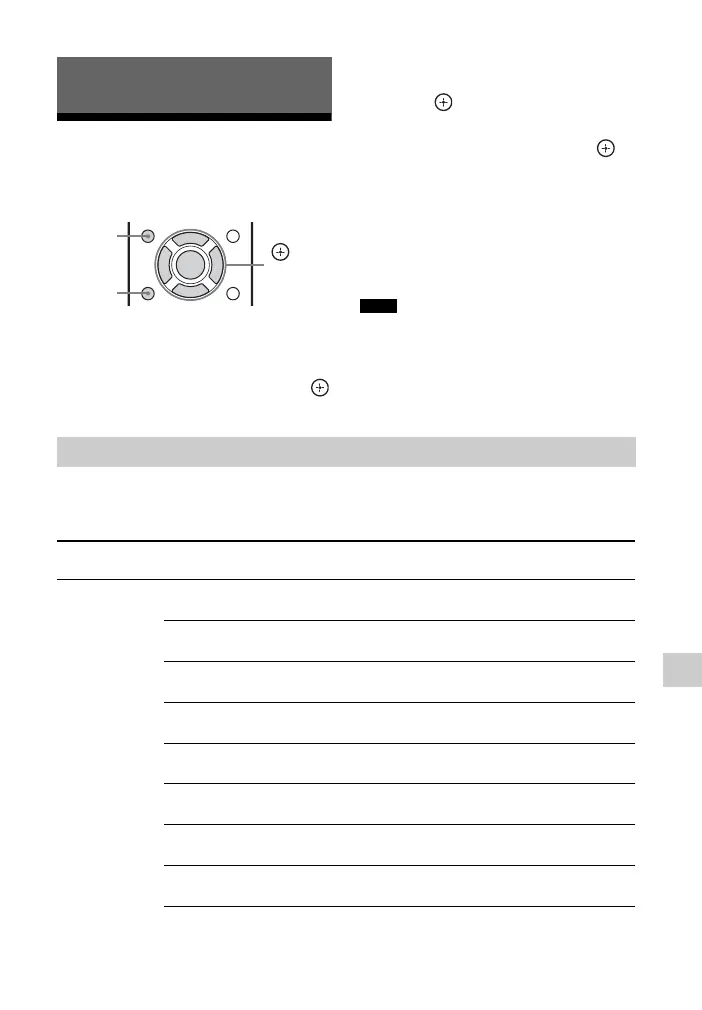
1 Press AMP MENU.
2 Press V/v repeatedly to select the
menu item you want, then press
or b.
3 Press V/v repeatedly to select the
parameter you want to adjust, then
press or b.
4 Press V/v repeatedly to select the
setting you want, then press .
To return to the previous
display
Press B or RETURN.
To exit the menu
Press AMP MENU.
Some parameters and settings may appear
dimmed on the display panel. This means that
they are either unavailable or fixed and
unchangeable.
The following options are available in each menu. For details, see the referencing page in
the parentheses.
Adjusting settings
RETURN
,
V/v/B/b
AMP
MENU
Note
Overview of the menus
Menu
[Display]
Parameters
[Display]
Settings
Level settings
[LEVEL]
(page 45)
Test tone
[TEST TONE]
OFF, AUTO xxx
a)
Front speaker balance
[FRT BAL]
BAL. L+1 to BAL. L+6, BALANCE,
BAL. R+1 to BAL. R+6
Center speaker level
[CNT LEVEL]
CNT –6.0 dB to CNT +6.0 dB
(0.5 dB interval)
Surround left speaker level
[SL LEVEL]
SL –6.0 dB to SL +6.0 dB
(0.5 dB interval)
Surround right speaker level
[SR LEVEL]
SR –6.0 dB to SR +6.0 dB
(0.5 dB interval)
Surround back left speaker level
b)
[SBL LEVEL]
SBL –6.0 dB to SBL +6.0 dB
(0.5 dB interval)
Surround back right speaker level
b)
[SBR LEVEL]
SBR –6.0 dB to SBR +6.0 dB
(0.5 dB interval)
Subwoofer level
[SW LEVEL]
SW –6.0 dB to SW +6.0 dB
(0.5 dB interval)



 To Next Page