23
GB
Connections
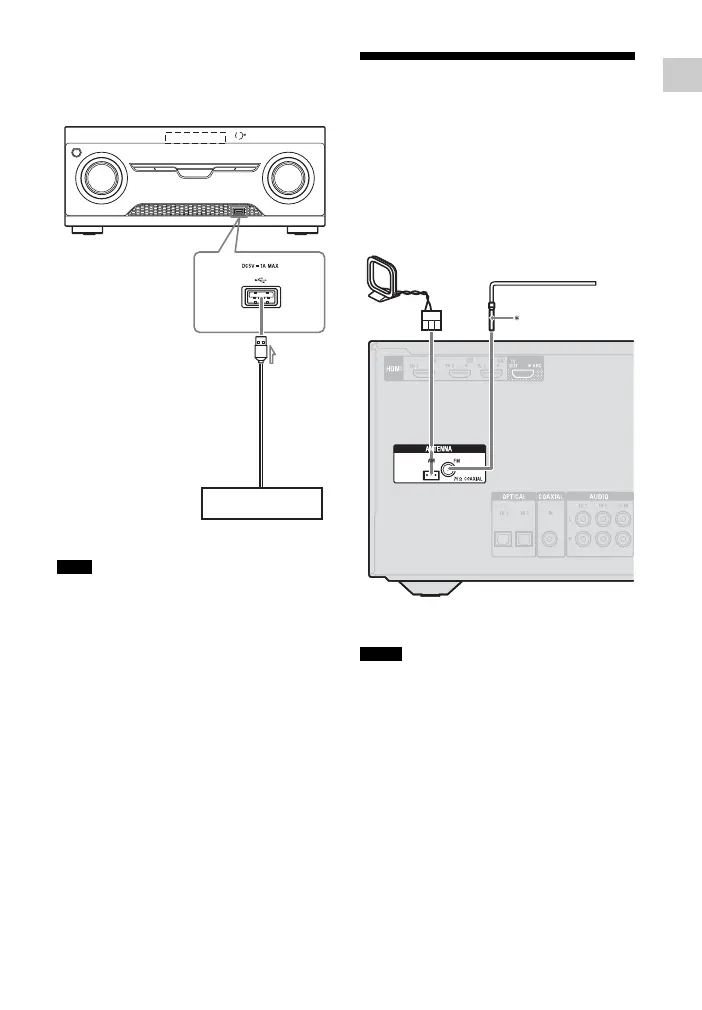
Connecting a USB device
(Except for South Africa and Argentina
models)
A USB cable (not supplied)
You can use your iPhone/iPod with this receiver
via Bluetooth connection only.
5: Connecting the
antennas (aerials)
Before connecting the antennas (aerials),
be sure to disconnect the AC power cord
(mains lead).
* The shape of the connector varies depending on
the area of this receiver
• To prevent noise pickup, keep the AM loop
antenna (aerial) away from the receiver and
other equipment.
• Be sure to fully extend the FM wire antenna
(aerial).
• After connecting the FM wire antenna (aerial),
keep it as horizontal as possible.
Note
USB device
A
Notes
FM wire antenna (aerial)
(supplied)
AM loop antenna (aerial)
(supplied)



 To Next Page