25
GB
Preparing the Receiver
Adjusting the speaker
levels and balance
(TEST TONE)
You can adjust the speaker levels and
balance while listening to the test tone from
your seating position.
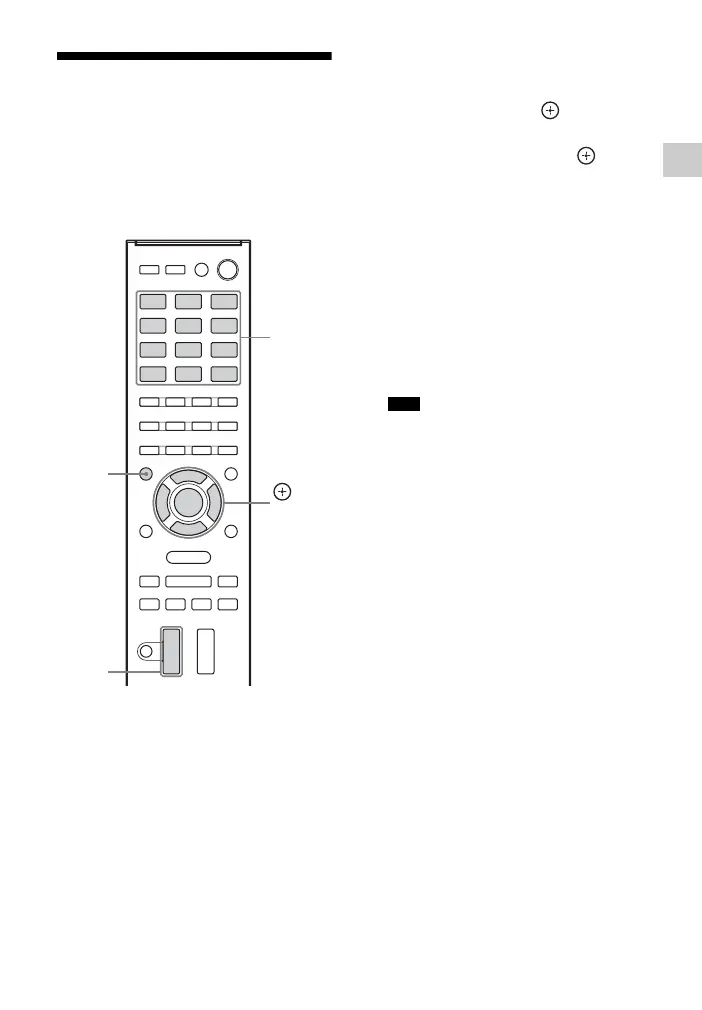
1 Press AMP MENU.
2 Press V/v repeatedly to select
“LEVEL”, then press or b.
3 Press V/v repeatedly to select
“TEST TONE”, then press or b.
4 Press V/v repeatedly to select
“AUTO xxx*”.
The test tone is output from each
speaker in sequence.
* xxx represent a speaker channel.
5 Adjust the speaker levels and
balance.
Use the LEVEL settings menu
(page 45) to adjust the speakers to
have the same sounding test tone level
for each speaker.
•
T
o adjust the level of all speakers at the
same time, press VOL +/–. You can also
use MASTER VOLUME on the receiver.
• The adjusted value are shown on the
display panel during adjustment.
6 Exit test tone.
Press any INPUT SELECTOR buttons
or select “OFF” in step 4.
INPUT
SELECTOR
buttons
,
V/v/B/b
AMP
MENU
VOL +/–
Tips



 To Next Page