20
US
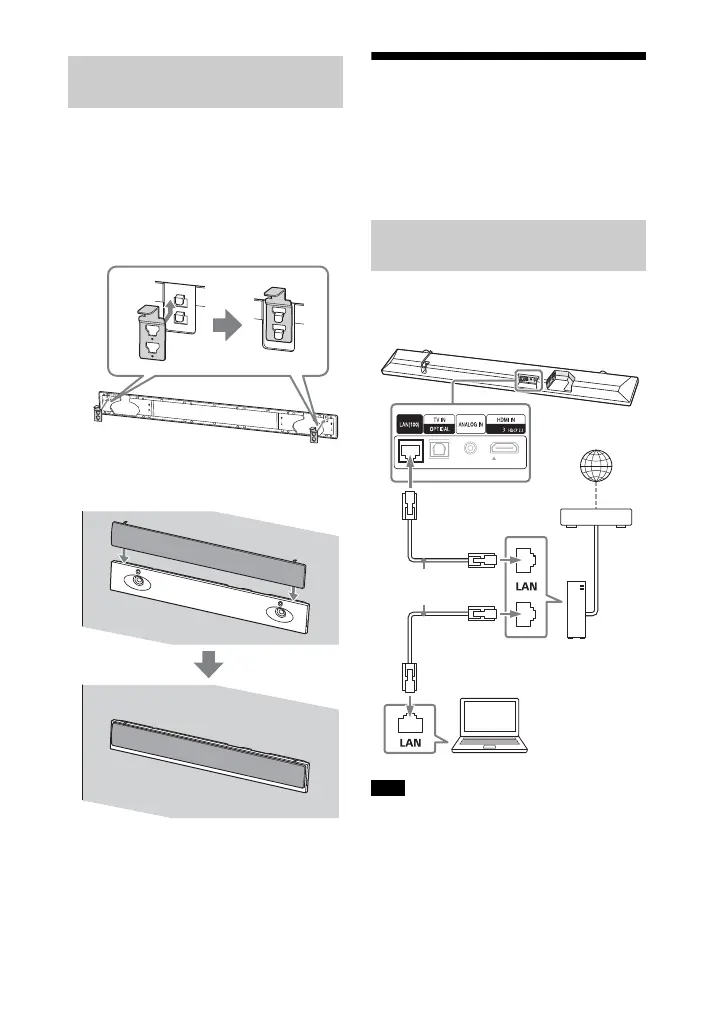
Attach the grille frame support hook to
the grille frame to prevent the grille
frame from falling.
1 Insert the grille frame support
hook into the hook on the grille
frame, then lift it up.
2 Attach the grille frame to the Bar
Speaker.
Connecting to a Wired
Network
Prepare the network by connecting the
system and PC to your home network
with a LAN cable.
The following illustration is the example
for connection of the system and PC to
your home network.
The server needs to be connected to the
same network as that of the system.
Tip
We recommend that you use a shielded
straight interface cable (not supplied).
Attaching the Grille Frame
When Mounting on a Wall
Connecting to a PC or Router
with a LAN Cable
Note
Internet
LAN cable
(not supplied)
Server
Router
Modem



 To Next Page