16
US
Connection for Viewing
Copyright-protected 4K
Content
To view copyright-protected 4K content
and listen to sound from the system,
connect the TV and device to the system
via an HDCP2.2-compatible HDMI jack.
You can only view copyright-protected
4K content through the HDCP2.2-
compatible HDMI jack connection.
1 Check which HDMI input jack on
your TV is compatible with
HDCP2.2.
Refer to the operating instructions
of the TV.
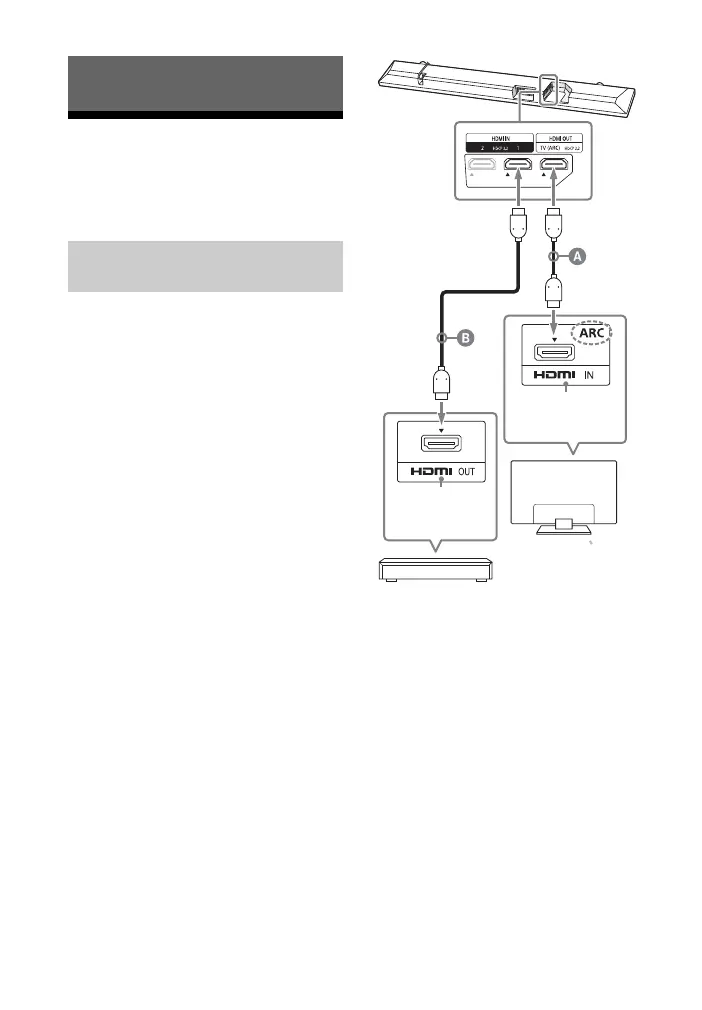
2 Connect the HDCP2.2-compatible
HDMI input jack on the TV and
HDMI OUT jack on the unit with
the HDMI cable (supplied).
TV connection is completed.
Connecting and Preparation
Connecting a 4K TV and 4K
Device
HDCP2.2-
compatible
HDMI jack
Blu-ray Disc™ player, cable box, or
satellite box, etc.
HDCP2.2-
compatible
HDMI jack
TV
HDMI cable (supplied)
HDMI cable (not supplied)
Premium High Speed HDMI cable with
Ethernet is recommended.



 To Next Page