44
GB
HT-XT3
4-558-561-13(1)
D:\NORM'S JOB\SONY HA\SO150002\HT-XT3 (PMRF 02)\4558561131_GB
(CEK)\070ADD.fm
masterpage: Left
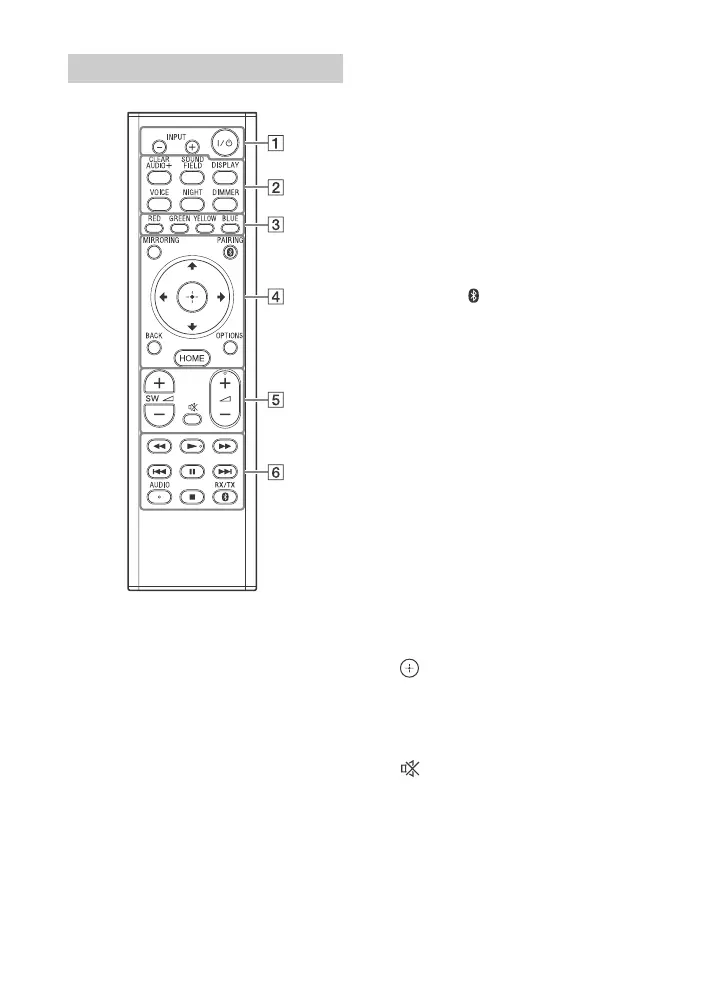
AUDIO, , and + buttons have a
tactile dot. Use the tactile dot as a
reference when operating the remote
control.
(on/standby)
Turns on the system or sets it to
standby mode.
INPUT +/– (page 8)
Selects the device you want to use.
Sound effect buttons
See “Enjoying sound effects”
(page 9).
CLEARAUDIO+, SOUND FIELD,
VOICE, NIGHT
DISPLAY
Displays playback information on
the TV screen.
DIMMER (page 33)
Adjusts the brightness of the front
panel display and blue LED
indicator.
Color buttons
Shortcut keys for selecting items on
some menus.
MIRRORING (page 19)
Selects the [Screen mirroring] input.
PAIRING (pages 11, 15)
Sets the system to pairing mode.
This button only works when
[Bluetooth Mode] is set to [Receiver]
(page 25).
BACK
Returns to the previous display.
OPTIONS (pages 12, 14, 29, 30)
Displays the Options menu on the
TV screen or in the front panel
display. (The location differs
depending on the selected
function.)
HOME (pages 8, 10, 16, 18, 22)
Enters or exits the system’s home
screen.
///
Moves the highlight to a displayed
item.
(enter)
Enters the selected item.
SW
(subwoofer volume) +/–
Adjust the volume of the bass
sound.
(muting)
Turns off the sound temporarily.
(volume) +/–
Adjusts the volume.
Playback operation buttons
See “Listening/Viewing” (page 8).
/ (rewind/fast forward)
Searches backward or forward.
Remote control



 To Next Page