Basic Operations
25
GB
Erasing Messages
You can erase the recorded messages one by one or all messages in a folder
at a time.
Note that once a recording has been erased, you cannot retrieve it.
Erasing Messages one by one
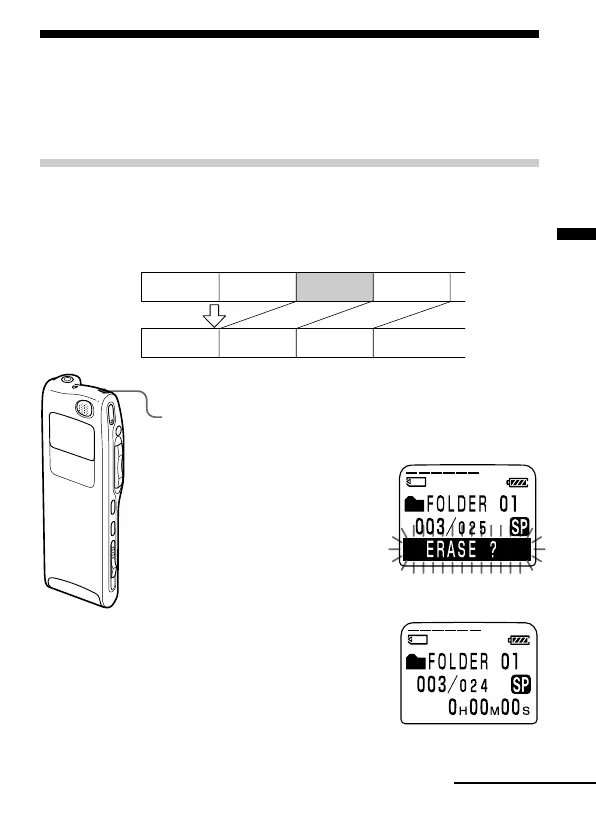
When a message is erased, the remaining messages will advance and
renumbered so that there will be no space between messages.
Erase Message 3
Message 1
Message 2 Message 3 Message 4
Before erasing
After erasing
Remaining messages are renumbered.
Message 1
Message 4 Message 5Message 2 Message 3
1 Press the ERASE button while playing back the
message you want to erase or press the ERASE
button for more than 1 second during stop mode.
A beep will sound and the
message number and
“ERASE?” will flash while the
first and last 5 seconds of the
message are played back 10
times.
2 Press the ERASE button while the message is being
played back.
The message is erased and the
remaining messages will be
renumbered. (For example, if you
erase Message 3, Message 4 will
be renumbered as Message 3.
When erasing is completed, the
unit will stop at the beginning of
the following message.)
Continued



 To Next Page