Various Ways of Playback
29
GB
Adding a Bookmark
You can add a bookmark at a point in a message, so that you can access the
point quickly by pressing the jog lever up or down (>/.) and start
playback.
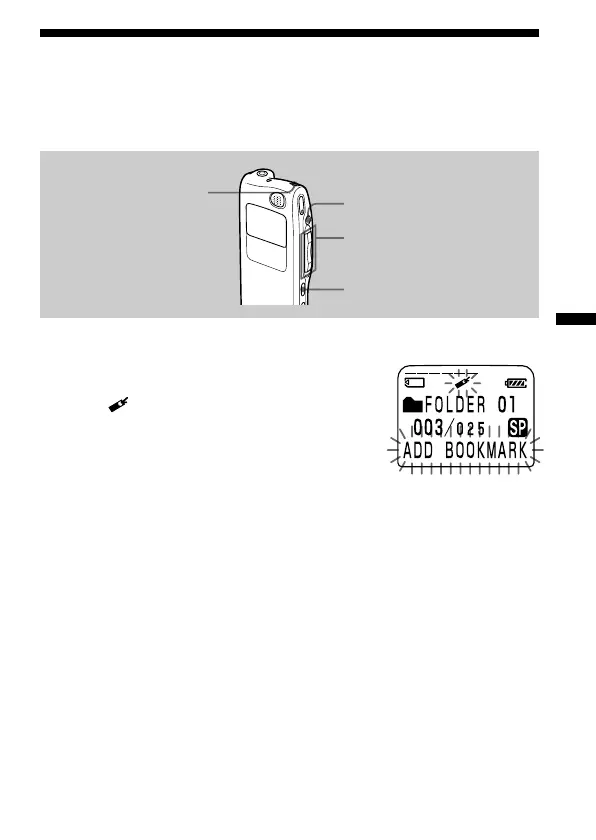
During playback or stop, press INDEX/BOOKMARK
for more than 1 second.
A bookmark is added and the bookmark
indicator ( ) flashes 3 times.
To start playback at the bookmark
Press the jog lever up or down (>/.) during stop so that the
bookmark indicator flashes 3 times. Then press the jog lever (x•B).
To delete the bookmark
1 In stop mode, press the jog lever up or down (>/.) to display
the number of the message with the bookmark you wish to delete.
2 While pressing INDEX/BOOKMARK, press ERASE for more than 1
second.
3 Press ERASE while the bookmark indicator and “ERASE MARK?” are
flashing.
Notes on adding/erasing index
• You can add only one bookmark in each message.
• If you add a bookmark, a previously added bookmark is deleted
automatically.
xSTOP
INDEX/BOOKMARK
ERASE
Jog lever (>/./
x•B)



 To Next Page