Other Functions
49
GB
5 Press the jog lever (x•B).
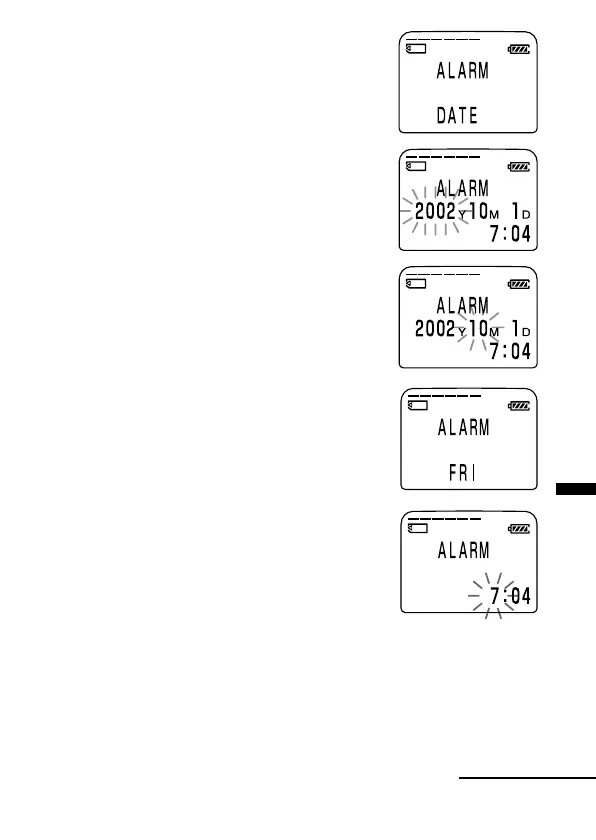
“DATE” will be displayed in the display
window.
3 Set the alarm date and time.
To play back on a desired date
1 Press the jog lever (x•B) while
“DATE” is displayed.
The year digits will flash.
2 Press the jog lever up or down (>/
.) to select the year digits and press
the jog lever (x•B).
The month digits will flash.
3 Set the month, day, and the time in
sequence, then press the jog lever
(x•B).
To play back once a week
1 Press the jog lever up or down (>/
.) to select the day of the week
(“SUN” for Sunday to “FRI” for Friday).
2 Press the jog lever (x•B).
The hour digits will flash.
3 Press the jog lever up or down (>/
.) to select the hour digits, and press
the jog lever (x•B).
The minute digit will flash.
4 Press the jog lever up or down (>/
.) to select the minute digits, and
press the jog lever (x•B).
Continued



 To Next Page