EasyManua.ls Logo

Sony ICF-2001D - Memory Scan Tuning; Memory Scan Operation; Skipping Stations and Bands

Sony ICF-2001D
78 pages
Print Icon
To Next Page IconTo Next Page
To Previous Page IconTo Previous Page
Loading...
ICF-2001D/2010
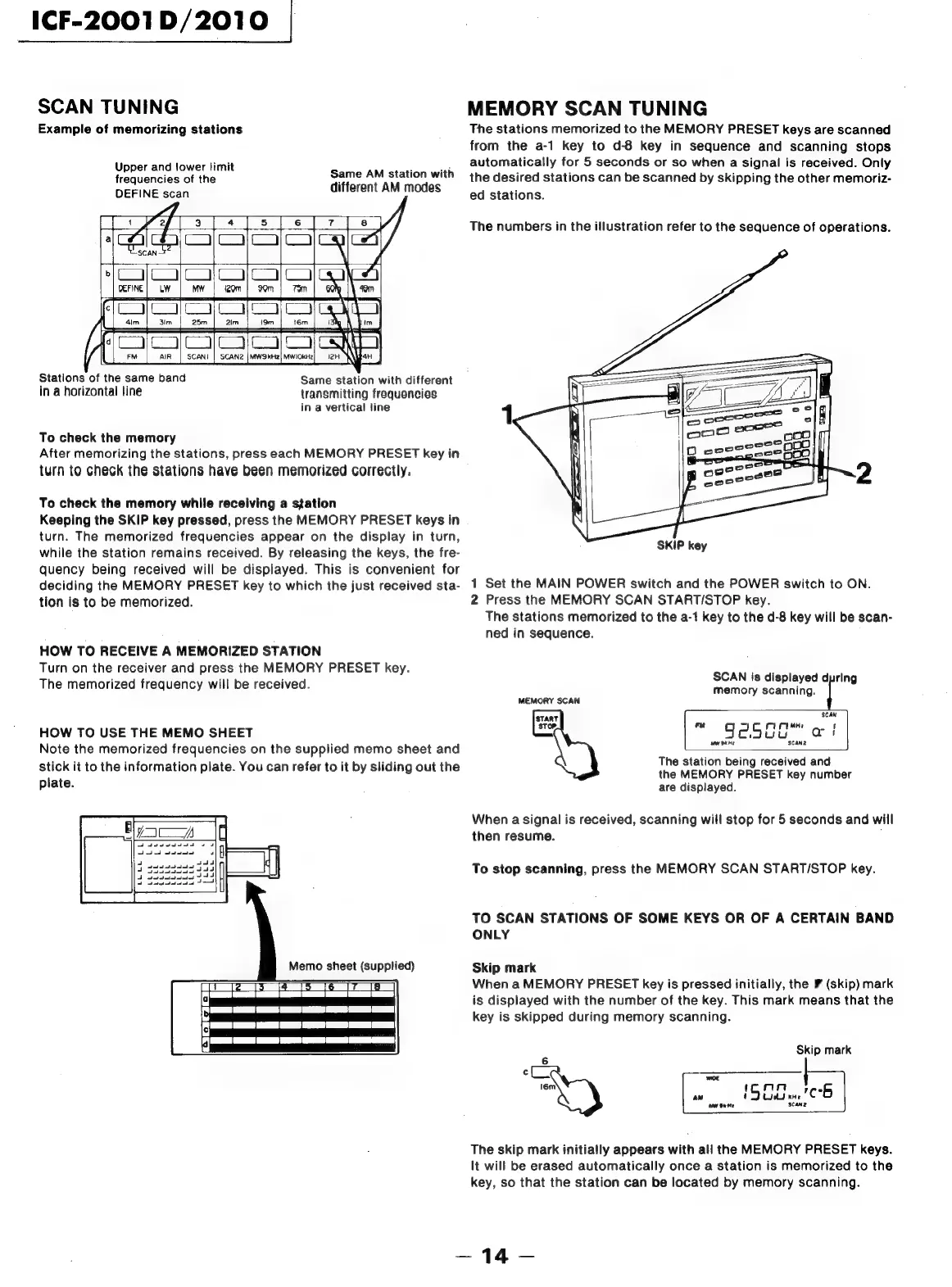
SCAN
TUNING
MEMORY
SCAN
TUNING
Example
of
memorizing
stations
The
stations
memorized
to
the
MEMORY
PRESET
keys
are
scanned
from
the
a-1
key
to
d-8
key
in
sequence
and
scanning
stops
Upper
and
lower
limit
automatically
for
5
seconds
or
so
when
a
signal
is
received.
Only
frequencies
of
the
peril
agua
with
the
desired
stations
can
be
scanned
by
skipping
the
other
memoriz-
DEFINE
scan
Merent
AM
Modes
ed
stations.
The
numbers
in
the
illustration
refer
to
the
sequence
of
operations.
Stations
of
the
same
band
Same
station
with
different
in
a
horizontal
line
transmitting
frequencies
in
a
vertical
line
1
To
check
the
memory
After
memorizing
the
stations,
press
each
MEMORY
PRESET
key
in
turn
to
check
the
stations
have
been
memorized
correctly.
To
check
the
memory
while
receiving
a
station
Keeping
the
SKIP
key
pressed,
press
the
MEMORY
PRESET
keys
in
turn.
The
memorized
frequencies
appear
on
the
display
in
turn,
while
the
station
remains
received.
By
releasing
the
keys,
the
fre-
quency
being
received
will
be
displayed.
This
is
convenient
for
deciding
the
MEMORY
PRESET
key
to
which
the
just
received
sta-
1
Set
the
MAIN
POWER
switch
and
the
POWER
switch
to
ON.
tion
is
to
be
memorized.
2
Press
the
MEMORY
SCAN
START/STOP
key.
The
stations
memorized
to
the
a-1
key
to
the
d-8
key
will
be
scan-
ned
in
sequence.
SKIP
key
HOW
TO
RECEIVE
A
MEMORIZED
STATION
Turn
on
the
receiver
and
press
the
MEMORY
PRESET
key.
The
memorized
frequency
will
be
received.
wcnayecrane
ie
MEMORY
SCAN
START
SCAN
HOW
TO
USE
THE
MEMO
SHEET
=
©
SeSUG
et
Note
the
memorized
frequencies
on
the
supplied
memo
sheet
and
“ee
tale
i
: ;
idi
The
station
being
received
and
ae
to
the
information
plate.
You
can
refer
to
it
by
sliding
out
the
the
MEMORY
PRESET
key
number
are
displayed.
When
a
signal
is
received,
scanning
will
stop
for
5
seconds
and
will
then
resume.
To
stop
scanning,
press
the
MEMORY
SCAN
START/STOP
key.
TO
SCAN
STATIONS
OF
SOME
KEYS
OR
OF
A
CERTAIN
BAND
ONLY
Memo
sheet
(supplied)
Skip
mark
:
:
When
a
MEMORY
PRESET
key
is
pressed
initially,
the
¥
(skip)
mark
is
displayed
with
the
number
of
the
key.
This
mark
means
that
the
key
is
skipped
during
memory
scanning.
Skip
mark
6
¢
WOE
16m
man
.
an
!
5
te
'C
6
ne
Gate
SCaNnz
The
skip
mark
initially
appears
with
all
the
MEMORY
PRESET
keys.
It
will
be
erased
automatically
once
a
station
is
memorized
to
the
key,
so
that
the
station
can
be
located
by
memory
scanning.

Related product manuals