EasyManua.ls Logo

Sony ICF-2001D - Programmable Timer Operation; Setting Up Programmable Timer Programs; Managing and Cancelling Timer Programs

Sony ICF-2001D
78 pages
Print Icon
To Next Page IconTo Next Page
To Previous Page IconTo Previous Page
Loading...
ICF-2001D/2010
PROGRAMMABLE
TIMER
OPERATION
—To
turn
on
the
receiver
automatically
Any
memovized
station
can
be
turned
on
automatically
at
the
desired
time
and
turned
off
after
60,
30
or
15
minutes
by
the
pro-
grammable
timer.
Four
timer
programs
can
be
set.
Before
setting
the
timer
@Set
the
MAIN
POWER
switch
and
the
POWER
switch
to
ON.
@
Memorize
the
stations
to
be
turned
on
to
the
MEMORY
PRESET
keys.
@
Adjust
the
VOLUME
control
to
normal
listening
level.
HOW
TO
SET
THE
TIMER
Set
the
following
three
items.
WTurn-on
time
@Timer
operation
time
(60,
30
or
15
minutes)
Station
to
be
turned
on
(number
of
the
MEMORY
PRESET
key)
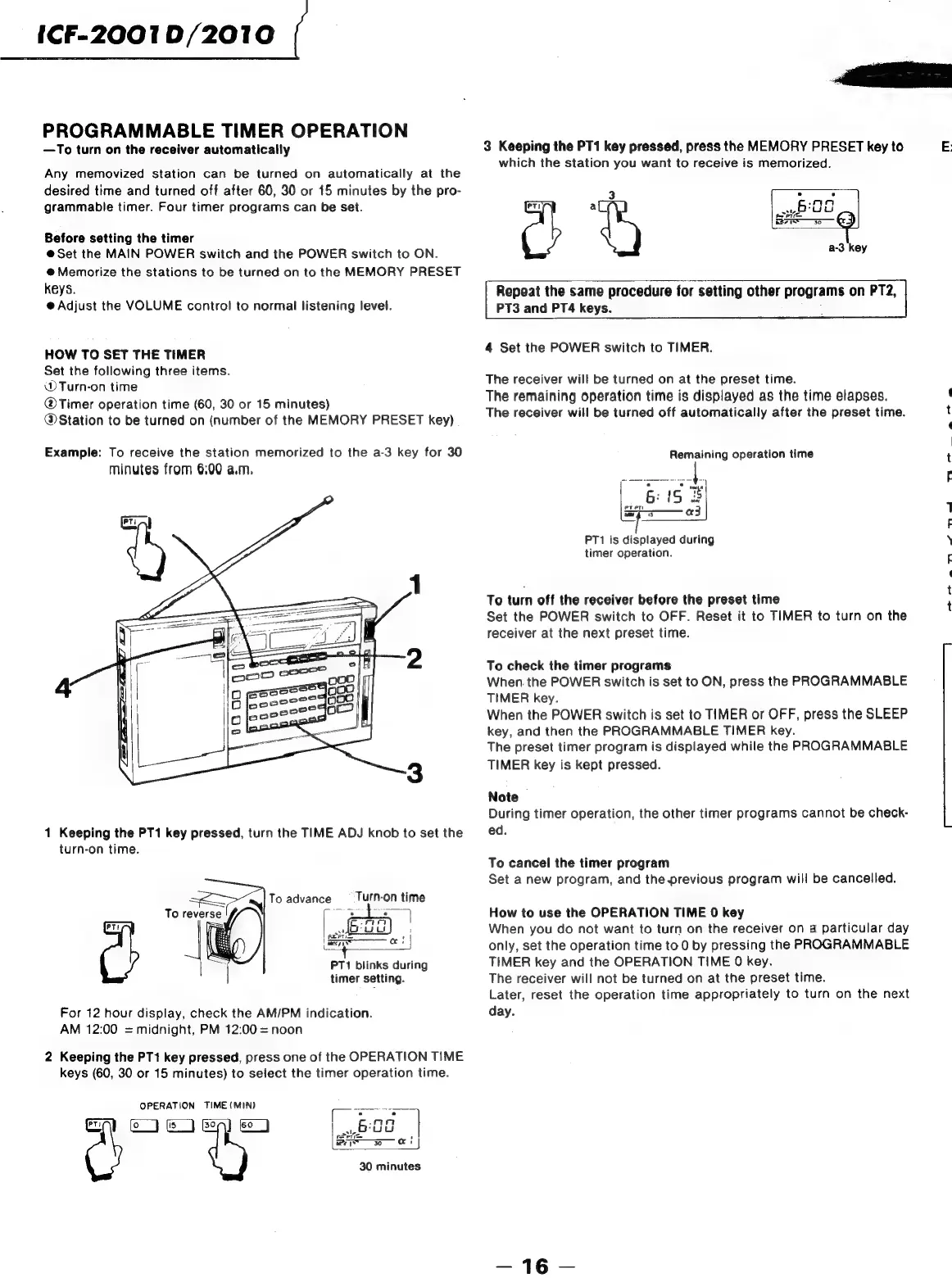
Example:
To
receive
the
station
memorized
to
the
a-3
key
for
30
minutes
from
6:00
a.m.
1
Keeping
the
PT1
key
pressed,
turn
the
TIME
ADJ
knob
to
set
the
turn-on
time.
To
advance
_—‘
Turn-on
time
eee
|
i
prei=
«!
ency
(mens
PT1
blinks
during
timer
setting.
For
12
hour
display,
check
the
AM/PM
indication.
AM
12:00
=
midnight,
PM
12:00
=
noon
2
Keeping
the
PT1
key
pressed,
press
one
of
the
OPERATION
TIME
keys
(60,
30
or
15
minutes)
to
select
the
timer
operation
time.
2
|
wey
0
OT
30
minutes
OPERATION
TIME
(MIN)
3
Keeping
the
PT1
key
pressed,
press
the
MEMORY
PRESET
key
to
which
the
station
you
want
to
receive
is
memorized.
Repeat
the
same
procedure
for
setting
other
programs
on
PT2,
PT3
and
PT4
keys.
.
%
4
Set
the
POWER
switch
to
TIMER.
The
receiver
will
be
turned
on
at
the
preset
time.
The
remaining
operation
time
is
displayed
as
the
time
elapses.
The
receiver
will
be
turned
off
automatically
after
the
preset
time.
Remaining
operation
time
PT1
is
displayed
during
timer
operation.
To
turn
off
the
receiver
before
the
preset
time
Set
the
POWER
switch
to
OFF.
Reset
it
to
TIMER
to
turn
on
the
receiver
at
the
next
preset
time.
To
check
the
timer
programs
When.
the
POWER
switch
is
set
to
ON,
press
the
PROGRAMMABLE
TIMER
key.
When
the
POWER
switch
is
set
to
TIMER
or
OFF,
press
the
SLEEP
key,
and
then
the
PROGRAMMABLE
TIMER
key.
The
preset
timer
program
is
displayed
while
the
PROGRAMMABLE
TIMER
key
is
kept
pressed.
Note
During
timer
operation,
the
other
timer
programs
cannot
be
check-
ed.
To
cancel
the
timer
program
Set
a
new
program,
and
theprevious
program
will
be
cancelled.
How
to
use
the
OPERATION
TIME
0
key
When
you
do
not
want
to
turn
on
the
receiver
on
a
particular
day
only,
set
the
operation
time
to
0
by
pressing
the
PROGRAMMABLE
TIMER
key
and
the
OPERATION
TIME
0
key.
The
receiver
will
not
be
turned
on
at
the
preset
time.
Later,
reset
the
operation
time
appropriately
to
turn
on
the
next
day.
E)

Related product manuals