EasyManua.ls Logo

Sony icf 2010 - Direct Tuning

Sony icf 2010
20 pages
Print Icon
To Next Page IconTo Next Page
To Previous Page IconTo Previous Page
Loading...
DIRECT
TUNING
If
you
know
the
frequency
of
a
station
to
be
received,
you
can
tune
in
the
station
easiiy
by
direct
tuning.
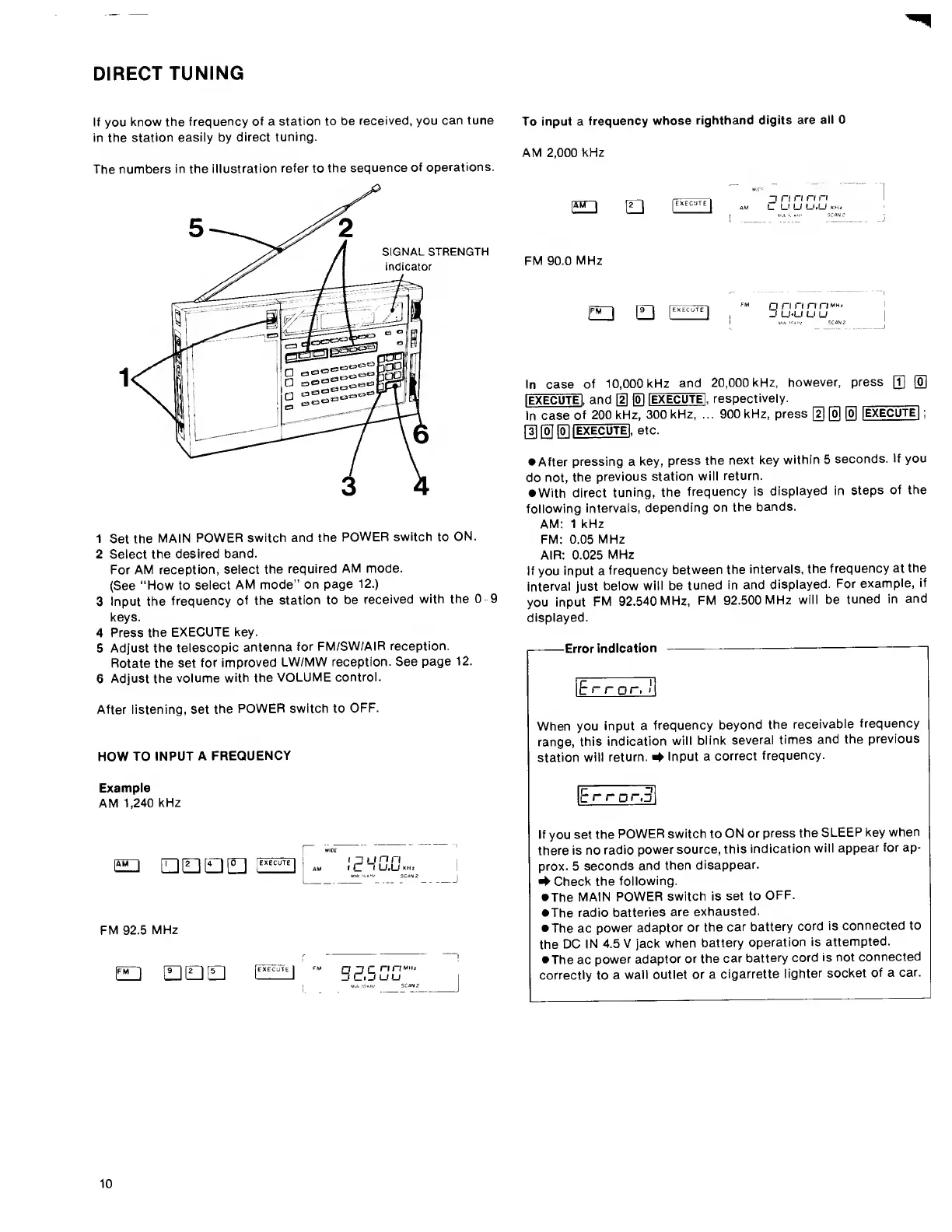
The
numbers
in
the
illustration
refer
to
the
sequence
of
operations.
1
Set
the
MAIN
POWER
switch
and
the
POWER
switch
to
ON.
2
Select
the
desired
band.
For
AM
reception,
select
the
required
AM
mode.
(See
“How
to
select
AM
mode”
on
page
12.)
3
Input
the
frequency
of
the
station
to
be
received
with
the
0
9
keys.
4
Press
the
EXECUTE
key.
5
Adjust
the
telescopic
antenna
for
FM/SW/AIR
reception.
Rotate
the
set
for
improved
LW/MW
reception.
See
page
12.
6
Adjust
the
volume
with
the
VOLUME
controi.
After
iistening,
set
the
POWER
switch
to
OFF.
HOW
TO
INPUT
A
FREQUENCY
Example
AM
1,240
kHz
S
[DEJQtl]
-M
Ic'Wuu.H.
!
uw
!bkMi
ScaNZ
j
FM
92.5
MHz
pn
HIDE]
El
o',5
00“
To
input
a
frequency
whose
righthand
digits
are
ail
0
AM
2,000
kHz
FM
90.0
MHz
”1
n
n
n
n
AM
L
U
U
U.U
K
[FM
I
[
9
~~|
[execute
I
FM
QrfrinriMH,
-.f
u*u
u
u
In
case
of
10,000
kHz
and
20,000
kHz,
however,
press
Q]
[o]
lEXECUTEI
,
and
[1]
|o]
IEXECUTEI
,
respectively.
In
case
of
200
kHz,
300
kHz,
...
900
kHz,
press
[D
0
®
[EXECUTE|
;
rslloTf^
[
E
XECUTE!
,
etc.
After
pressing
a
key,
press
the
next
key
within
5
seconds.
If
you
do
not,
the
previous
station
will
return.
With
direct
tuning,
the
frequency
is
displayed
in
steps
of
the
foilowing
intervals,
depending
on
the
bands.
AM:
1
kHz
FM:
0.05
MHz
AIR:
0.025
MHz
If
you
input
a
frequency
between
the
intervals,
the
frequency
at
the
interval
just
below
will
be
tuned
in
and
displayed.
For
example,
if
you
input
FM
92.540
MHz,
FM
92.500
MHz
will
be
tuned
in
and
displayed.
I-Error
indication
--—-—i
Error,
I
When
you
input
a
frequency
beyond
the
receivabie
frequency
range,
this
indication
will
blink
several
times
and
the
previous
station
wili
return.
^
Input
a
correct
frequency.
r
~i
c
r
rgr.o
If
you
set
the
POWER
switch
to
ON
or
press
the
SLEEP
key
when
there
is
no
radio
power
source,
this
indication
wili
appear
for
ap¬
prox.
5
seconds
and
then
disappear.
•¥
Check
the
following.
The
MAIN
POWER
switch
is
set
to
OFF.
The
radio
batteries
are
exhausted.
The
ac
power
adaptor
or
the
car
battery
cord
is
connected
to
the
DC
IN
4.5
V
jack
when
battery
operation
is
attempted.
The
ac
power
adaptor
or
the
car
battery
cord
is
not
connected
correctly
to
a
wall
outlet
or
a
cigarrette
lighter
socket
of
a
car.
10

Other manuals for Sony icf 2010

Related product manuals