EasyManua.ls Logo

Sony icf 2010 - Page 9

Sony icf 2010
20 pages
Print Icon
To Next Page IconTo Next Page
To Previous Page IconTo Previous Page
Loading...
RADIO
POWER
SOURCES
CLOCK
SETTING
For
roceivor
oporation,
the
computer/clock
batteries
and
one
of
the
When
the
computer/clock
batteries
are
instailed,
the
clock
begins
foliowing
three
radio
power
sources
are
necessary.
to
operate
from
0;00.
RADIO
BATTERIES
Battery
Installation
Insert
three
size
D
batteries
(lEC
designation
R20)
with
correct
polarity,
foilowing
illustration
[D]
on
page
3.
The
set
cannot
be
operated
on
the
internal
batteries
when
the
ac
power
adaptor
or
car
battery
cord
is
connected
to
the
set.
When
the
set
is
not
to
be
used
for
a
long
period
of
time
or
is
to
be
operated
extensively
on
other
power
sources,
remove
the
batteries
to
avoid
damage
caused
by
battery
leakage
and
corrosion.
Battery
life
You
can
expect
Eveready
No.
1250
batteries
to
last
for
approx.
30
hours
for
AM/AIR
reception
and
approx.
40
hours
for
FM
reception.
This
assumes
listening
for
four
hours
a
day
at
normal
volume.
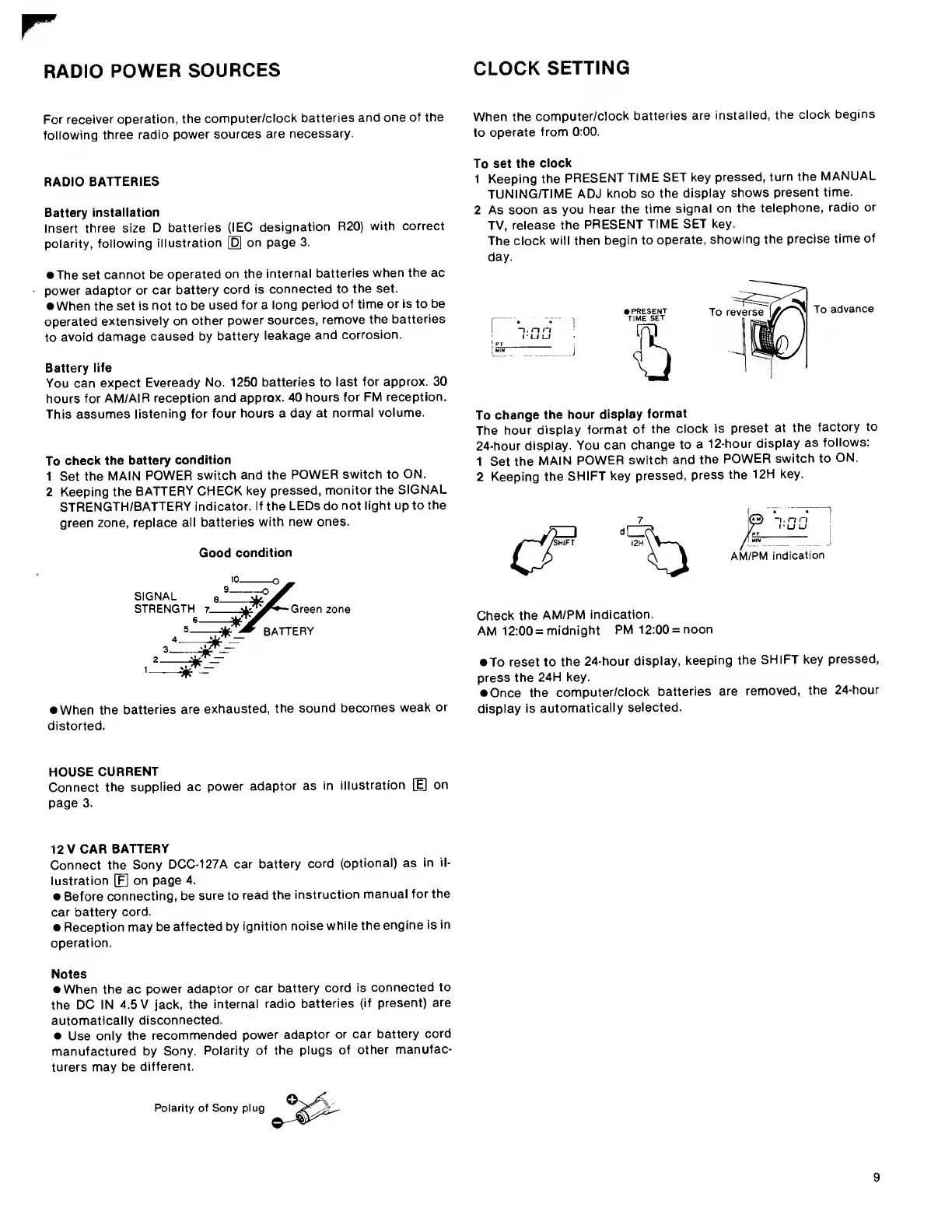
To
check
the
battery
condition
1
Set
the
MAIN
POWER
switch
and
the
POWER
switch
to
ON.
2
Keeping
the
BATTERY
CHECK
key
pressed,
monitor
the
SIGNAL
STRENGTH/BATTERY
indicator.
If
the
LEDs
do
not
light
up
to
the
green
zone,
replace
all
batteries
with
new
ones.
Good
condition
zone
^
When
the
batteries
are
exhausted,
the
sound
becomes
weak
or
distorted.
To
set
the
clock
1
Keeping
the
PRESENT
TIME
SET
key
pressed,
turn
the
MANUAL
TUNING/TIME
ADJ
knob
so
the
display
shows
present
time.
2
As
soon
as
you
hear
the
time
signal
on
the
telephone,
radio
or
TV,
release
the
PRESENT
TIME
SET
key.
The
clock
will
then
begin
to
operate,
showing
the
precise
time
of
day.
To
change
the
hour
display
format
The
hour
display
format
of
the
clock
is
preset
at
the
factory
to
24-hour
display.
You
can
change
to
a
12-hour
display
as
follows:
1
Set
the
MAIN
POWER
switch
and
the
POWER
switch
to
ON.
2
Keeping
the
SHIFT
key
pressed,
press
the
12H
key.
AM/PM
indication
Check
the
AM/PM
indication.
AM
12:00
=
midnight
PM
12:00
=
noon
To
reset
to
the
24-hour
display,
keeping
the
SHIFT
key
pressed,
press
the
24H
key.
Once
the
computer/clock
batteries
are
removed,
the
24-hour
display
is
automatically
selected.
HOUSE
CURRENT
Connect
the
supplied
ac
power
adaptor
as
in
illustration
[E]
on
page
3.
12
V
CAR
BATTERY
Connect
the
Sony
DCC-127A
car
battery
cord
(optional)
as
in
il¬
lustration
[F|
on
page
4.
Before
connecting,
be
sure
to
read
the
instruction
manual
for
the
car
battery
cord.
Reception
may
be
affected
by
ignition
noise
while
the
engine
is
in
operation.
Notes
When
the
ac
power
adaptor
or
car
battery
cord
is
connected
to
the
DC
IN
4.5
V
jack,
the
internal
radio
batteries
(if
present)
are
automatically
disconnected.
Use
only
the
recommended
power
adaptor
or
car
battery
cord
manufactured
by
Sony.
Polarity
of
the
plugs
of
other
manufac¬
turers
may
be
different.
Polarity
of
Sony
plug

Other manuals for Sony icf 2010

Related product manuals