EasyManua.ls Logo

Sony icf 2010 - Page 13

Sony icf 2010
20 pages
Print Icon
To Next Page IconTo Next Page
To Previous Page IconTo Previous Page
Loading...
SCAN
TUNING
Use
scan
tuning
to
automatically
scan
the
stations
in
the
frequen¬
cy
range
of
a
broadcast
band
or
the
range
which
you
want.
Two
scan
modes
are
seiectable:
SCAN
1
mode
to
stop
scanning
at
the
first
station
iocated,
or
SCAN
2
mode
to
stop
scanning
for
1.5
seconds
at
each
station
located.
I
D
EFINE
scan
|
—To
scan
between
the
desired
frequencies,
in
a
part
of
a
broad¬
cast
band
or
beyond
a
broadcast
band
1
Memorize
the
lower
limit
frequency
and
the
upper
limit
fre¬
quency
to
the
a-1
and
a-2
keys
as
follows:
Tune
in
the
frequency
with
direct
tuning,
and
keeping
the
ENTER
key
pressed,
press
the
a-1
or
a-2
key.
HOW
TO
CHANGE
THE
MW
SCANNING
INTERVAL
The
MW
scanning
interval
is
preset
at
the
factory
to
9
kHz
to
match
the
frequency
allocation
system
of
most
countries.
If
you
use
the
receiver
where
the
frequency
allocation
system
is
based
on
a
10
kHz
interval,
such
as
in
the
U.S.A.
and
Canada,
change
the
MW
scanning
interval
as
follows:
1
Set
the
MAIN
POWER
switch
and
the
POWER
switch
to
ON.
2
Keeping
the
SHiFT
key
pressed,
press
the
MW
10
kHz
key.
(To
reset
to
9
kHz
interval,
press
the
SHIFT
key
and
MW
9
kHz
key.)
I
I
r
n
n
I
I
_/
u.u
«».
VWlUHHt
SCANS
J.
-
10
kHz
appears.
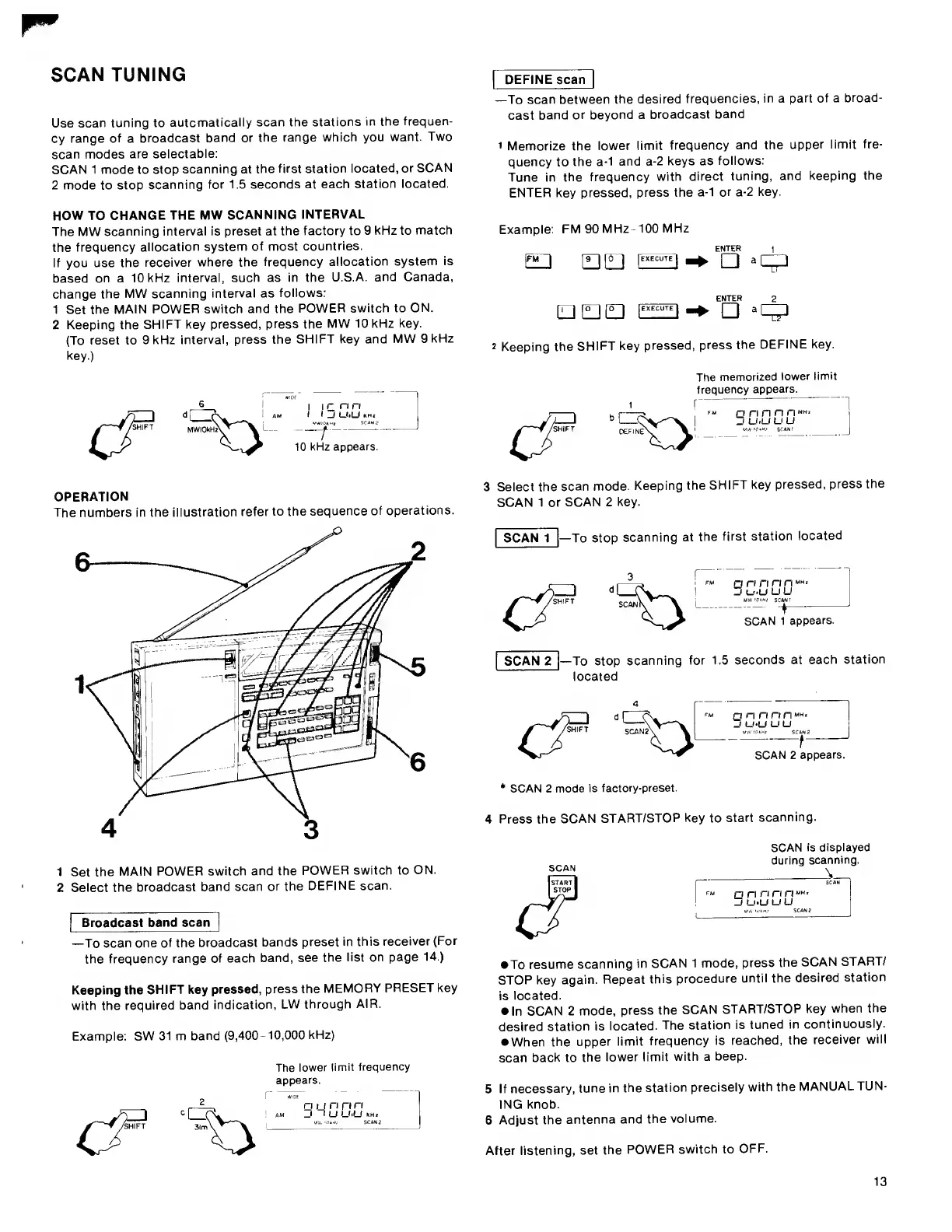
OPERATION
The
numbers
in
the
iiiustration
refer
to
the
sequence
of
operations.
1
Set
the
MAIN
POWER
switch
and
the
POWER
switch
to
ON.
2
Select
the
broadcast
band
scan
or
the
DEFINE
scan.
I
Broadcast
band
scan
|
—To
scan
one
of
the
broadcast
bands
preset
in
this
receiver
(For
the
frequency
range
of
each
band,
see
the
list
on
page
14.)
Keeping
the
SHIFT
key
pressed,
press
the
MEMORY
PRESET
key
with
the
required
band
indication,
LW
through
AIR.
Example:
SW
31
m
band
(9,400-10,000
kHz)
The
lower
limit
frequency
appears.
Example:
FM
90
MHz-100
MHz
QEJ
D
-4-
2
Keeping
the
SHIFT
key
pressed,
press
the
DEFINE
key.
y
-
A
/^(FT
DEFINE'
The
memorized
lower
limit
frequency
appears.
r
]
rinririMH'
,
u.u
u
u
SCAN'
I
3
S
elect
the
scan
mode.
Keeping
the
SHIFT
key
pressed,
press
the
SCAN
1
or
SCAN
2
key.
SCAN
1
To
stop
scanning
at
the
first
station
located
on
nnnwH'
u
U.u
u
u
MWTOIH/
SCAN!
-
-t-
SCAN
1
appears.
SCAN
2
|—To
stop
scanning
for
1.5
seconds
at
each
station
located
SCAN2\
\
n
n
n
n
n
_j
U‘U
u
u
--
f
SCAN
2
appears.
*
SCAN
2
mode
is
factory-preset.
4
P
ress
the
SCAN
START/STOP
key
to
start
scanning.
SCAN
is
displayed
during
scanning.
To
resume
scanning
in
SCAN
1
mode,
press
the
SCAN
START/
STOP
key
again.
Repeat
this
procedure
until
the
desired
station
is
located.
In
SCAN
2
mode,
press
the
SCAN
START/STOP
key
when
the
desired
station
is
located.
The
station
is
tuned
in
continuously.
When
the
upper
limit
frequency
is
reached,
the
receiver
will
scan
back
to
the
lower
limit
with
a
beep.
5
If
necessary,
tune
in
the
station
precisely
with
the
MANUALTUN¬
ING
knob.
6
Adjust
the
antenna
and
the
volume.
After
listening,
set
the
POWER
switch
to
OFF.
13

Other manuals for Sony icf 2010

Related product manuals