EasyManua.ls Logo

Sony icf 2010 - Memory Tuning; How to Memorize a Station

Sony icf 2010
20 pages
Print Icon
To Next Page IconTo Next Page
To Previous Page IconTo Previous Page
Loading...
MEMORY
TUNING
BROADCAST
BANDS
You
can
designate
a
broadcast
band
to
be
scanned
from
the
follow¬
ing,
by
pressing
the
SHiFT
key
and
the
corresponding
MEMORY
PRESET
key.
Once
the
frequencies
of
the
stations
are
memorized,
ali
you
have
to
do
is
to
push
a
key.
Up
to
32
stations
can
be
memorized
to
the
a-1
to
d-8
MEMORY
PRESET
keys.
AM
mode
can
aiso
be
memorized.
Broadcast
band
Frequency
range
to
be
scanned
Scanning
interval
LW
150-285
kHz
3
kHz
MW
530-1620
kHz
(531-1620
kHz)
10
kHz
(9
kHz)
120
m
2250-2550
kHz
90
m
3150-3450
kHz
75
m
3850-4050
kHz
60
m
4700-5110
kHz
49
m
5900-6250
kHz
SW
41
m
7000-7400
kHz
5
kHz
31
m
9400
-10000
kHz
25
m
11500-12150
kHz
21
m
13500-13900
kHz
19
m
15000-15700
kHz
16
m
17450
-18000
kHz
13
m
21350
-21950
kHz
_
11
m
25570-26100
kHz
FM
76.0-108.0
MHz
0.05
MHz
AIR
116-136
MHz
0.025
MHz
The
frequency
ranges
of
the
SW
meter
bands
to
be
scanned
are
somewhat
wider
than
those
indicated
on
the
front
panel
of
the
receiver.
The
frequencies
between
two
SW
meter
bands
can
be
scanned
with
the
DEFINE
scan
at
a
5
kHz
scanning
intervai.
To
check
the
frequency
range
to
be
scanned
Keeping
the
SHIFT
key
pressed,
press
the
L1
(a-1)
key
or
the
L2(a-2)
key.
The
lower
limit
frequency
or
the
upper
limit
frequency
appears
on
the
frequency
display.
The
selected
scanning
range
is
memorized
even
after
the
receiver
is
once
turned
off
or
the
station
beyond
the
range
is
tuned
in.
Notes
Since
scanning
stops
with
a
stronger
signal
than
the
preset
level,
it
may
stops
a
little
before
or
after
the
exact
frequency
of
a
station.
If
this
happens,
tune
in
the
station
precisely
with
the
MANUAL
TUNING
knob.
When
scanning
does
not
stop
at
all
during
AM
(LW,
MW
or
SW)
reception,
make
sure
the
AM
RF
GAIN
control
(right
side)
is
set
to
MAX
and
the
AM
ATT
selector
(left
side)
is
set
to
DX.
When
scanning
stops
at
a
noise
or
many
unwanted
stations
dur¬
ing
AM
reception,
slide
the
AM
RF
GAIN
control
slightly
toward
MIN.
Then,
set
the
AM
ATT
selector
to
LOCAL.
AM
mode,
scanning
range
setting,
scan
mode
and
MW
scanning
interval
cannot
be
changed
during
scanning.
HOW
TO
MEMORIZE
A
STATION
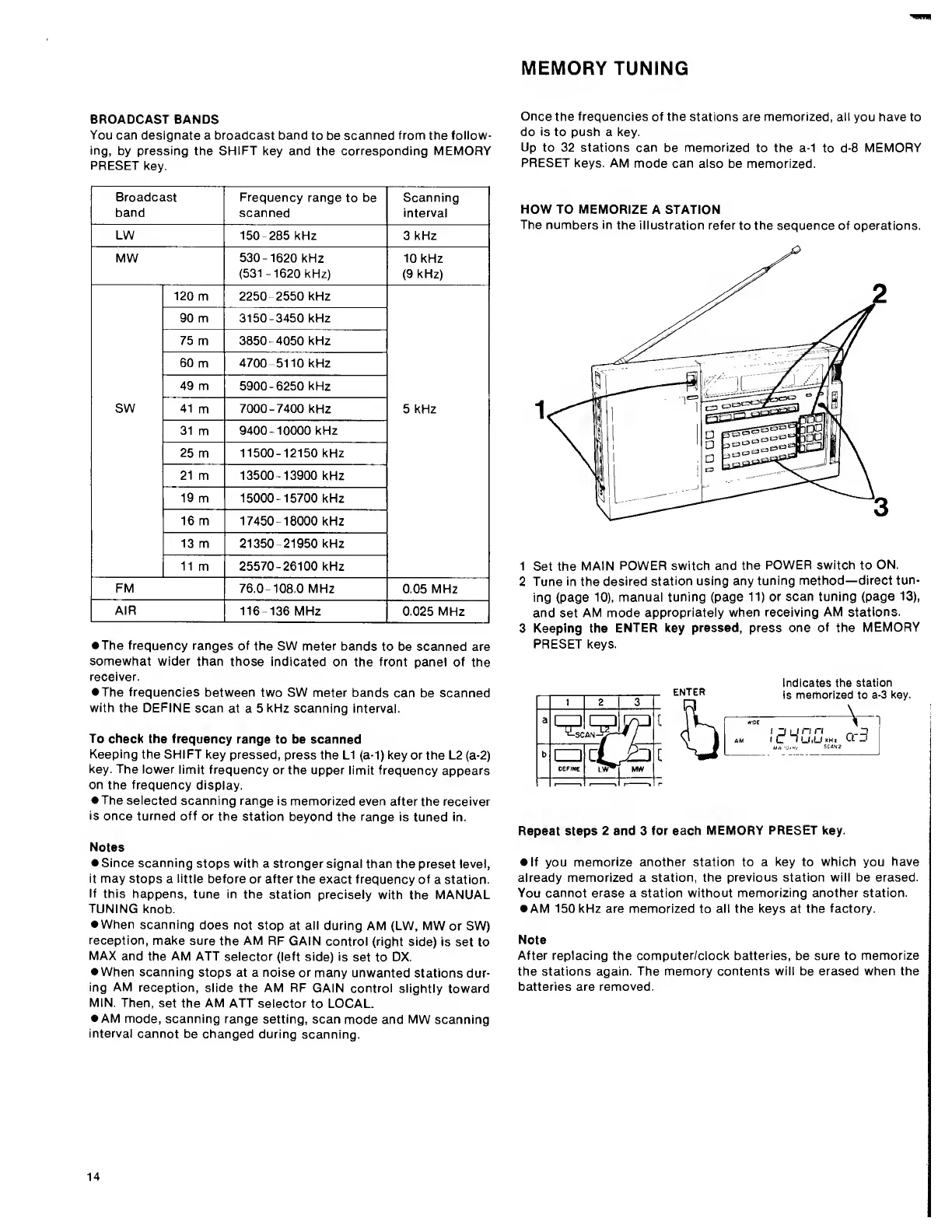
The
numbers
in
the
illustration
refer
to
the
sequence
of
operations.
1
Set
the
MAIN
POWER
switch
and
the
POWER
switch
to
ON.
2
Tune
in
the
desired
station
using
any
tuning
method—direct
tun¬
ing
(page
10),
manual
tuning
(page
11)
or
scan
tuning
(page
13),
and
set
AM
mode
appropriately
when
receiving
AM
stations.
3
Keeping
the
ENTER
key
pressed,
press
one
of
the
MEMORY
PRESET
keys.
ENTER
b
Indicates
the
station
is
memorized
to
a-3
key.
I
U
I
C
»L
7
n
U.LJki
At
a-3
Repeat
steps
2
and
3
for
each
MEMORY
PRESET
key.
If
you
memorize
another
station
to
a
key
to
which
you
have
already
memorized
a
station,
the
previous
station
will
be
erased.
You
cannot
erase
a
station
without
memorizing
another
station.
AM
150
kHz
are
memorized
to
all
the
keys
at
the
factory.
Note
After
replacing
the
computer/clock
batteries,
be
sure
to
memorize
the
stations
again.
The
memory
contents
will
be
erased
when
the
batteries
are
removed.
14

Other manuals for Sony icf 2010

Related product manuals