EasyManua.ls Logo

Sony icf 2010 - Page 16

Sony icf 2010
20 pages
Print Icon
To Next Page IconTo Next Page
To Previous Page IconTo Previous Page
Loading...
SLEEP
TIMER
OPERATION
—To
turn
off
the
receiver
automatically
To
scan
stations
of
some
keys
only
1
Press
the
MEMORY
PRESET
key
to
which
the
station
you
want
to
skip
is
memorized.
2
Keeping
the
SKIP
key
pressed,
press
the
same
MEMORY
PRESET
key
again
so
the
r
mark
appears.
To
scan
stations
of
a
certain
band
(FM,
AM
or
AIR)
only
Example:
To
scan
FM
stations
only
Keeping
the
SKIP
key
pressed,
press
the
AM
band
select
key
and
the
AIR
band
select
key
once
or
twice
so
that
the
f
mark
appears
on
the
upper
left
of
the
band
indication.
Skip
mark
The
receiver
can
be
turned
off
automaticaily
after
15,
30
or
60
minutes
by
the
sleep
timer.
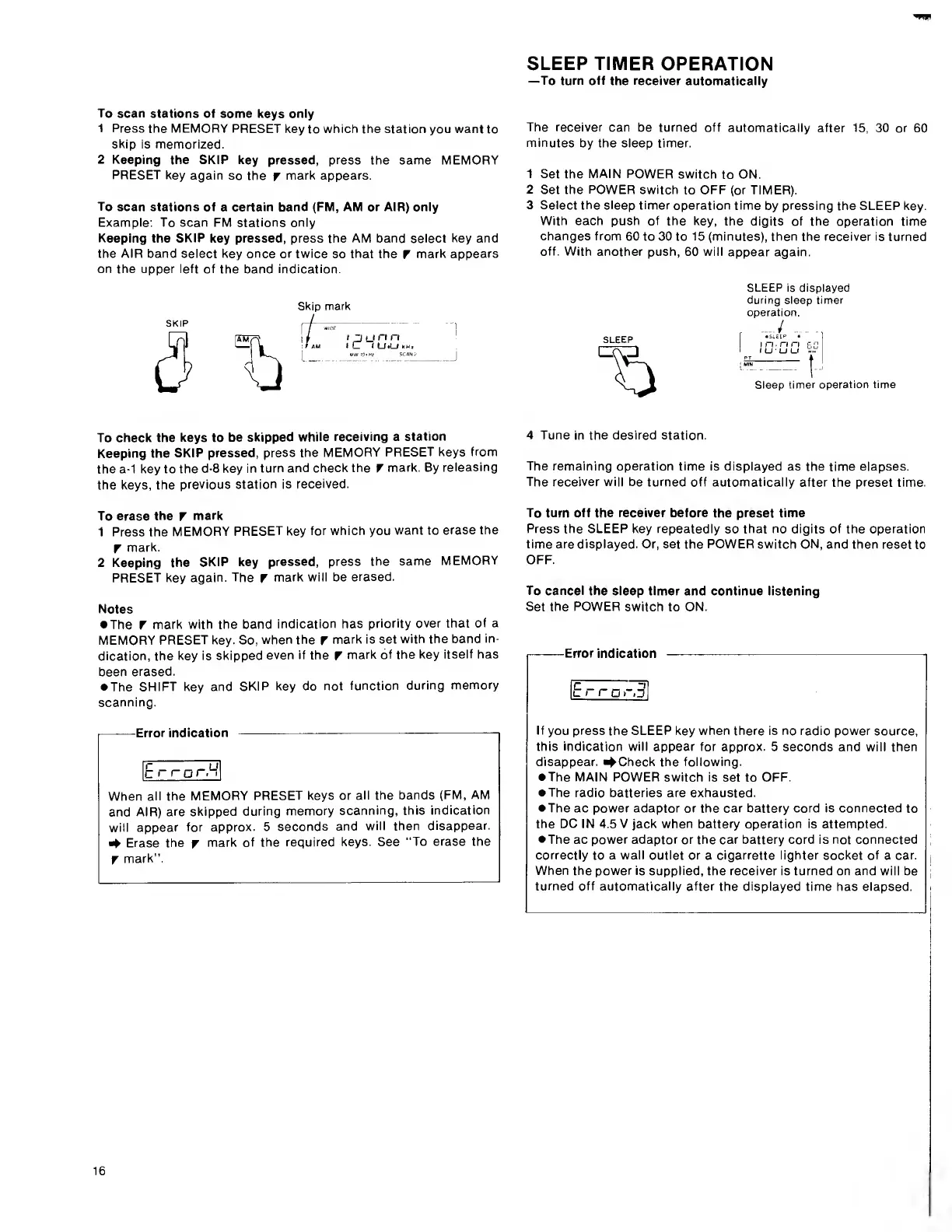
1
Set
the
MAIN
POWER
switch
to
ON.
2
Set
the
POWER
switch
to
OFF
(or
TIMER).
3
Select
the
sleep
timer
operation
time
by
pressing
the
SLEEP
key.
With
each
push
of
the
key,
the
digits
of
the
operation
time
changes
from
60
to
30
to
15
(minutes),
then
the
receiver
is
turned
off.
With
another
push,
60
will
appear
again.
SLEEP
SLEEP
is
displayed
during
sleep
timer
operation.
SLEEP
I
n
n
ri
p,
r;
(
u
u
u
Sleep
timer
operation
time
To
check
the
keys
to
be
skipped
while
receiving
a
station
Keeping
the
SKIP
pressed,
press
the
MEMORY
PRESET
keys
from
the
a-1
key
to
the
d-8
key
in
turn
and
check
the
r
mark.
By
releasing
the
keys,
the
previous
station
is
received.
To
erase
the
f
mark
1
Press
the
MEMORY
PRESET
key
for
which
you
want
to
erase
the
r
mark.
2
Keeping
the
SKIP
key
pressed,
press
the
same
MEMORY
PRESET
key
again.
The
f
mark
will
be
erased.
Notes
The
r
mark
with
the
band
indication
has
priority
over
that
of
a
MEMORY
PRESET
key.
So,
when
the
f
mark
is
set
with
the
band
in¬
dication,
the
key
is
skipped
even
if
the
f
mark
of
the
key
itself
has
been
erased.
The
SHIFT
key
and
SKIP
key
do
not
function
during
memory
scanning.
I-Error
indication
-
1
When
all
the
MEMORY
PRESET
keys
or
all
the
bands
(FM,
AM
and
AIR)
are
skipped
during
memory
scanning,
this
indication
will
appear
for
approx.
5
seconds
and
will
then
disappear.
Erase
the
r
mark
of
the
required
keys.
See
“To
erase
the
r
mark".
4
T
une
in
the
desired
station.
The
remaining
operation
time
is
displayed
as
the
time
elapses.
The
receiver
will
be
turned
off
automatically
after
the
preset
time.
To
turn
off
the
receiver
before
the
preset
time
Press
the
SLEEP
key
repeatedly
so
that
no
digits
of
the
operation
time
are
displayed.
Or,
set
the
POWER
switch
ON,
and
then
reset
to
OFF.
To
cancel
the
sleep
timer
and
continue
listening
Set
the
POWER
switch
to
ON.
Error
indication
Erro
r,3,
If
you
press
the
SLEEP
key
when
there
is
no
radio
power
source,
this
indication
will
appear
for
approx.
5
seconds
and
will
then
disappear.
C
heck
the
following.
The
MAIN
POWER
switch
is
set
to
OFF.
The
radio
batteries
are
exhausted.
The
ac
power
adaptor
or
the
car
battery
cord
is
connected
to
the
DC
IN
4.5
V
jack
when
battery
operation
is
attempted.
The
ac
power
adaptor
or
the
car
battery
cord
is
not
connected
correctly
to
a
wall
outlet
or
a
cigarrette
lighter
socket
of
a
car.
When
the
power
is
supplied,
the
receiver
is
turned
on
and
will
be
turned
off
automatically
after
the
displayed
time
has
elapsed.
16

Other manuals for Sony icf 2010

Related product manuals