Other convenient uses32
GB
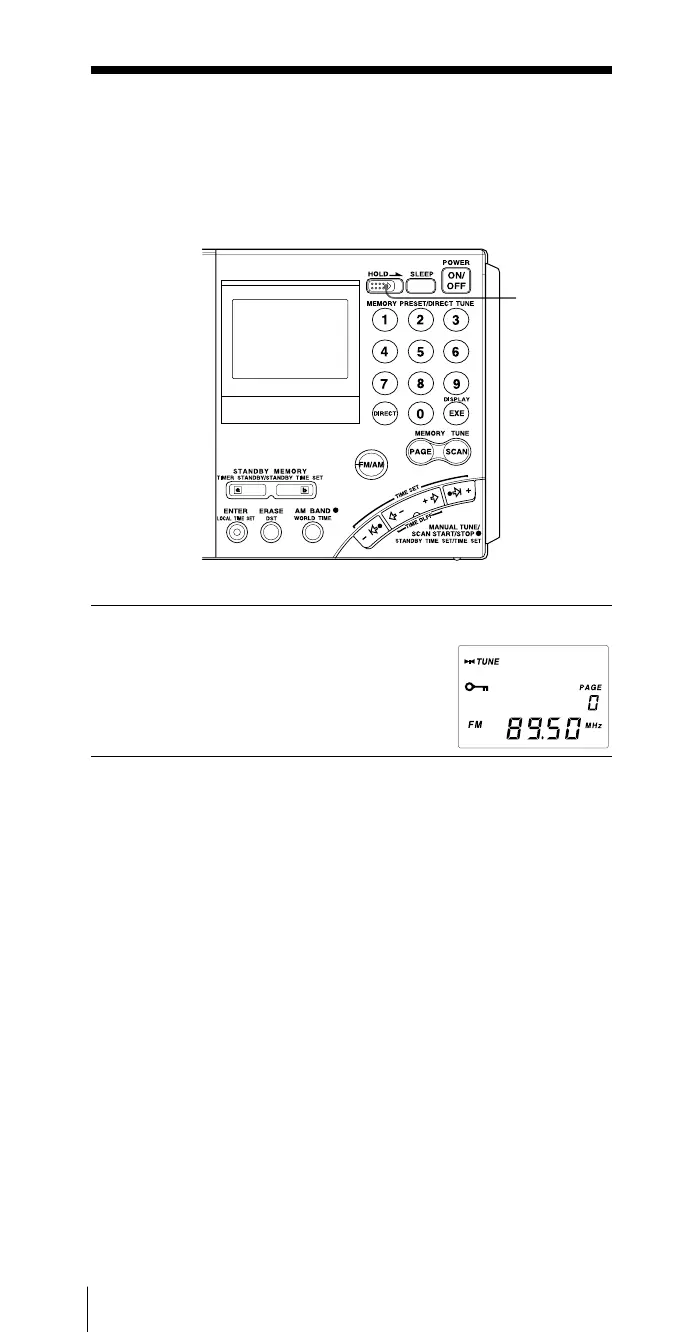
1 Slide the HOLD switch in the direction of the arrow.
“-” indicator will appear and all buttons
become inoperative.
To cancel the hold function
Slide HOLD switch in the direction opposite the arrow so that
“-” disappears from the display.
Tips
When the hold function is activated while the radio is turned off, the
standby timer function is temporarily canceled (see “Waking up to the
radio or alarm – Standby function”, page 28). The standby timer can only
be temporarily canceled when the radio is off.
B Other convenient uses
Preventing operation errors
— Hold function
When the hold function is activated, all buttons become inoperative,
preventing accidental operation when the radio is being carried or used.
The hold function can also be used to temporarily cancel the standby
timer function.
1


 To Next Page