KV-25F3
— 28 —
SECTION 4
CIRCUIT ADJUSTMENTS
4-1. ELECTRICAL ADJUSTMENTS
5
+
+
(ON SCREEN
DISPLAY)
(DIGIT 5) (VOLUME
+
) (TV)
Service adjustment to this model can be performed
with the supplied remote commander RM-862.
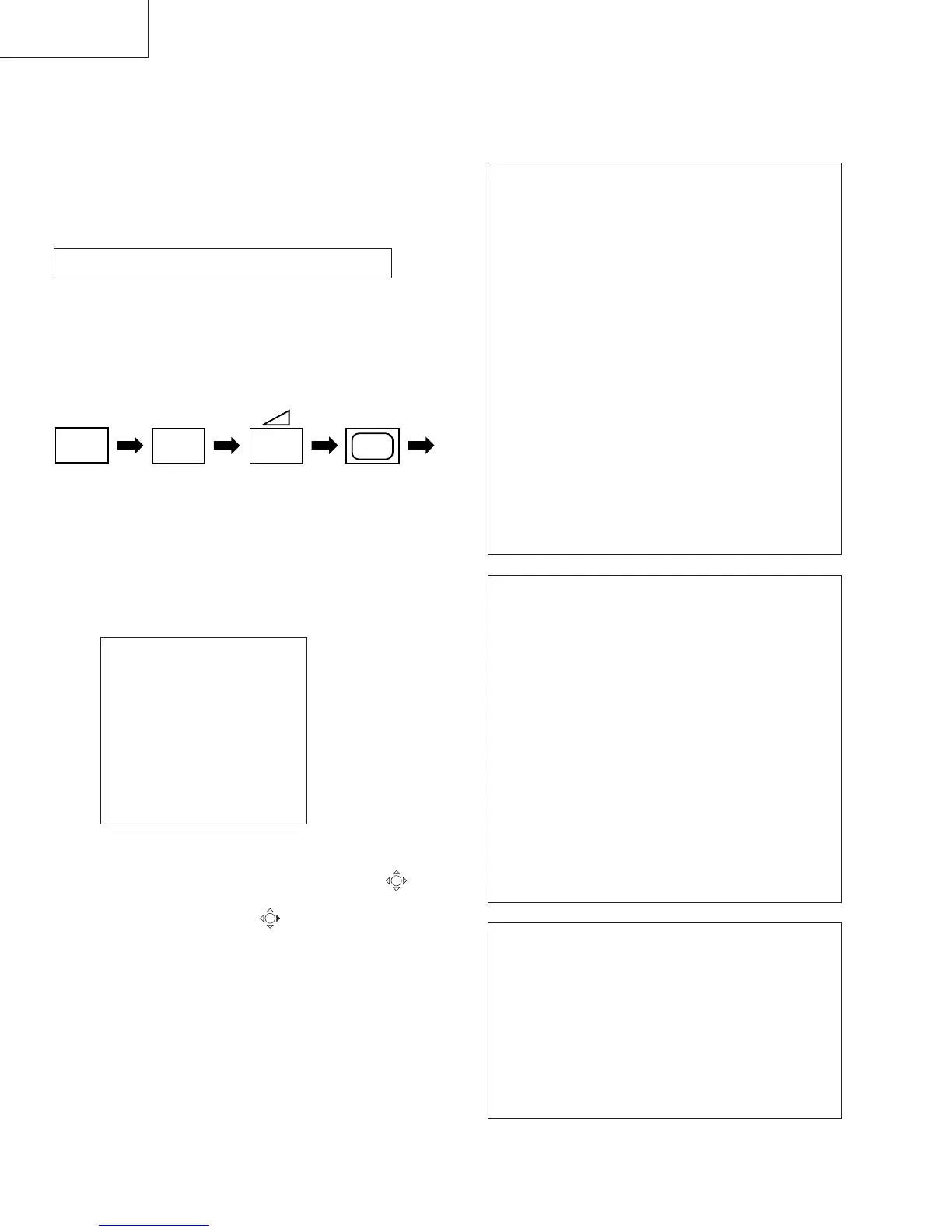
HOW TO ENTER INTO SERVICE MODE
1. Turn on the main power switch of the set and
enter into standby mode.
2. Press the following sequence of buttons on the Remote
Commander.
"TT-- " will appear in the top right corner of the screen.
Other status information will also be displayed.
3. Press MENU on the commander to obtain the following
menu on the screen.
4. Move to the corresponding adjustment using the
button on the commander.
5. Move the button to the right to enter the selected
adjustment.
6. Turn off the power to quit the service mode when
adjustments are completed.
TEST MENU
> Picture adjustment
Geometry
Wide
MSP
IC status
Current TV status
PICTURE ADJUSTMENT
AFC mode 1
REF position 2
SCP BGR 1
SCP BGF 1
Trap Fo 0
Sub contrast Adj
Sub colour Adj
Sub brightness Adj
Sub hue Adj
Green drive Adj
Blue drive Adj
Green cutoff Adj
Blue cutoff Adj
Gamma 0
Pre / overshoot 0
Y delay 3
GEOMETRY ADJUSTMENT
V Size Adj
V Position Adj
S Correction Adj
V Linearity Adj
H Size Adj
H Position Adj
Pin Amp Adj
Pin Phase Adj
AFC Bow Adj
AFC Angle Adj
EHT V Adj
EHT H Adj
Corner Pin Adj
WIDE
V Aspect 47
V Scroll 31
Upper V Lin 0
Lower V Lin 0
Left Blanking 1
Right Blanking 11



 To Next Page