masterpage:Left
filename[D:\MVC-CD1000 kaihan\3062473121\3062473121MVCCD1000UC\02GB-
MVCCD1000UC\10add.fm]
76
model name1[MVC-CD1000]
[3-062-473-12(1)]
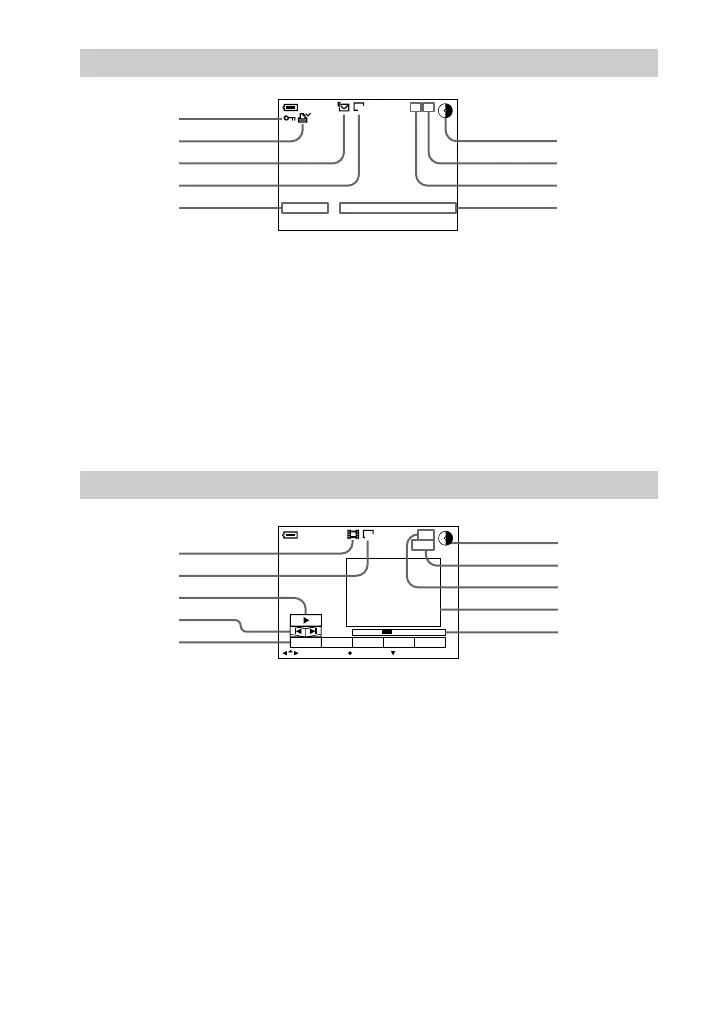
1 Protect indicator/Zoom scaling
indicator
B Printmarkoftheplayback
image
C Recording mode of the
playback image
D Image size indicator
E File name*
F Remaining disc capacity
indicator
G Number of stored images on a
disc
H Image number
I Recording date of the playback
image*
∗ When the menu bar is displayed, this
indicator disappears from the screen.
A Moving image file indicator
B Image size indicator
C Playback button
B is displayed during stop, and X
during playback.
D Image searching buttons
E Menu bar and guide menu
F Remaining disc capacity
indicator
G Counter
H Image number/number of
stored images on a disc
I Playback image
J Playback bar
The indicators during still image playback
100-0001
120min
1280
12:00AM2000 7 4
11/12
6
5
4
1
3
2
7
8
9
The indicators during moving image playback
0:10
160
120min
6/8
SELECT OK
MENU BAR OFF
DELETE
INDEX FILE SETUPTOOL
6
7
8
9
0
5
4
2
1
3
01cov.book Page 76 Wednesday, July 19, 2000 10:33 AM



 To Next Page
 Loading...








