36-GB
Using various functions for recording
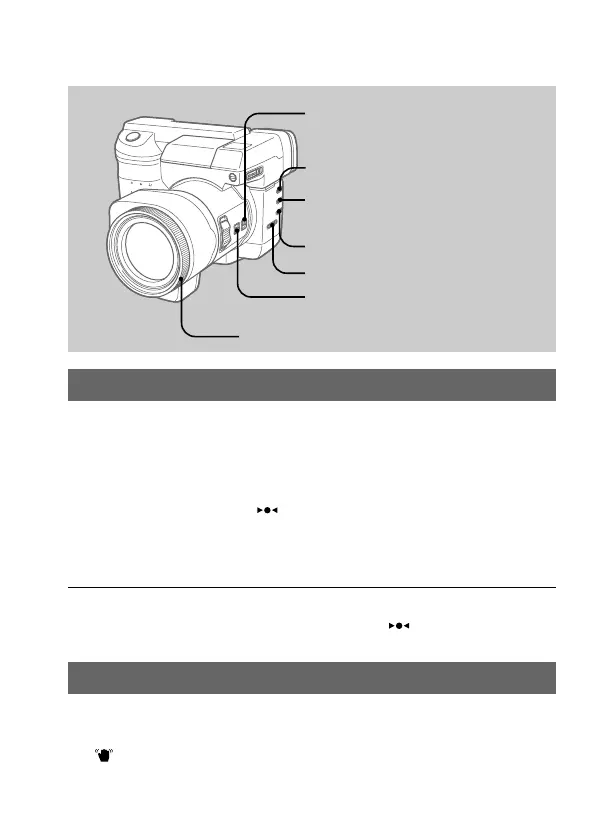
Focusing manually
/ See page 47
1 Set FOCUS AUTO/MANUAL to MANUAL.
f appears on the LCD screen or in the viewfinder.
2 Turn the focus ring to achieve a sharp focus.
The position marked “ ” indicates the area in focus.
To reactivate auto focusing (AF), set FOCUS AUTO/MANUAL
to AUTO.
Notes
• When recording in relatively dark environment, it is recommended to record
after focusing manually.
• When you focus manually in dark environment “
” may not be
displayed.
Releasing the SteadyShot function
/ See page 48
Set STEADYSHOT to OFF.
disappears on the LCD screen or in the viewfinder.
To reactivate SteadyShot function, set STEADYSHOT to ON.
STEADYSHOT ON/OFF
Focus ring
FOCUS AUTO/MANUAL
WHITE BALANCE
∑ (One-push white balance)
PROGRAM AE
PROGRAM AE –/+



 To Next Page
 Loading...









