Additional information
39-GB
When the lithium battery becomes weak or dead, the “I” indicator
flashes on the LCD screen. In this case, replace the battery with a
Sony CR2025 or Duracell DL-2025 lithium battery. Use of any other
battery may present a risk of fire or explosion.
When installing the lithium battery, keep the battery pack attached.
Otherwise, you will need to reset the date and time retained by the
lithium battery.
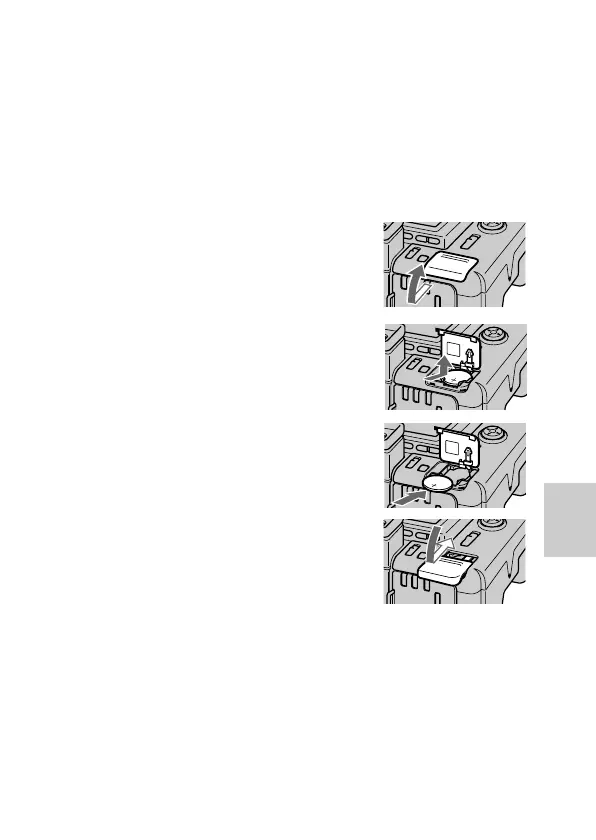
1 Slide the lid of the lithium
battery compartment and
open it.
2 Push the lithium battery once
and push it out from the
holder.
3 Install the lithium battery with
the positive (+) side facing out.
4 Close the lid.
WARNING
The battery may explode if mistreated. Do not recharge, disassemble, or
dispose of in fire.
CAUTION
Danger of explosion if battery is incorrectly replaced.
Replace only with the same type recommended by the manufacturer.
Discard used batteries according to the manufacturer’s instructions.
Changing the lithium battery in the
camera



 To Next Page
 Loading...









