EasyManua.ls Logo

Sony MDP-A1 - Controlling Laser Disc Playback Features; Image Enhancement and Audio Options

Sony MDP-A1
48 pages
Print Icon
To Next Page IconTo Next Page
To Previous Page IconTo Previous Page
Loading...
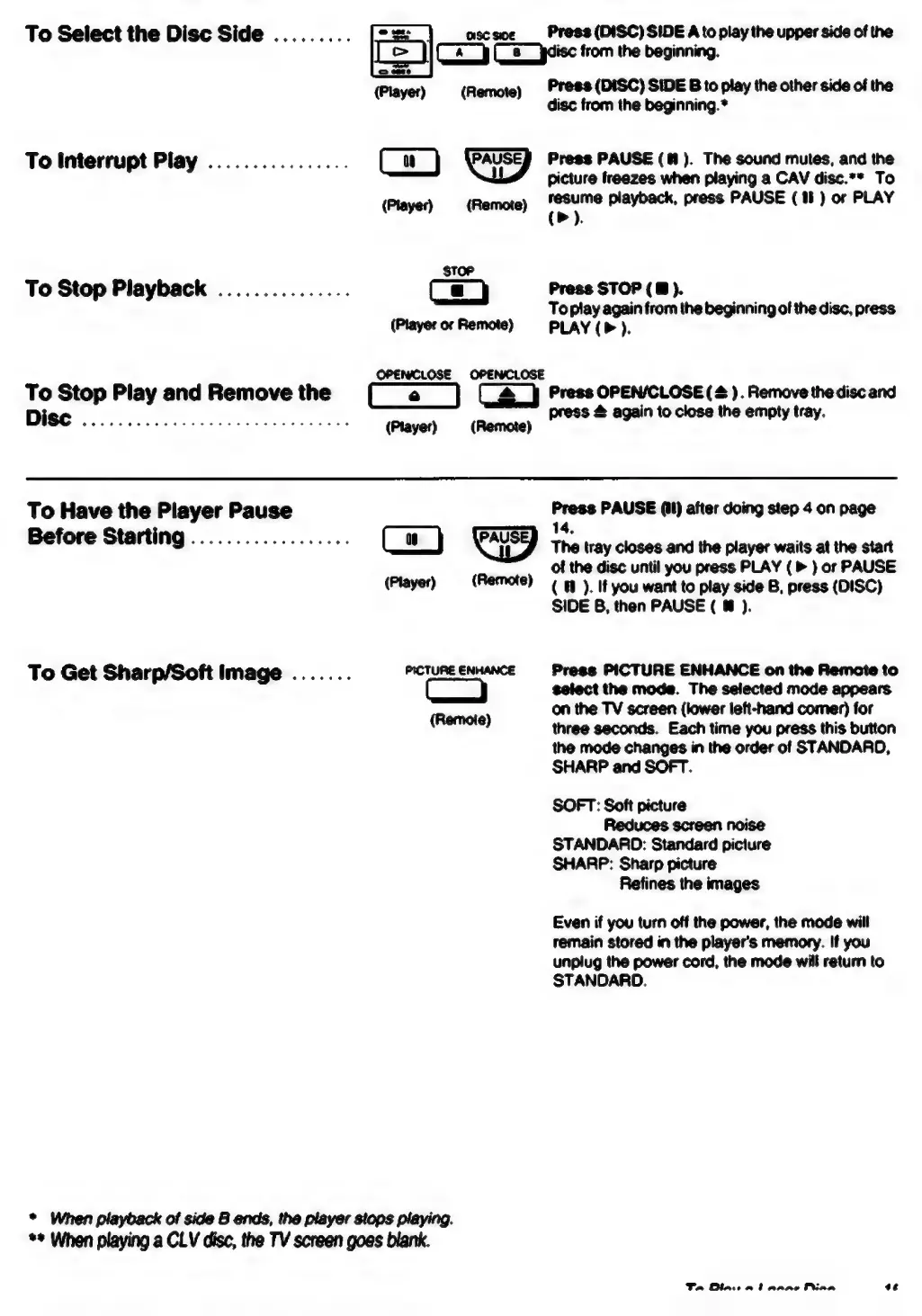
To
Select
the
Disc
Side
.........
-s:
CISC
SIDE
Press
(DISC)
SIDE
A
to
play
the
upper
side
of
the
>
|
(x)
(5
jaisc
trom
the
beginning.
(Player)
(Remote)
To
Interrupt
Play
................
(Player)
(Remote)
STOP
To
Stop
Playback
...............
Ca)
(Player
or
Remote)
OPENCLOSE
OPENCLOSE
Press
(DISC)
SIDE
B
to
play
the
other
side
of
the
disc
from
the
beginning.*
Press
PAUSE
(@#).
The
sound
mutes,
and
the
picture
freezes
when
playing
a
CAV
disc.**
To
resume
playback,
press
PAUSE
(18)
or
PLAY
(>).
Press
STOP
(8
).
Topiay
again
from
the
beginning
of
the
disc,
press
PLAY
(P
).
To
Stop
Play
and
Remove
the
(a
|
(g_}
Press
OPEN/CLOSE
(2).
Remove
thediscand
DIGG
5
sdaccciilenche
kis
Aeodax
fix
(Player)
(Remote)
To
Have
the
Player
Pause
Before
Starting
..................
(Player)
(Remote)
To
Get
Sharp/Soft
Image
.......
PICTURE
ENHANCE
Co
(Remote)
*
When
playback
of
side
8
ends,
the
player
stops
playing.
**
When
playing
a
CLV
disc,
the
TV
screen
goes
blank.
press
&
again
to
close
the
empty
tray.
Press
PAUSE
(it)
after
doing
step
4
on
page
14,
The
tray
closes
and
the
player
waits
at
the
start
of
the
disc
until
you
press
PLAY
(
»
}
or
PAUSE
(
@
).
If
you
want
to
play
side
B,
press
(DISC)
SIDE
B,
then
PAUSE
(
@
).
Press
PICTURE
ENHANCE
on
the
Remote
to
select
the
mode.
The
selected
mode
appears
on
the
TV
screen
(lower
left-hand
comer)
for
three
seconds.
Each
time
you
press
this
button
the
mode
changes
in
the
order
of
STANDARD,
SHARP
and
SOFT.
SOFT:
Soft
picture
Reduces
screen
noise
STANDARD:
Standard
picture
SHARP:
Sharp
picture
Refines
the
images
Even
if
you
turn
off
the
power,
the
mode
will
remain
stored
in
the
player's
memory.
If
you
unplug
the
power
cord,
the
mode
will
return
to
STANDARD.
Ta
Blasi
at
arene
Pina
¢

Table of Contents

Related product manuals