EasyManua.ls Logo

Sony MDP-A1 - Understanding CD Displays and Messages; On-Screen and Front Panel Displays

Sony MDP-A1
48 pages
Print Icon
To Next Page IconTo Next Page
To Previous Page IconTo Previous Page
Loading...
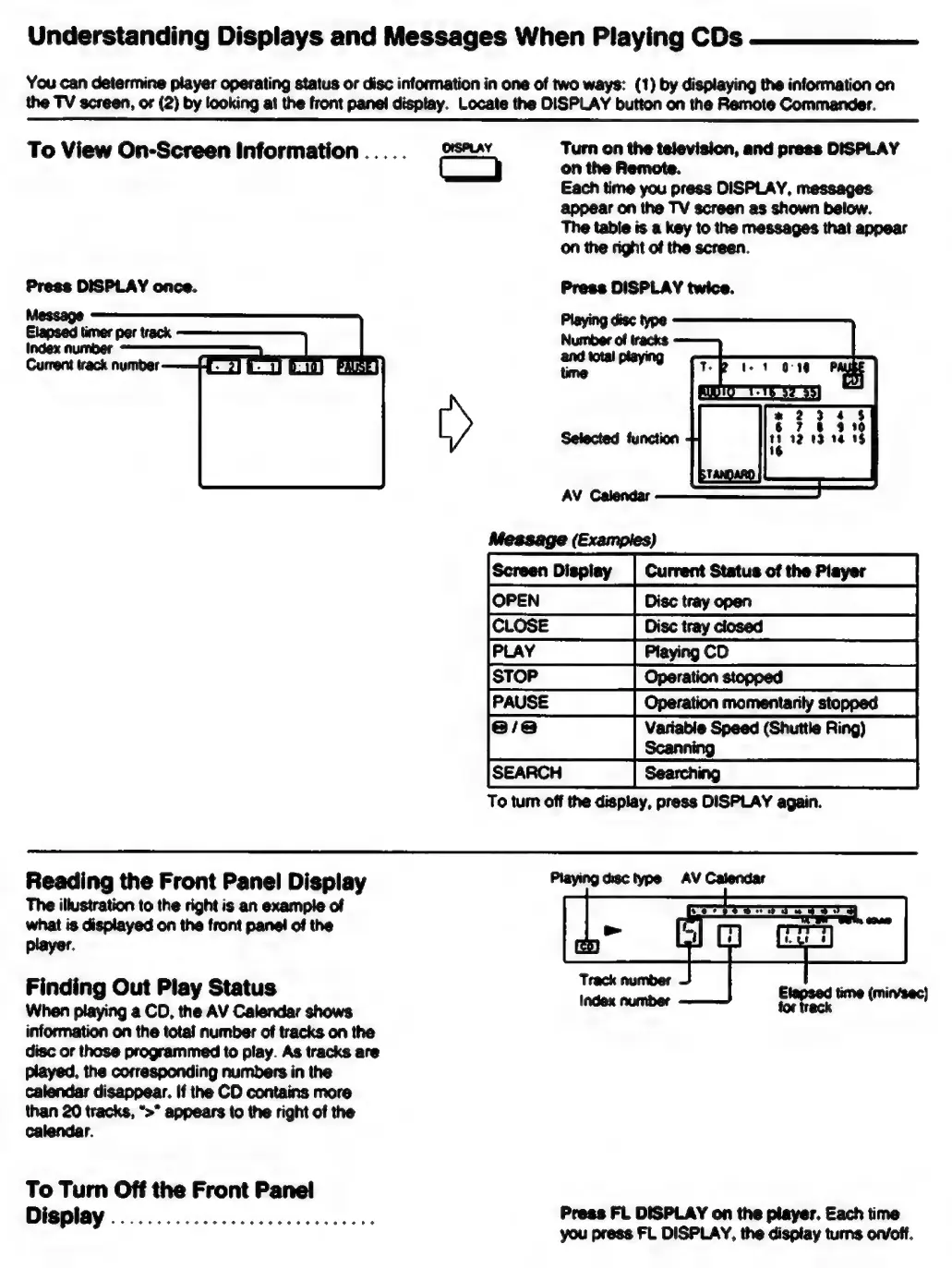
Understanding
Displays
and
Messages
When
Playing
CDs
You
can
determine
player
operating
status
or
disc
information
in
one
of
two
ways:
(1)
by
displaying
the
information
on
the
TV
screen,
or
(2)
by
looking
at
the
front
panel
display.
Locate
the
DISPLAY
button
on
the
Remote
Commander.
To
View
On-Screen
Information
.....
OISPLAY
Turn
on
the
television,
and
press
DISPLAY
on
the
Remote.
Each
time
you
press
DISPLAY,
messages
appear
on
the
TV
screen
as
shown
below.
The
table
is
a
key
to
the
messages
that
appear
on
the
right
of
the
screen.
Press
DISPLAY
twice.
Playing
disc
type
Number
of
tracks
and
total
playing
time
Selected
function
AV
Calendar
Message
(Examples)
Disc
tray
open
Disc
tray
closed
Playing
CD
Operation
stopped
Operation
momentarily
stopped
‘@
Variable
Speed
(Shuttle
Ring)
Scanning
Searching
To
tum
off
the
display,
press
DISPLAY
again.
LOSE
VIO
<
Reading
the
Front
Panel
Display
The
illustration
to
the
right
is
an
example
of
what
is
displayed
on
the
front
panel
of
the
player.
Finding
Out
Play
Status
When
playing
a
CD,
the
AV
Calendar
shows
information
on
the
total
number
of
tracks
on
the
disc
or
those
programmed
to
play.
As
tracks
are
played,
the
corresponding
numbers
in
the
calendar
disappear.
If
the
CD
contains
more
than
20
tracks,
“>”
appears
to
the
right
of
the
calendar.
To
Turn
Off
the
Front
Panel
Display
.................
cece
eee
Playing
disc
type
AV
Calendar
Track
number
Index
number
ing
ot
i
eae
Press
FL
DISPLAY
on
the
player.
Each
time
you
press
FL
DISPLAY,
the
display
turns
on/off.

Table of Contents

Related product manuals