EasyManua.ls Logo

Sony MDP-A1 - Shuffle Playback for CDs and CDVs; Initiating and Managing Shuffle Play

Sony MDP-A1
48 pages
Print Icon
To Next Page IconTo Next Page
To Previous Page IconTo Previous Page
Loading...
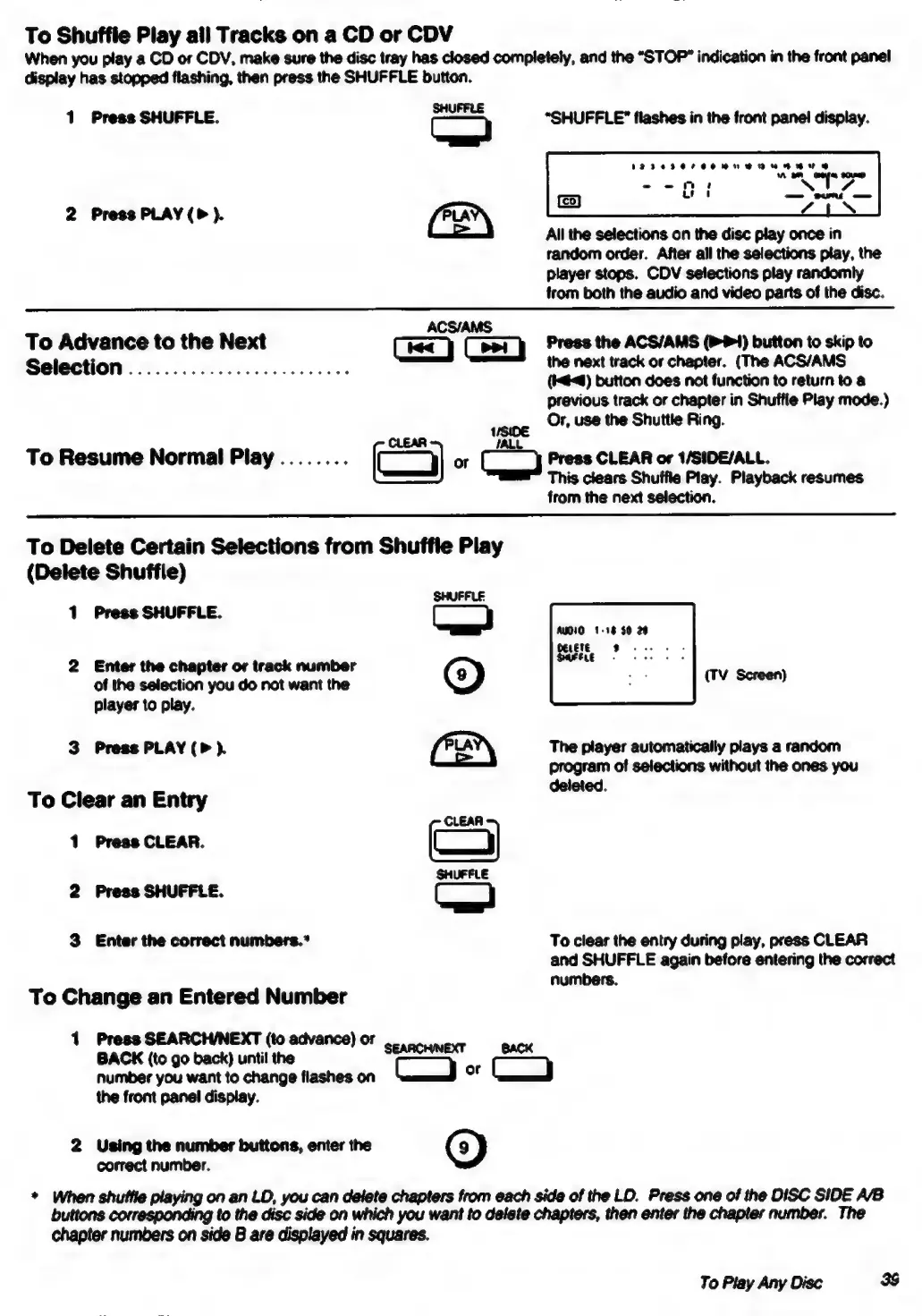
To
Shuffle
Play
all
Tracks
on
a
CD
or
CDV
When
you
play
a
CD
or
CDV,
make
sure
the
disc
tray
has
closed
completely,
and
the
“STOP”
indication
in
the
front
panel
display
has
stopped
flashing,
then
press
the
SHUFFLE
button.
1
Press
SHUFFLE.
C}
“SHUFFLE”
flashes
in
the
front
panel
display.
2
Press
PLAY
).
All
the
selections
on
the
disc
play
once
in
random
order.
After
all
the
selections
play,
the
player
stops.
CDV
selections
play
randomly
from
both
the
audio
and
video
parts
of
the
disc.
ACS/AMS
To
Advance
to
the
Next
(isc)
(evry
Press
the
ACS/AMS
(1)
button
to
skip
to
Selection
.................0..00055
the
next
track
or
chapter.
(The
ACS/AMS
(#4)
button
does
not
function
to
return
to
a
previous
track
or
chapter
in
Shuffle
Play
mode.)
‘me
Or,
use
the
Shuttle
Ring.
CLEAR
PALL
To
Resume
Normal
Play
........
(9
or
Press
CLEAR
or
1/SIDE/ALL.
This
clears
Shuffle
Play.
Playback
resumes
from
the
next
selection.
To
Delete
Certain
Selections
from
Shuffle
Play
(Delete
Shuffle)
1
Press
SHUFFLE
|
oe
Asse.
;
2
Enter
the
chapter
or
track
number
a
of
the
selection
you
do
not
want
the
()
Uy
poeen
player
to
play.
3
Press
PLAY
(>
).
(Per)
The
player
automatically
plays
a
random
program
of
selections
without
the
ones
you
deleted.
To
Clear
an
Entry
CLEAA
1
Press
CLEAR.
o=_)
SHUFELE
2
Press
SHUFFLE.
a
3
Enter
the
correct
numbers.*
To
clear
the
entry
during
play,
press
CLEAR
and
SHUFFLE
again
before
entering
the
correct
numbers.
To
Change
an
Entered
Number
1
Press
SEARCH/NEXT
(to
advance)
or
BACK
(to
go
back)
until
the
‘co
SS
number
you
want
to
change
flashes
on
or
Loy
the
front
panel
display.
2
Using
the
number
buttons,
enter
the
@)
correct
number.
*
When
shuffle
playing
on
an
LD,
you
can
delete
chapters
from
each
side
of
the
LD.
Press
one
of
the
DISC
SIDE
A/B
buttons
corresponding
to
the
disc
side
on
which
you
want
to
delete
chapters,
then
enter
the
chapter
number.
The
chapter numbers
on
side
B
are
displayed
in
squares.
To
Play
Any
Disc
3S

Table of Contents

Related product manuals