EasyManua.ls Logo

Sony MDR DS6000 - Charging; Charging Procedure and Troubleshooting

Sony MDR DS6000
32 pages
Print Icon
To Next Page IconTo Next Page
To Previous Page IconTo Previous Page
Loading...
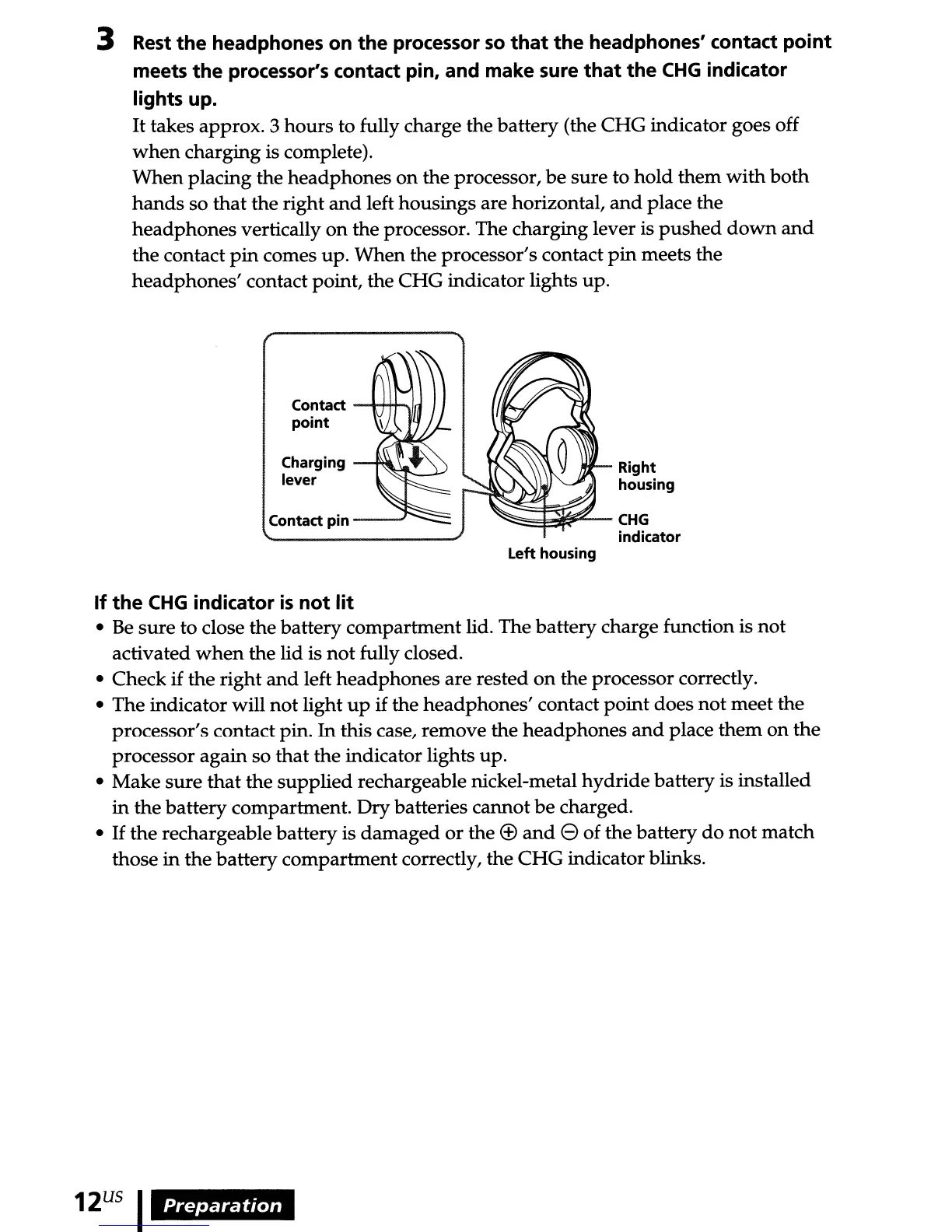
3 Rest
the
headphones
on
the
processor
so
that
the
headphones' contact
point
meets
the
processor's contact pin, and make sure
that
the
CHG
indicator
lights up.
It
takes approx. 3
hours
to fully charge the
battery
(the
CHG
indicator goes off
when
charging is complete).
When
placing the
headphones
on
the processor,
be
sure to
hold
them
with
both
hands
so
that
the right
and
left housings are horizontal,
and
place the
headphones
vertically
on
the processor. The charging lever is
pushed
down
and
the contact
pin
comes
up.
When
the processor's contact
pin
meets the
headphones'
contact point, the
CHG
indicator lights up.
Contact --t-H+..,.'.-j
point
Charging
lever
Contact
pin
_--.J
Right
housing
~~~-CHG
indicator
Left housing
If
the
CHG
indicator
is
not
lit
Be
sure
to
close the battery compartment lid. The
battery
charge function is
not
activated
when
the lid is
not
fully closed.
Check
if
the
right
and
left
headphones
are
rested
on
the processor correctly.
The indicator will
not
light
up
if the
headphones'
contact
point
does
not
meet the
processor's contact pin.
In
this case, remove the
headphones
and
place
them
on
the
processor again so
that
the indicator lights up.
Make
sure
that
the
supplied
rechargeable nickel-metal
hydride
battery is installed
in
the
battery
compartment.
Dry
batteries cannot
be
charged.
If
the
rechargeable battery is
damaged
or
the
<±>
and
e of the battery
do
not
match
those
in
the battery
compartment
correctly, the
CHG
indicator blinks.
12
US
I
Preparation

Related product manuals